<?xml version="1.0" encoding="utf-8"?><feed xmlns="http://www.w3.org/2005/Atom" ><generator uri="https://jekyllrb.com/" version="4.4.1">Jekyll</generator><link href="https://www.moesif.com/blog/feed.xml" rel="self" type="application/atom+xml" /><link href="https://www.moesif.com/blog/" rel="alternate" type="text/html" /><updated>2026-04-17T23:34:09+00:00</updated><id>https://www.moesif.com/blog/feed.xml</id><title type="html">Moesif Blog</title><subtitle>Guides and Best Practices for Building and Growing API Businesses.</subtitle><author><name>Moesif API Analytics</name><email>team@moesif.com</email><uri>https://www.moesif.com</uri></author><entry><title type="html">Leveraging AI For a Better API Strategy</title><link href="https://www.moesif.com/blog/api-strategy/api-development/Leveraging-AI-For-a-Better-API-Strategy/" rel="alternate" type="text/html" title="Leveraging AI For a Better API Strategy" /><published>2026-03-18T00:00:00+00:00</published><updated>2026-03-18T00:00:00+00:00</updated><id>https://www.moesif.com/blog/api-strategy/api-development/Leveraging-AI-For-a-Better-API-Strategy</id><content type="html" xml:base="https://www.moesif.com/blog/api-strategy/api-development/Leveraging-AI-For-a-Better-API-Strategy/"><![CDATA[<p>“API strategy” is a term prominently established in the ecosystem and heavily discussed, implemented, and followed by organizations. The term is more relevant now since <a href="https://www.devopsdigest.com/state-of-the-api-2025-api-strategy-is-becoming-ai-strategy" target="_blank">API strategy has become, for the most part, AI strategy</a>, since AI agents and services are now consuming APIs and tools to work towards business-specific goals under human tutelage. So the longstanding definition and scope of API strategy must take into account AI consumers.</p>

<p>Then comes the actual process of building the API strategy. To no one’s surprise, here we can use AI too. So this article will be about how we can use AI to assemble and put into action better API strategies.</p>

<!-- url -->

<!-- image -->

<!-- excerpt -->

<!-- subtext -->

<!-- button text -->

<div class="cta-section__wrapper">
  <div class="cta-section__text">
    <img src="https://blog.moesif.com/images/posts/cta/logo.svg" alt="Learn More About Moesif" />
    <span id="cta_message" class="cta-section__excerpt">
      Build Smarter API Strategy with Moesif
    </span>
    <span class="cta-section__subtext">
      14 day free trial. No credit card required.
    </span>
    <a id="cta_anchor" href="https://www.moesif.com/wrap?onboard=true&amp;utm_source=blog&amp;utm_medium=top-cta&amp;utm_content=Leveraging-AI-For-a-Better-API-Strategy" class="buttoncta buttoncta--large buttoncta--primary">
      Try for Free
    </a>
  </div>
  <img class="cta-section__image" src="https://blog.moesif.com/images/posts/cta/cta-monitoring.svg" alt="" />
</div>

<h2 id="what-is-api-strategy">What is API strategy</h2>

<p>API strategy thoroughly outlines, in a high-level, how to use application programming interfaces (APIs) to drive meaningful business outcomes. It aligns APIs with revenue, reliability, and long-term growth.</p>

<p>The first obvious benefit of this premeditation is that your API program, since its inception or conceptualization, has zero misalignment with the business requisites, and close to zero chances of such in the future.</p>

<p>Look at modern SaaS or enterprise environments: there exists internal platforms, partner ecosystems, and integrations shouldered by APIs, even more so with organizations’ oftentimes aggressive AI adoption. APIs have therefore become business infrastructure; API strategy guarantees that you intentionally, measurably, and sustainably maintain those interfaces.</p>

<p>An efficacious API strategy answers these questions:</p>

<ul>
  <li>Why does this API exist? It must support one or more business objectives.</li>
  <li>Who consumes it? The consumer demographic may consist of external developers, partners, internal teams, or monetized customers.</li>
  <li>How does it evolve safely? Versioning, deprecation, and compatibility policies must exist.</li>
  <li>How is it measured? Usage, performance, and revenue signals must inform decisions.</li>
</ul>

<p>APIs slip into mere technical assets if you fail to answer these questions, since no strategic direction exists. You will ship endpoints, monitor them, but flounder to connect API behavior to business impact. And things deteriorate as you scale.</p>

<p>AI can help build and solidify your API strategy, but it can only do so when teams have established a lucid definition of the strategy itself and a shared understanding of that strategy.</p>

<h2 id="the-limits-of-traditional-api-strategy">The limits of traditional API strategy</h2>

<p>Modern APIs generate millions of requests, across regions, tenants, and use cases. The static style guides, rigid review processes, and manual approval gates will work for a portfolio of ten APIs, but unquestionably break down at enterprise scale. Without the force-multiplying capability of AI, the traditional way of strategizing APIs around your business aims will only cost you capital, by stifling innovation and introducing risks.</p>

<h3 id="governance-and-decisions">Governance and decisions</h3>

<p>Traditionally, maintaining quality requires human intervention. So your architects will look at documents and resources like OpenAPI specs for consistency, security, and standards. However, as the number of APIs and their integrations grow, review teams get overwhelmed. It also becomes more impractical to not have automated processes in place that are principled and controlled. You will be waiting weeks for approval or the situation will likely force your hand to sidestep governance entirely, precipitating shadow APIs, which are even more precarious now in the AI-saturated market.</p>

<p>And with growth, strategic decisions also get harder. For example:</p>

<ul>
  <li>Pricing tiers set without deep behavioral segmentation</li>
  <li>Security policies applied uniformly across different risk profiles</li>
  <li>Roadmap priorities based on anecdotal customer feedback</li>
</ul>

<p>These decisions often rely on partial signals, but not the entirety of the context. When in small scale, you can intuitively make that deficiency work, but not in large scale.</p>

<h3 id="specifications">Specifications</h3>

<p>AI-assisted software development means code changes even faster now than documentation. So how feasible is the static strategy that relies on that documentation being the source of truth?</p>

<p>If you don’t have automated, intelligent feedback loops, the discrepancies between the designed API (the spec) and the running API (production) only exacerbates.</p>

<h3 id="forward-looking-analytics">Forward-looking analytics</h3>

<p>What insights does your API analytics give you?</p>

<ul>
  <li>Request volume against an endpoint</li>
  <li>Average latency</li>
  <li>Tenants generating the most traffic</li>
</ul>

<p>These are, undoubtedly, valuable. But they don’t explain why behavior changed nor predict. You might suddenly discover that usage has dropped for a major customer; you have the dashboards to verify that. But what is the churn risk? An endpoint might have low volume but high strategic dependency, like having many high-value accounts depend on it. You need AI-powered analytics tools like Moesif to keep tabs on such scenarios.</p>

<h3 id="scale-changes-the-problem">Scale changes the problem</h3>

<p>Throughout the expansion of the API ecosystem, more customers integrate, more partners build on top, and more internal services depend on shared contracts. But every new integration also contributes to the complexity.</p>

<p>Human-driven analysis doesn’t scale linearly with complexity; the surface area grows faster than the team’s amplitude. As a result, you inevitably face problems like this:</p>

<ul>
  <li>Slower incident response</li>
  <li>Missed monetization opportunities</li>
  <li>Reactive roadmap adjustments</li>
</ul>

<p>Modern, AI-powered API ecosystems will exceed the assumption that you can interpret all relevant signals by yourself for a perceptive, cogent API strategy. You need to incorporate AI to keep in pace with the scale of modern software systems and the competitive innovation in building such systems.</p>

<h2 id="where-ai-improves-api-strategy">Where AI improves API strategy</h2>

<p>AI improves API strategy at two moments: when you first define it and as you review, manage, and update it over time. In both cases, AI can help <a href="https://apievangelist.com/2022/11/08/the-four-most-important-dimensions-that-block-api-progress/" target="_blank">ground strategic conversations</a> in observable patterns as opposed to assumptions.</p>

<h3 id="api-design-and-governance">API design and governance</h3>

<p>Decisions behind API standards, versioning rules, and design conventions often rely on documentation and review processes that vary across teams. For example, producers focus on delivery, governance focuses on policies, and product concentrates on time-to-market.</p>

<p>By integrating AI, you can review OpenAPI contracts at scale, detect schema inconsistencies, identify and escalate potential breaking changes, and highlight divergence from naming or structural standards. You will know about compatibility risks before release.</p>

<p>Being able to evaluate measurable drift is better than debating whether or not standards are being followed, and friction between producers and governance roles.</p>

<h3 id="development-confidence-and-flexible-strategy">Development confidence and flexible strategy</h3>

<p>Your confidence in any strategic change results from delivery confidence. Teams, for good reasons, will hesitate to evolve APIs if the test coverage and protocols is weak or contract validation is inconsistent.</p>

<p>AI can help generate tests, discover edge cases, and validate contracts, all of which contribute to increased confidence in iterative development. You can simulate scenarios and verify compatibility faster.</p>

<p>For API-early teams, this creates a disciplined foundation. And API-first organizations can more quickly adapt their strategy to business requisites.</p>

<h3 id="documentation-and-developer-experience">Documentation and developer experience</h3>

<p>One of the most common strategy gaps appears in adoption. APIs are technically sound but can be difficult to understand or integrate. AI can generate documentation drafts from contracts, summarize version changes, and analyze support tickets to identify recurring motifs that thwart customers from achieving their goals. Later on, they are automatically added to the documentation to help troubleshoot future issues.</p>

<p>AI can also help generate SDKs and their documentation, examples, onboarding flows, guides, and tutorials, as well as keep them updated. Changes in each release and their impact internally and on customers, technical and business, can be efficiently and apropos communicated.</p>

<p>Through an intelligent, automated, and controlled process, documentation and related resources evolve and accommodate the product as well as its customers. The end result is a materially improved and forward-looking developer experience.</p>

<h3 id="lifecycle-decisions">Lifecycle decisions</h3>

<p>How do you definitively know whether a version is safe to deprecate or whether migration is complete? It is one example of a lifecycle decision that has debates and disagreements around.</p>

<p>Using AI-powered platforms like Moesif, you can get insights about adoption patterns across accounts and environments. You can identify where migration readiness is strong and where risky. AI helps with lifecycle decisions by making data-backed insights more accessible, thereby making those decisions evidence-driven as opposed to only being a matter of timelines.</p>

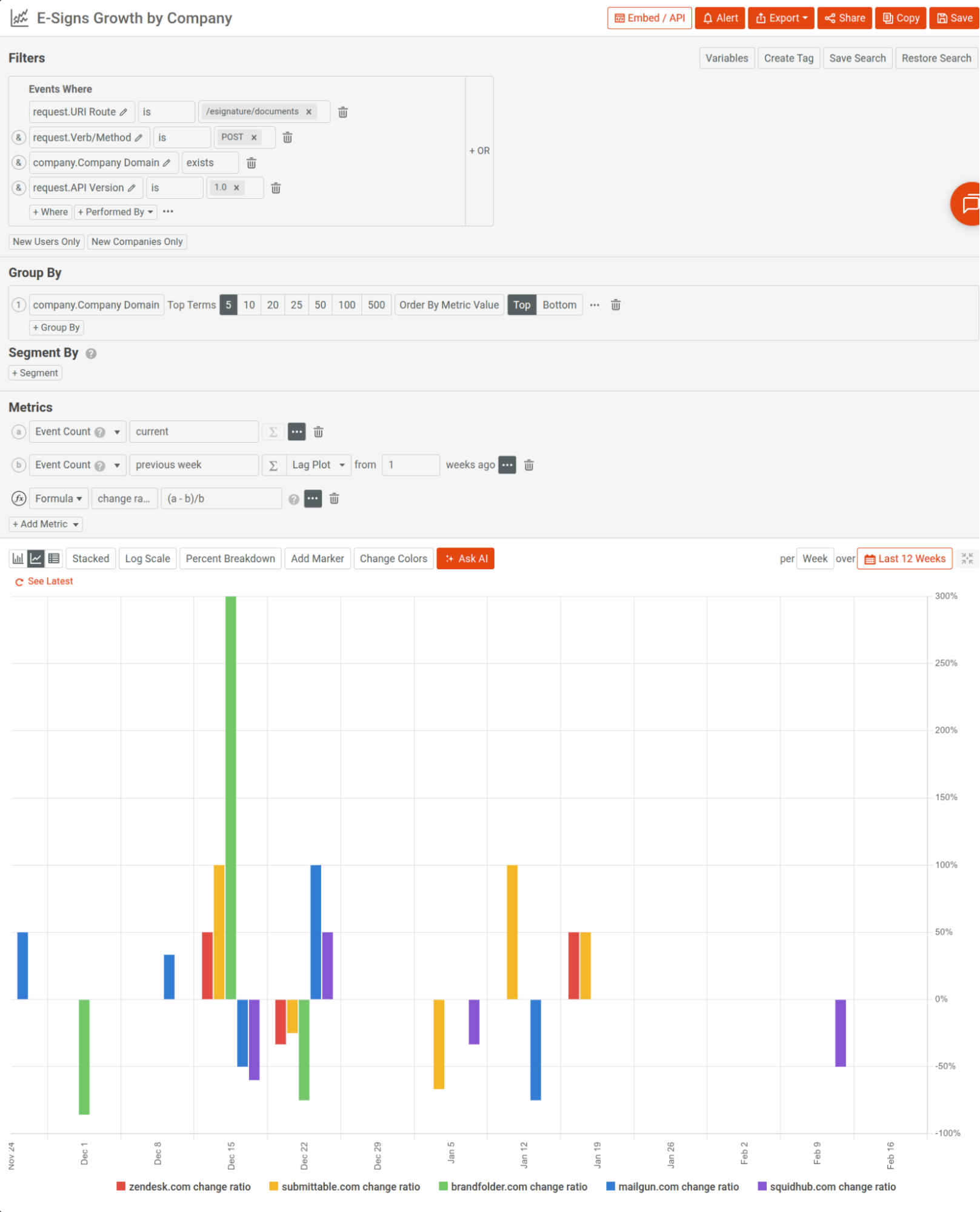
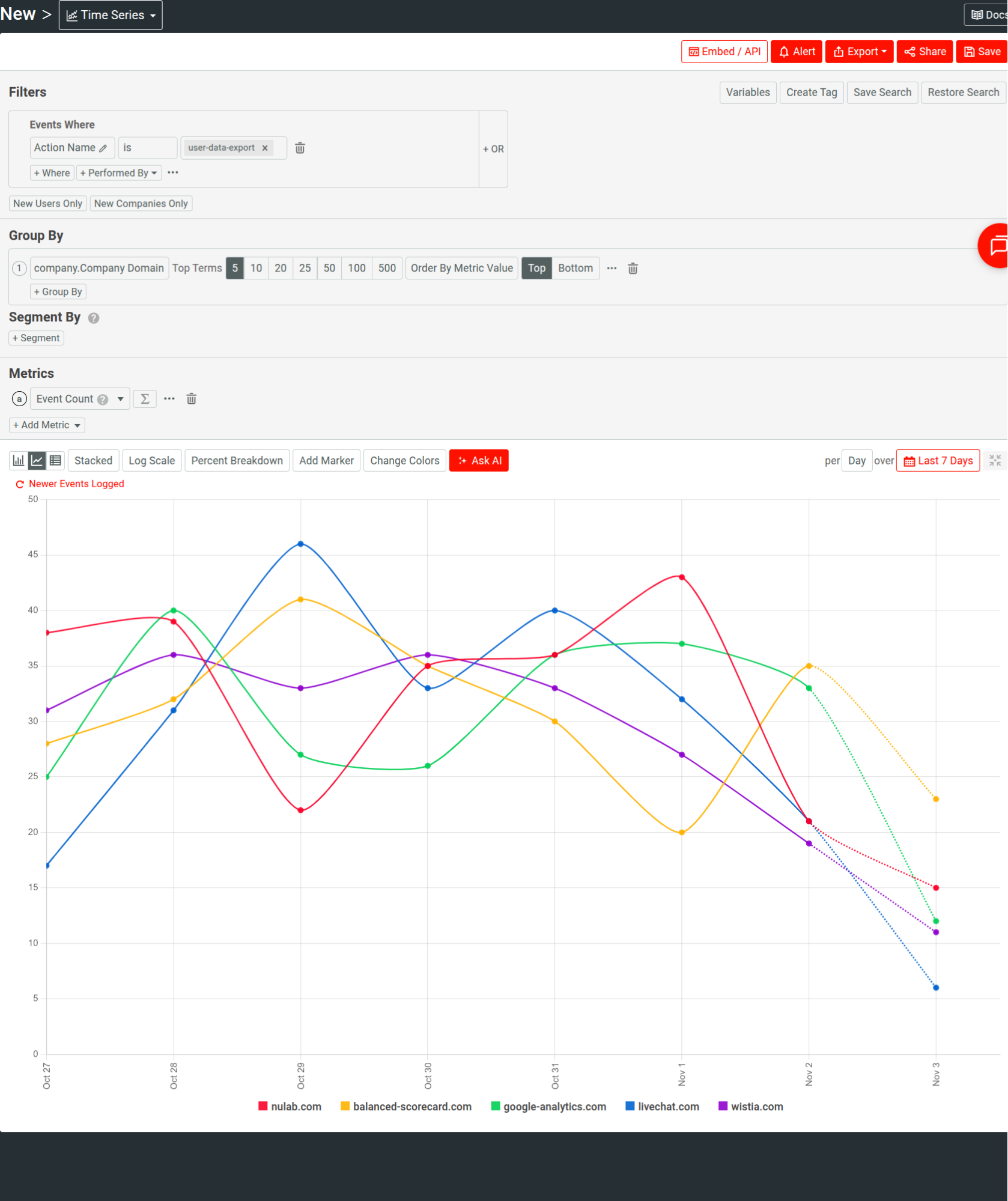
<p>For example, the following <a href="https://www.moesif.com/docs/api-analytics/time-series-analysis/" target="_blank">time series</a> looks at API adoption for a version across customers:</p>

<p><img class="lazyload blur-up" data-src="/blog/images/posts/2026-03-18-Leveraging-AI-For-a-Better-API-Strategy/growth-by-company.png" alt="A time series analyzing growth for an electronic signature API, breaking it down by company domains." title="Understanding product growth using Moesif." /></p>

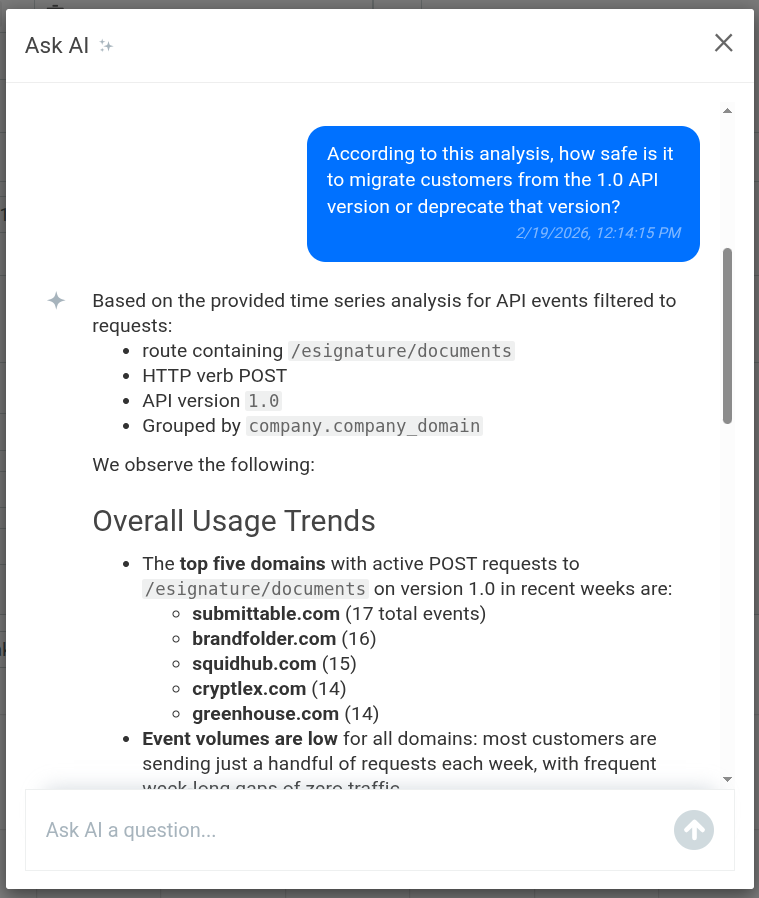
<p>We can then select <strong>Ask AI</strong> to quickly get some insights into migration and deprecation posture of the API version:</p>

<p><img class="lazyload blur-up" data-src="/blog/images/posts/2026-03-18-Leveraging-AI-For-a-Better-API-Strategy/ai-explain-moesif.png" alt="Asking AI Explain in Moesif to understand whether or not to deprecate an API version and migration of existing customers." title="Leveraging AI Explain to make better, fast API strategy decisions." /></p>

<h3 id="aligning-api-behavior-with-business-outcomes">Aligning API behavior with business outcomes</h3>

<p>People have differing incentives. A developer cares about the code, but a product manager cares about adoption. If you don’t understand the incentives of the person you are talking to, empathize with them, you won’t make progress.</p>

<p>AI can help correlate usage with retention signals, expansion behavior, support load, and revenue exposure. You can leverage it to establish a shared analytics layer across roles, irrespective of the varying technical expertise of the individuals. This allows leadership to evaluate aspects that materially influence business outcomes.</p>

<p>Moesif’s <a href="https://www.moesif.com/docs/api-analytics/#ai-explain" target="_blank">AI Explain</a> makes analytics accessible to every team member; they can ask questions about the real-time analytics data to quickly garner insights that they can start acting on in no time.</p>

<h2 id="how-to-introduce-ai-into-your-api-strategy">How to introduce AI into your API strategy</h2>

<p>Let’s go back to <a href="https://apievangelist.com/2022/11/08/that-api-strategy-sounds-great-but-where-do-we-start/" target="_blank">another one of Kin Lane’s posts</a> that opines that starting with an API strategy must follow a thorough understanding of where one is in their API journey. We can follow that same line of thought when introducing AI in the process.</p>

<p>So if your organization is API-early, before anything else, make sure API contracts are standardized and usage data is structured. You want your current state of affairs as lucid as possible: a very promising aspect where you can leverage AI.</p>

<p>If yours is an API-aware but wrestling with governance alignment, introduce AI at points of disagreement. Governance reviews is another great place to leverage AI, for example dependency management.</p>

<p>For API-first organizations operating at scale, focus on business alignment. Use AI-powered analytics tools like Moesif to correlate API usage with revenue and retention. You can also analyze support cost, and even consider using AI-powered chatbot for real-time support. You can use AI to model your roadmaps and discuss pricing to precisely control the economic impact of your endeavors.</p>

<p>Regardless of maturity in terms of where you are in the API journey, the foundation remains the same: data discipline. You must consistently enrich and tag requests with contextual information like tenant, version, and plan data. Make contracts machine-readable. Same goes for support-related analysis.</p>

<p>It’s also important to introduce AI within the existing cadence of your strategic activities, for example, quarterly roadmap reviews, lifecycle planning sessions, and pricing evaluations. Irrespective of whether or not AI is there, leadership must remain accountable for decisions.</p>

<p>A sound approach is to start with one recurring tension in your API strategy. Then observe the outcome that follows after you make the decision with the help of AI. Based on the result, if you are confident, you can branch out into more.</p>

<h2 id="conclusion">Conclusion</h2>

<p>Introducing AI into API strategy is an incremental enhancement to how you review and refine strategy. The proliferation of AI and its democratization across disciplines are showing us how powerful and critical the roles of APIs are. AI-assisted API strategy offers meaningful benefits there as we build and deliver more complex software through more proactive, automated, accessible, and fast processes in API lifecycles.</p>

<!-- url -->

<!-- image -->

<!-- excerpt -->

<!-- subtext -->

<!-- button text -->

<div class="cta-section__wrapper">
  <div class="cta-section__text">
    <img src="https://blog.moesif.com/images/posts/cta/logo.svg" alt="Learn More About Moesif" />
    <span id="cta_message" class="cta-section__excerpt">
      Align API Usage with Business Outcomes using AI
    </span>
    <span class="cta-section__subtext">
      14 day free trial. No credit card required.
    </span>
    <a id="cta_anchor" href="https://www.moesif.com/wrap?onboard=true&amp;utm_source=blog&amp;utm_medium=bottom-cta&amp;utm_content=Leveraging-AI-For-a-Better-API-Strategy" class="buttoncta buttoncta--large buttoncta--primary">
      Try for Free
    </a>
  </div>
  <img class="cta-section__image" src="https://blog.moesif.com/images/posts/cta/metrics-filtering.svg" alt="" />
</div>

<!-- url -->

<!-- image -->

<!-- hero text -->

<!-- sub text -->

<!-- cta button text -->

<div id="popupModal" class="popup-modal" style="display:none;">
    <div class="popup-content">
        <span class="close-button" onclick="closeModal()">&times;</span>
        <div class="popup-top">
            <div class="image-wrapper">
                <img src="https://blog.moesif.com/images/cta-banners/onboard-body-empty-state-step-2-on-dark.svg" alt="Enhance Your API Strategy with AI." />
            </div>
        </div>
        <div class="popup-bottom">
            <span class="popup-hero">Enhance Your API Strategy with AI.</span>
            <span class="popup-body">Use Moesif’s AI-powered, real-time analytics to understand your product and customers and drive business growth.</span>
            <button id="ctaButton" class="cta-button">Try for Free</button>
            <span class="popup-footer">No credit card required</span>
        </div>
    </div>
</div>

<script>
    // Close modal function
    function closeModal() {
        document.getElementById('popupModal').style.display = 'none';
    }

    document.addEventListener("DOMContentLoaded", function () {
        var modalShown = false;

        // Function to show the modal
        function showModal() {
            if (!modalShown) {
                document.getElementById('popupModal').style.display = 'flex';
                modalShown = true; // Ensure the modal is only shown once
            }
        }

        // Function to handle scroll event
        function checkScroll() {
            if (window.scrollY > (document.documentElement.scrollHeight - window.innerHeight) / 2) { // Check if user has scrolled halfway down the page
                showModal();
                window.removeEventListener('scroll', checkScroll); // Remove scroll event listener once modal is shown
            }
        }

        // Function to detect exit intent
        function checkExitIntent(e) {
            if (e.clientY < 50 && e.movementY < 0) {
                showModal();
                document.removeEventListener('mousemove', checkExitIntent);
            }
        }

        // Add event listeners
        window.addEventListener('scroll', checkScroll);
        document.addEventListener('mousemove', checkExitIntent);

        // Set a timeout to show the modal after 10 seconds
        setTimeout(showModal, 30000); // 10000 milliseconds = 10 seconds

        document.getElementById('ctaButton').addEventListener('click', function () {
            window.location.href = 'https://www.moesif.com/wrap?onboard=true&utm_source=blog&utm_medium=popup-cta&utm_content=Leveraging-AI-For-a-Better-API-Strategy'; // The URL is inserted here from your template
        });
    });

</script>]]></content><author><name>Abu Sakib</name><email>abu@moesif.com</email></author><category term="api-strategy" /><category term="api-development" /><category term="API Strategy" /><category term="API Analytics" /><category term="API Monitoring" /><summary type="html"><![CDATA[Learn how to leverage AI to build and fortify your API strategy. Improve design, governance, documentation, and align APIs with business outcomes.]]></summary></entry><entry><title type="html">The 5 Best Mixpanel Alternatives of 2025</title><link href="https://www.moesif.com/blog/api-strategy/The-5-Best-Mixpanel-Alternatives-of-2025/" rel="alternate" type="text/html" title="The 5 Best Mixpanel Alternatives of 2025" /><published>2025-11-28T00:00:00+00:00</published><updated>2025-11-28T00:00:00+00:00</updated><id>https://www.moesif.com/blog/api-strategy/The-5-Best-Mixpanel-Alternatives-of-2025</id><content type="html" xml:base="https://www.moesif.com/blog/api-strategy/The-5-Best-Mixpanel-Alternatives-of-2025/"><![CDATA[<p>On November 9, 2025, Mixpanel suffered a security breach when an attacker gained unauthorized access to their systems through a smishing (SMS phishing) campaign. The breach resulted in customer data being exported, including names, email addresses, approximate locations, and analytics information. The fallout has been swift—<a href="https://openai.com/index/mixpanel-incident/" target="_blank" rel="noopener noreferrer">OpenAI, one of Mixpanel’s high-profile customers, has already terminated their relationship with the platform</a> and is conducting expanded security reviews across their entire vendor ecosystem.</p>

<p>While the breach specifically affected analytics data rather than core product systems, it’s a stark reminder that the tools we use to understand our users also become custodians of sensitive information. Trust, as OpenAI noted in their response, is foundational to the customer experience —and once it’s shaken, teams start looking for alternatives.</p>

<p>Even without this latest news as a factor, there are many other product analytics platforms available that go beyond the limitations and use cases of Mixpanel. While Mixpanel has become a popular tool for good reason—the platform is quite solid for the bulk of use cases—there are some advanced and specific use cases that lend themselves better to other platforms. For example, at <a href="https://www.moesif.com/" target="_blank">Moesif</a> we focus heavily on helping developer tools and platforms keep track of customer behavior beyond just what happens in the UI, looking at system-level events like API calls. For applications that rely on stuff outside of the UI to paint the full picture of a user’s journey, Mixpanel often comes up short.</p>

<p>In this post we’ll go over the top 5 Mixpanel alternatives for a wide assortment of use cases. Let’s get started by looking a bit further at Mixpanel, its key features, and where it excels before digging into other options.</p>

<!-- url -->

<!-- image -->

<!-- excerpt -->

<!-- subtext -->

<!-- button text -->

<div class="cta-section__wrapper">
  <div class="cta-section__text">
    <img src="https://blog.moesif.com/images/posts/cta/logo.svg" alt="Learn More About Moesif" />
    <span id="cta_message" class="cta-section__excerpt">
      Monitor and Analyze APIs with Moesif
    </span>
    <span class="cta-section__subtext">
      14 day free trial. No credit card required.
    </span>
    <a id="cta_anchor" href="https://www.moesif.com/wrap?onboard=true&amp;utm_source=blog&amp;utm_medium=top-cta&amp;utm_content=Moesif-Gloo-Gateway-Deep-API-Analytics-and-Observability-at-the-Edge" class="buttoncta buttoncta--large buttoncta--primary">
      Try for Free
    </a>
  </div>
  <img class="cta-section__image" src="https://blog.moesif.com/images/posts/cta/cta-monitoring.svg" alt="" />
</div>

<h2 id="what-is-mixpanel"><strong>What is Mixpanel?</strong></h2>

<p>Mixpanel is a powerful product analytics tool that allows companies to track user behavior within web and mobile applications. Unlike traditional analytics tools that focus on page views (like Google Analytics used to), Mixpanel pioneered the event-based tracking model. This means instead of just knowing someone visited a page, you know they “clicked a button,” “watched a video,” or “added an item to cart.” Having this level of insight is critical for modern applications and websites where knowing deeper insights on how users are interacting and converting matters.</p>

<p>As one of the early platforms in the space, Mixpanel has been a go-to solution for product managers and marketers for years because of its ability to create complex funnels, retention cohorts, and segmentation reports. It helps teams answer questions like, “Do users who watch the onboarding video retain longer than those who don’t?” or “Where are users dropping off in the signup flow?”—areas where earlier generations of tools were not able to really give much insight.</p>

<h2 id="understanding-mixpanel-limitations"><strong>Understanding Mixpanel Limitations</strong></h2>

<p>While Mixpanel is a giant in the industry, it isn’t without its flaws and limitations. Although many teams get up and running quickly on the platform, a few items get teams looking for an alternative when the quantitative and qualitative data offered by Mixpanel isn’t quite enough. Here are the main structural and functional limitations that drive teams to look beyond Mixpanel:</p>

<h3 id="developer-blind-spots"><strong>Developer Blind Spots</strong></h3>

<p>Mixpanel is great for UI interactions, but it often misses the “invisible” events that happen at the API or system level. For developer-first products, the real story happens in the code, not just the clicks. When a developer integrates your API, Mixpanel might show you they visited your docs and clicked around your dashboard. But did they successfully make their first API call? How long did it take? What errors did they hit? These questions go unanswered.</p>

<h3 id="manual-event-tracking-creates-technical-debt"><strong>Manual Event Tracking Creates Technical Debt</strong></h3>

<p>Manual tracking implementation is perhaps Mixpanel’s most significant structural limitation. Upon implementation, you need to make your best guess about which user events matter the most, then have an engineer configure it all. If you change your mind or want to track additional events later, you’ll have to set them up again and risk ending up with inconsistent (and thus difficult to use) data.</p>

<p>The practical impact is that you can’t access historical data on events you didn’t set up to track from the beginning. By the time you discover that a particular action is important, it’s too late to collect data on it. Any historical insight is lost forever.</p>

<h3 id="funnel-report-inconsistencies"><strong>Funnel Report Inconsistencies</strong></h3>

<p>Users frequently report that Mixpanel’s funnel reports can give inconsistent starting values—the same event showing different numbers in a funnel report versus a metrics report. This leads to data discrepancies that erode trust in the insights you’re generating. When your team starts questioning whether the numbers are accurate, the tool stops being useful for decision-making.</p>

<h3 id="scalability-constraints"><strong>Scalability Constraints</strong></h3>

<p>Mixpanel becomes less effective as organizations scale, largely because of how data gets accessed. Since collecting event data is manual, data often becomes siloed and only accessed by the individual who set it up. The lack of a centralized place to process, store, and maintain governance makes it harder for teams to work together on large-scale data projects. What starts as a single source of truth becomes fragmented tribal knowledge.</p>

<h3 id="cost-at-scale"><strong>Cost at Scale</strong></h3>

<p>Mixpanel’s pricing model is based on Monthly Tracked Users (MTUs) or event volume. As your product grows, costs can increase significantly. This creates an uncomfortable dynamic where success is punished—the more users you have, the more you pay, often at rates that outpace the additional value you’re extracting from the platform.</p>

<h3 id="data-governance-and-privacy"><strong>Data Governance and Privacy</strong></h3>

<p>As highlighted by the November 2025 breach, trusting a third-party vendor with deep, identifiable user data requires robust security assurance. For organizations with strict data residency requirements (like <a href="https://gdpr.eu/what-is-gdpr/" target="_blank" rel="noopener noreferrer">GDPR in Europe</a>) or compliance needs (HIPAA, SOC 2), relying on a US-centric cloud platform introduces complexity. Some alternatives offer self-hosting options that eliminate this concern entirely.</p>

<h2 id="what-to-look-for-in-a-mixpanel-alternative"><strong>What to Look for in a Mixpanel Alternative</strong></h2>

<p>When shopping for an alternative, you shouldn’t just look for a clone. You should look for platforms that solve the specific problems Mixpanel creates or ignores. Here’s what separates the best modern alternatives from the pack:</p>

<h3 id="autocapture-vs-manual-tagging"><strong>Autocapture vs. Manual Tagging</strong></h3>

<p>Some tools record every user interaction automatically from day one. You don’t need to define events upfront; you can define them retroactively when you need the data. This eliminates the “I wish we’d been tracking that” problem entirely, especially for non technical users .</p>

<h3 id="api-and-system-visibility"><strong>API and System Visibility</strong></h3>

<p>For SaaS and developer platforms, you need to see API usage, latency, and errors alongside user behavior. If your product has significant functionality that happens outside the browser—through APIs, SDKs, or background processes—UI-only analytics will always give you an incomplete picture. <a href="https://www.moesif.com/features/api-analytics" target="_blank">API analytics</a> provides the visibility that traditional product analytics tools miss.</p>

<h3 id="self-hosting-and-open-source-options"><strong>Self-Hosting and Open Source Options</strong></h3>

<p>For strict compliance needs, the ability to host the analytics stack on your own servers is a game-changer. It’s also a hedge against exactly the kind of third-party breach that just affected Mixpanel’s customers.</p>

<h3 id="integrated-actionability"><strong>Integrated Actionability</strong></h3>

<p>The best tools don’t just show you data; they let you act on it. This might mean triggering an email when a user hits a specific error, alerting sales when a customer’s usage suggests they’re ready to upgrade, or even <a href="https://www.moesif.com/solutions/metered-api-billing" target="_blank">connecting usage data directly to billing systems</a>.</p>

<h3 id="reasonable-pricing-at-scale"><strong>Reasonable Pricing at Scale</strong></h3>

<p>Look for pricing models that scale predictably with your growth. Some platforms offer volume discounts that actually make the per-event cost decrease as you scale, rather than punishing you for success.</p>

<h2 id="measuring-success-with-analytics"><strong>Measuring Success with Analytics</strong></h2>

<p>Switching tools is also a great time to audit how you measure success. A common trap is tracking “vanity metrics”. These are numbers that look good in dashboards but don’t actually correlate with business outcomes. Total page views, raw session counts, and feature usage without context all fall into this category.</p>

<p>Instead, focus on metrics that align with your specific business model:</p>

<p><strong>Retention Rate</strong>: Are users coming back after Day 1, Day 7, or Day 30? Retention is the clearest signal of whether your product delivers ongoing value.</p>

<p><strong>Time to Value (TTV)</strong>: How quickly does a new user get to their first “Aha!” moment? For developer products, this is often called “Time to First Hello World”—the interval between signup and successful first API call.</p>

<p><strong>Feature Adoption</strong>: Are people actually using that new feature you spent months building? And more importantly, do users who adopt that feature retain better than those who don’t?</p>

<p><strong>API Usage and Health</strong>: For developer tools, success might look like a high volume of successful API calls, low error rates, and acceptable latency. These <a href="/blog/technical/api-development/Top-API-Metrics-For-Product-Led-Growth/">API metrics</a> are invisible to UI-focused analytics tools.</p>

<p><strong>Revenue Attribution</strong>: Can you connect specific user behaviors to revenue outcomes? This is where analytics moves from interesting to actionable.</p>

<p>The focus should be on which metrics really matter to your core business. If you’re a blog site that gets paid for views then maybe high-level metrics like page visits are okay, but if your website is there to drive leads for your product, you’ll obviously want to look much deeper.</p>

<h2 id="common-mistakes-in-analytics"><strong>Common Mistakes in Analytics</strong></h2>

<p>At Moesif, we’ve seen almost everything when it comes to analytics, including mistakes that many teams make when implementing and analyzing them. Before diving into specific tools, here are a few pitfalls to avoid regardless of which platform you choose:</p>

<p><strong>Tracking Everything Immediately</strong>: Don’t try to instrument every possible interaction on day one. You’ll end up with a cluttered dashboard that no one uses and event names that are inconsistent. Start with your core KPIs and expand thoughtfully.</p>

<p><strong>Ignoring Data Governance</strong>: Bad data in means bad insights out. Establish naming conventions for events early and enforce them ruthlessly. Mixing “Sign Up” with “signup_clicked” with “user_signup_complete” makes analysis painful. Consistency is key.</p>

<p><strong>Siloing Analytics Data</strong>: Analytics shouldn’t live in a vacuum. Your product data should ideally connect to your CRM, marketing tools, and support desk to give a 360-degree view of the customer. Look for platforms with support for these types of integrations.</p>

<p><strong>Confusing Correlation with Causation</strong>: Just because users who use Feature X retain longer doesn’t mean Feature X causes retention. It might just be that power users tend to use every feature. Be careful about determining causality, especially when making product decisions based on analytics insights.</p>

<p>This covers the main areas where we tend to see folks struggle when implementing and leveraging analytics. Luckily, many of the best platforms help to enforce best practices and make many of these challenges obsolete (or close to it). Next, let’s look at some of the best Mixpanel alternatives for you to check out.</p>

<h2 id="top-5-mixpanel-alternatives"><strong>Top 5 Mixpanel Alternatives</strong></h2>

<p>Now that we’ve established what to look for, let’s dig into the specific platforms. Each of these serves different use cases and team profiles, so the “best” choice depends heavily on what you’re building and who your users are.</p>

<p><img class="lazyload blur-up" data-src="/blog/images/posts/2025-11-28-The-5-Best-Mixpanel-Alternatives-of-2025/moesif-logo.png" alt="Moesif logo." /></p>

<h3 id="moesif"><strong>Moesif</strong></h3>

<p><strong>Best for</strong>: API-first products, developer platforms, AI/ML companies, and B2B SaaS where value extends beyond the UI.</p>

<p><a href="https://www.moesif.com/" target="_blank">Moesif</a> takes a fundamentally different approach than Mixpanel. While Mixpanel and most alternatives focus on what happens in your UI—button clicks, page views, form submissions—Moesif focuses on what happens at the infrastructure level. For developer tools, AI platforms, and API-first products, this is the difference between seeing shadows on the wall and understanding actual system behavior.</p>

<h4 id="why-api-level-visibility-matters"><strong>Why API-Level Visibility Matters</strong></h4>

<p>Consider a developer integrating your API. In Mixpanel, you might see they visited your docs, maybe clicked around your dashboard, perhaps downloaded an SDK. But the critical questions remain unanswered: Did they successfully make their first API call? How long did integration take? What errors did they encounter? What endpoints are they actually using versus what you expected?</p>

<p>This is the “<a href="/blog/api-guide/api-analytics-and-reporting/" target="_blank">Time to First Hello World</a>” problem—the single most important metric for developer products, and one that UI-focused tools simply cannot capture. Moesif tracks the complete developer journey: from first documentation visit, through authentication setup, to first successful API call, and onward to how usage patterns evolve over time.</p>

<h4 id="payload-level-analytics"><strong>Payload-Level Analytics</strong></h4>

<p><a href="https://www.moesif.com/features/api-traces" target="_blank">Moesif can inspect API request and response bodies</a> (with appropriate privacy controls), enabling analysis that’s impossible with standard UI tracking. Want to know how many tokens your AI customers are consuming? Which specific fields in your API response are actually being used? Whether customers are sending malformed requests that your documentation doesn’t address?</p>

<p>This payload visibility lets you answer product questions that would require custom instrumentation and engineering work in any UI-focused tool. You can segment and aggregate by URI, HTTP headers, body fields, or customer demographics—giving you the full picture of how your API is actually being used in the wild. Moesif <a href="https://www.moesif.com/enterprise/api-analytics-for-api-management" target="_blank">integrates with major API gateways</a> including Kong, AWS API Gateway, Azure APIM, and NGINX, so you can get visibility regardless of your infrastructure choices.</p>

<h4 id="monetization-built-in"><strong>Monetization Built In</strong></h4>

<p>For API businesses moving to <a href="/blog/developer-platforms/self-service/Best-Practices-For-Usage-Based-Billing-to-Generate-Revenue-from-APIs/" target="_blank">usage-based pricing</a> (and in 2025, that’s most of them), Moesif connects usage data directly to billing. You can meter any usage metric—API transactions, feature utilization, unique users, even custom outcomes—and implement prepaid, postpaid, or pay-as-you-go models with a few clicks. Companies like <a href="http://You.com" target="_blank" rel="noopener noreferrer">You.com</a> <a href="https://www.moesif.com/casestudies/How-you-com-scaled-AI-and-API-monetization-via-token-usage-based-billing-and-product-observability" target="_blank">have used Moesif to launch usage-based billing</a> for their AI APIs in days rather than months.</p>

<p>The platform <a href="/blog/developer-platforms/stripe/How-to-Set-Up-Usage-Based-Billing-with-Stripe-and-Moesif-for-your-API/" target="_blank">integrates with billing providers like Stripe</a> for automatic invoicing, which means <a href="https://stripe.com/billing/usage-based-billing" target="_blank" rel="noopener noreferrer">usage-based pricing</a> doesn’t require building custom billing infrastructure. For <a href="https://www.moesif.com/industries/monetization-for-ai-applications" target="_blank">AI companies charging by token</a>, API platforms charging by call volume, or SaaS products implementing consumption-based models, this is transformative.</p>

<h4 id="debug-and-support-use-cases"><strong>Debug and Support Use Cases</strong></h4>

<p>When a customer reports an issue, your support team can see their exact API call history, including the specific errors they encountered, the payloads they sent, and the responses they received. This makes Moesif valuable beyond product management—engineering and support teams use it as a <a href="/blog/api-analytics/api-strategy/8-Best-API-Observability-Tools-in-2024/">debugging and observability tool</a>.</p>

<p>You can also set up alerts for specific error conditions, identify customers who are struggling with integration, and automate outreach based on usage patterns. The platform bridges the gap between observability (what’s happening in your system) and customer success (what should we do about it).</p>

<h4 id="key-features"><strong>Key Features</strong></h4>

<ul>
  <li><a href="https://www.moesif.com/features/api-analytics" target="_blank"><strong>API and Payload Analytics</strong></a>: Inspect request/response bodies to track specific usage metrics impossible with UI tracking</li>
  <li><strong>Developer Journey Tracking</strong>: See the complete path from docs visit to first API call to scaled usage</li>
  <li><a href="https://www.moesif.com/solutions/metered-api-billing" target="_blank"><strong>Usage-Based Billing</strong></a>: Connect usage data directly to Stripe, Chargebee, or Zuora for automated invoicing</li>
  <li><strong>Time to First Hello World</strong>: Track the metric that matters most for developer products</li>
  <li><a href="https://www.moesif.com/features/api-dashboards" target="_blank"><strong>Customer Health Dashboards</strong></a>: Identify at-risk customers, upsell opportunities, and integration problems</li>
  <li><strong>Self-Serve Reporting</strong>: Empower product, engineering, and support teams without bottlenecking on BI</li>
</ul>

<h4 id="considerations"><strong>Considerations</strong></h4>

<p>Moesif is purpose-built for API-first products. If your entire user experience happens in a browser UI with no meaningful API or system-level activity, traditional product analytics tools may serve you better. The platform’s strength is its depth in infrastructure-level visibility—if that’s not where your product’s value is delivered, you likely won’t fully leverage what Moesif offers.</p>

<h4 id="pricing"><strong>Pricing</strong></h4>

<p>Moesif offers a free tier, with <a href="https://www.moesif.com/price" target="_blank">paid plans based on event volume</a>. Pricing scales with committed volume (higher tiers get better per-event rates), and all paid plans include 1 year of data retention. Enterprise plans offer custom retention and additional security features.</p>

<p><img class="lazyload blur-up" data-src="/blog/images/posts/2025-11-28-The-5-Best-Mixpanel-Alternatives-of-2025/amplitude-logo.png" alt="Amplitude logo." /></p>

<h3 id="amplitude"><strong>Amplitude</strong></h3>

<p><strong>Best for</strong>: Large consumer (B2C) products and traditional product management teams who want the most direct Mixpanel replacement.</p>

<p>Amplitude is frequently cited as the most direct competitor to Mixpanel, and for good reason. There’s substantial overlap in capabilities—funnels, retention charts, path analysis, cohort comparisons. If you’re comfortable with Mixpanel’s paradigm but frustrated with execution issues, Amplitude is the obvious evaluation.</p>

<h4 id="where-amplitude-excels"><strong>Where Amplitude Excels</strong></h4>

<p>Amplitude shines with advanced visualization capabilities and its “Compass” feature, which helps identify behaviors that correlate with long-term retention. For product teams trying to answer “what actions predict whether a user will stick around?”, Compass automates the correlation analysis that would otherwise require manual hypothesis testing.</p>

<p>The platform also excels at cross-platform tracking—stitching together web and mobile user journeys into a unified view. For consumer apps where users bounce between devices, this continuity matters. Amplitude handles the identity resolution challenges better than most alternatives.</p>

<p>Amplitude has also invested heavily in AI capabilities and feature management tools that Mixpanel lacks. You can get predictive analytics about user behavior and manage feature rollouts from the same platform, reducing tool sprawl.</p>

<h4 id="the-same-core-limitation"><strong>The Same Core Limitation</strong></h4>

<p>Here’s the honest truth: Amplitude improves on Mixpanel’s execution but doesn’t fundamentally change the paradigm. You’ll still need to decide which events to track upfront, and you’ll still need engineering resources to configure that tracking. If you change your mind later, you’ll still have gaps in historical data.</p>

<p>The platform offers more flexibility in visualization and analysis than Mixpanel, but the underlying architecture—manual event definition, no autocapture, no retroactive analysis—remains the same. Amplitude is a better tool for the same approach, not a fundamentally different approach.</p>

<p>Some non-analyst users also find Amplitude frustrating despite its self-serve positioning. While there are plenty of options for slicing and dicing data, the sheer number of features can overwhelm teams who just want straightforward answers.</p>

<h4 id="key-features-1"><strong>Key Features</strong></h4>

<ul>
  <li><strong>Product Analytics</strong>: Funnels, retention, path analysis with more visualization flexibility than Mixpanel</li>
  <li><strong>Compass</strong>: Automated correlation analysis to identify behaviors that predict retention</li>
  <li><strong>Cross-Platform Tracking</strong>: Unified view of users across web, mobile, and other touchpoints</li>
  <li><strong>AI-Powered Insights</strong>: Predictive analytics and anomaly detection</li>
  <li><strong>Feature Management</strong>: Built-in feature flags and experimentation (newer addition)</li>
  <li><strong>Self-Serve Reporting</strong>: Designed for product teams to explore data independently</li>
</ul>

<h4 id="considerations-1"><strong>Considerations</strong></h4>

<p>Amplitude’s manual event tracking means you’ll face the same “I wish we’d tracked that” moments as Mixpanel. The platform also offers limited connectivity with some data warehouses compared to alternatives, which can be a constraint if your analytics strategy depends on data warehouse integration.</p>

<p>For teams that need API-level visibility, system event tracking, or usage-based monetization, Amplitude won’t fill those gaps—it’s focused squarely on UI-level product analytics.</p>

<h4 id="pricing-1"><strong>Pricing</strong></h4>

<p>Amplitude offers a generous free tier (up to 50,000 monthly tracked users), which is often enough for early-stage startups. The Plus tier starts at $49/month for up to 300,000 users. Growth and Enterprise tiers have custom pricing with additional features and support.</p>

<p><img class="lazyload blur-up" data-src="/blog/images/posts/2025-11-28-The-5-Best-Mixpanel-Alternatives-of-2025/posthog-logo.png" alt="PostHog logo." /></p>

<h3 id="posthog"><strong>PostHog</strong></h3>

<p><strong>Best for</strong>: Engineering-led teams, companies with strict data privacy requirements, and those wanting an all-in-one open-source solution.</p>

<p>PostHog has gained massive traction by taking a fundamentally different approach to the analytics market: open source first, self-hosting as a core option, and bundling multiple tools into a single platform. In the wake of the Mixpanel breach, PostHog’s model looks increasingly attractive.</p>

<h4 id="the-open-source-advantage"><strong>The Open Source Advantage</strong></h4>

<p>PostHog’s code is open source and can be self-hosted on your own infrastructure. This isn’t just a philosophical stance—it has practical implications for security and compliance. When you self-host, your analytics data never leaves your systems. There’s no third-party breach risk because there’s no third party holding your data.</p>

<p>For companies with strict data privacy requirements (HIPAA, GDPR, SOC 2), self-hosting eliminates an entire category of compliance complexity. You’re not evaluating whether your analytics vendor’s security posture meets your requirements; you’re applying your own security posture to your own infrastructure.</p>

<p>Even if you use PostHog’s cloud offering, the transparency of open-source code means you can audit exactly what data is being collected and how it’s being processed. There’s no black box.</p>

<h4 id="the-all-in-one-bundle"><strong>The All-in-One Bundle</strong></h4>

<p>PostHog isn’t just analytics—it bundles session recording, feature flags, A/B testing, and surveys into a single platform. This reduces tool sprawl and creates tighter integration between capabilities. Want to see session recordings for users who dropped off at a specific funnel step? You can do that without exporting data between tools.</p>

<p>Feature flags in particular are well-integrated. You can target experiments to specific cohorts identified through your analytics data, measure the impact directly in the same platform, and roll out successful variants without context-switching.</p>

<h4 id="developer-friendly-implementation"><strong>Developer-Friendly Implementation</strong></h4>

<p>PostHog is designed for technical teams. The documentation is excellent, the API is well-designed, and the community (largely composed of engineers) provides solid support. If your team is comfortable working with code and infrastructure, PostHog’s implementation will feel natural.</p>

<p>The platform also captures some events automatically out of the box, reducing (though not eliminating) the manual tagging burden.</p>

<h4 id="key-features-2"><strong>Key Features</strong></h4>

<ul>
  <li><strong>Product Analytics</strong>: Event tracking, funnels, retention, paths, trends—the core product analytics toolkit</li>
  <li><strong>Session Recording</strong>: Watch how users interact with your product without a separate tool</li>
  <li><strong>Feature Flags</strong>: Roll out features gradually and target specific user segments</li>
  <li><strong>A/B Testing</strong>: Built-in experimentation framework connected to your analytics data</li>
  <li><strong>Surveys</strong>: Collect qualitative feedback alongside quantitative data</li>
  <li><strong>Self-Hosting</strong>: Run PostHog on your own infrastructure for complete data control</li>
</ul>

<h4 id="considerations-2"><strong>Considerations</strong></h4>

<p>The breadth of PostHog’s feature set creates a learning curve. Users consistently mention that the platform can feel overwhelming initially, especially for less technical team members. You’ll want dedicated time for onboarding and setup.</p>

<p>The free tier also has limited data retention (1 month in some modules), which constrains historical analysis if you’re not on a paid plan. And while PostHog is more developer-friendly than alternatives, it still requires technical resources to fully implement and maintain.</p>

<p>For API-level analytics and usage-based monetization, PostHog doesn’t offer the same depth as Moesif. Its strength is in UI-level product analytics with the added benefits of open source and self-hosting, making it a robust analytics solution .</p>

<h4 id="pricing-2"><strong>Pricing</strong></h4>

<p>PostHog offers a generous free tier with usage-based pricing beyond that. The pricing is transparent and published—no “contact sales for pricing” opaqueness. Self-hosted deployments can reduce costs further since you’re paying only for infrastructure rather than per-event fees.</p>

<p><img class="lazyload blur-up" data-src="/blog/images/posts/2025-11-28-The-5-Best-Mixpanel-Alternatives-of-2025/heap-logo.png" alt="Heap logo." /></p>

<h3 id="heap"><strong>Heap</strong></h3>

<p><strong>Best for</strong>: Non-technical product teams who need autocapture simplicity and the ability to analyze events retroactively.</p>

<p>Heap’s core selling point directly addresses Mixpanel’s most painful limitation: manual event tracking. With Heap, you don’t decide which events to track upfront. The platform records everything—every click, swipe, form submission, and page view—automatically from the moment you install it.</p>

<h4 id="the-power-of-retroactive-analysis"><strong>The Power of Retroactive Analysis</strong></h4>

<p>This autocapture approach enables something genuinely transformative: retroactive analysis. Suppose your team decides, six months into using Heap, that you want to understand how users interact with a specific button that was never tagged in your Mixpanel setup. In Mixpanel, that data doesn’t exist. In Heap, you define the event now and instantly see six months of historical data for it.</p>

<p>The practical impact is huge. Product teams can explore hypotheses about user behavior without waiting for engineering to instrument new events. Questions that would require “let’s add tracking and wait a few weeks for data” become immediately answerable. This changes the speed at which you can learn from your users.</p>

<h4 id="lower-engineering-burden"><strong>Lower Engineering Burden</strong></h4>

<p>Because Heap captures everything automatically, the implementation burden shifts dramatically. You’re not maintaining a complex tagging plan, not filing tickets for engineering to add new events, not discovering months later that someone misspelled an event name. The platform handles data collection; your team focuses on analysis.</p>

<p>This makes Heap particularly attractive for product and marketing teams who don’t have dedicated engineering resources for analytics instrumentation. You install a snippet, wait for data to accumulate, and start analyzing.</p>

<h4 id="the-scale-trade-off"><strong>The Scale Trade-off</strong></h4>

<p>Heap’s autocapture approach has a downside: at high scale, it can capture more data than you need, making it harder to find signals in the noise. Sites with millions of weekly visitors may need to configure limits on data capture to avoid overwhelming the system and the analysts trying to use it.</p>

<p>There’s also a discoverability challenge. When everything is captured but nothing is explicitly defined, finding the specific interactions you care about requires more exploration than in a well-organized manual tagging system. Some teams find this liberating; others find it chaotic.</p>

<h4 id="key-features-3"><strong>Key Features</strong></h4>

<ul>
  <li><strong>Autocapture</strong>: Every user interaction recorded automatically from day one</li>
  <li><strong>Retroactive Analysis</strong>: Define events now, analyze historical data immediately</li>
  <li><strong>Segmentation</strong>: Create cohorts based on behavior and integrate with marketing tools</li>
  <li><strong>Session Replay</strong>: Built-in session recording to see exactly how users interact</li>
  <li><strong>AI Features</strong>: Heap’s CoPilot can answer questions about your data in natural language</li>
  <li><strong>Integrations</strong>: Connect to Salesforce, Marketo, Shopify, and major data warehouses</li>
</ul>

<h4 id="considerations-3"><strong>Considerations</strong></h4>

<p>Autocapture is a different philosophy, not an objectively better one. Some teams prefer the discipline of explicit event definitions—it forces clarity about what you’re measuring and why. Heap’s approach can lead to data sprawl if you’re not thoughtful about how you organize and name your retroactively-defined events.</p>

<p>For API-level visibility and system events, Heap won’t help—it’s focused entirely on UI interactions. And like most alternatives, it doesn’t offer the usage-based monetization capabilities that API businesses need.</p>

<h4 id="pricing-3"><strong>Pricing</strong></h4>

<p>Heap offers four plans with pricing available on request: Free, Growth, Pro, and Premier. The free tier provides a starting point, but access to advanced features and longer data retention requires paid plans.</p>

<p><img class="lazyload blur-up" data-src="/blog/images/posts/2025-11-28-The-5-Best-Mixpanel-Alternatives-of-2025/google-analytics-logo.png" alt="Google Analytics logo." /></p>

<h3 id="google-analytics-ga4"><strong>Google Analytics (GA4)</strong></h3>

<p><strong>Best for</strong>: Marketing teams focused on acquisition, traffic analysis, and ad attribution. Complement to (not replacement for) product analytics.</p>

<p>Google Analytics is ubiquitous—most websites have it installed by default as it is a core component in most marketing analytics stacks. But it’s important to understand what GA4 is and isn’t, especially in the context of customer journey analytics . It’s primarily a web analytics platform focused on acquisition: where visitors come from, how they find you, and top-level engagement metrics. It is not a product analytics tool in the same sense as Mixpanel.</p>

<h4 id="where-ga4-excels"><strong>Where GA4 Excels</strong></h4>

<p>For understanding traffic sources, GA4 is unbeatable. Which campaigns are driving visitors? Which organic keywords are performing? How does paid versus organic acquisition compare? These are GA4’s core strengths, and the integration with Google Ads makes attribution for paid campaigns seamless.</p>

<p>GA4 has moved toward an event-based model (a significant change from Universal Analytics), which brings it closer to product analytics territory. You can track custom events and create conversion goals. For marketing websites and content sites where the primary goal is lead generation, GA4 often provides enough insight without additional tools.</p>

<p>It’s also free, which matters. For early-stage companies or marketing teams with limited budgets, GA4 provides solid foundational data at no cost.</p>

<h4 id="where-ga4-falls-short"><strong>Where GA4 Falls Short</strong></h4>

<p>Google Analytics users usually find out quickly that GA4 struggles with user identity. Linking visits from different devices and sessions to a single person requires workarounds, and the platform is built around aggregate analysis rather than individual user journeys. If your goal is understanding how specific users move through your product, GA4 will frustrate you.</p>

<p>Custom event tracking requires Google Tag Manager, adding implementation complexity. The data model, while improved, still feels designed for websites rather than applications. And the interface, while familiar, can be confusing—Google has a history of sunsetting and restructuring Analytics products, which creates learning curve churn.</p>

<p>Perhaps most importantly for this comparison: GA4 has no API-level visibility, no autocapture beyond basic page views, limited session replay capabilities, and no built-in experimentation. It’s a different tool for a different purpose.</p>

<h4 id="key-features-4"><strong>Key Features</strong></h4>

<ul>
  <li><strong>Traffic Analysis</strong>: Detailed acquisition metrics, source/medium tracking, campaign attribution</li>
  <li><strong>Google Ads Integration</strong>: Seamless connection between ad spend and on-site behavior</li>
  <li><strong>Event Tracking</strong>: Custom events via Google Tag Manager</li>
  <li><strong>Audience Segmentation</strong>: Create audiences for remarketing and analysis</li>
  <li><strong>Free Tier</strong>: Full-featured analytics at no cost</li>
  <li><strong>Real-Time Data</strong>: See active users and their behavior as it happens</li>
</ul>

<h4 id="considerations-4"><strong>Considerations</strong></h4>

<p>Data privacy is a concern with GA4. Google’s data practices have raised compliance questions in Europe, and using GA4 typically requires cookie consent banners that can disrupt user experience. For companies where GDPR compliance is critical, this adds friction.</p>

<p>The paid version (GA360) starts at $50,000/year—far more expensive than dedicated product analytics tools that offer deeper capabilities. At that price point, you’d get significantly more value from a platform built for product analytics rather than an enterprise version of a marketing tool.</p>

<h4 id="positioning"><strong>Positioning</strong></h4>

<p>GA4 is best understood as a complement to product analytics, not a replacement. Use GA4 for acquisition metrics, traffic analysis, and marketing attribution. Use a dedicated product analytics tool for understanding how users engage with your product after they arrive.</p>

<p>Most mature analytics stacks include both.</p>

<h3 id="comparison-summary"><strong>Comparison Summary</strong></h3>

<table>
  <thead>
    <tr>
      <th>Platform</th>
      <th>Best For</th>
      <th>Key Differentiator</th>
      <th>Limitation</th>
    </tr>
  </thead>
  <tbody>
    <tr>
      <td><strong>Moesif</strong></td>
      <td>API-first products, developer platforms</td>
      <td>API/payload-level analytics, usage-based monetization</td>
      <td>Less suited for pure UI products</td>
    </tr>
    <tr>
      <td><strong>Amplitude</strong></td>
      <td>Traditional product analytics</td>
      <td>Direct Mixpanel competitor with better execution</td>
      <td>Still requires manual event tracking</td>
    </tr>
    <tr>
      <td><strong>PostHog</strong></td>
      <td>Engineering teams, privacy-conscious orgs</td>
      <td>Open source, self-hosting option, all-in-one bundle</td>
      <td>Learning curve, technical implementation</td>
    </tr>
    <tr>
      <td><strong>Heap</strong></td>
      <td>Non-technical teams</td>
      <td>Autocapture, retroactive analysis</td>
      <td>Can be overwhelming at scale</td>
    </tr>
    <tr>
      <td><strong>Google Analytics</strong></td>
      <td>Marketing teams</td>
      <td>Free, excellent traffic/acquisition analysis</td>
      <td>Not true product analytics</td>
    </tr>
  </tbody>
</table>

<h2 id="conclusion"><strong>Conclusion</strong></h2>

<p>The recent Mixpanel breach is a reminder that the tools we rely on aren’t infallible. Whether you’re evaluating alternatives due to security concerns, cost pressures, or because you’ve outgrown Mixpanel’s UI-centric focus, 2025 offers strong options: Amplitude and Heap for traditional product analytics, PostHog for open-source flexibility and self-hosting, and Google Analytics for acquisition metrics.</p>

<p>But if you’re building an API platform, AI service, or developer tool—where the real user journey happens in code rather than clicks—UI-focused analytics will always leave you blind to what matters most. First API call, integration completion, error resolution, usage scaling: these moments happen outside the browser.</p>

<p><a href="https://www.moesif.com" target="_blank"><strong>Start a free trial with Moesif</strong></a> to see what API-level visibility looks like. No credit card required.</p>

<!-- url -->

<!-- image -->

<!-- excerpt -->

<!-- subtext -->

<!-- button text -->

<div class="cta-section__wrapper">
  <div class="cta-section__text">
    <img src="https://blog.moesif.com/images/posts/cta/logo.svg" alt="Learn More About Moesif" />
    <span id="cta_message" class="cta-section__excerpt">
      See What Mixpanel Misses: Track the Full API Journey
    </span>
    <span class="cta-section__subtext">
      14 day free trial. No credit card required.
    </span>
    <a id="cta_anchor" href="https://www.moesif.com/wrap?onboard=true&amp;utm_source=blog&amp;utm_medium=bottom-cta&amp;utm_content=The-5-Best-Mixpanel-Alternatives-of-2025" class="buttoncta buttoncta--large buttoncta--primary">
      Try for Free
    </a>
  </div>
  <img class="cta-section__image" src="https://blog.moesif.com/images/posts/cta/onboard-body-empty-state-step-2-on-dark.svg" alt="" />
</div>

<!-- url -->

<!-- image -->

<!-- hero text -->

<!-- sub text -->

<!-- cta button text -->

<div id="popupModal" class="popup-modal" style="display:none;">
    <div class="popup-content">
        <span class="close-button" onclick="closeModal()">&times;</span>
        <div class="popup-top">
            <div class="image-wrapper">
                <img src="https://blog.moesif.com/images/posts/cta/onboard-body-empty-state-step-2-on-dark.svg" alt="The Mixpanel Alternative for API &amp; AI Products." />
            </div>
        </div>
        <div class="popup-bottom">
            <span class="popup-hero">The Mixpanel Alternative for API &amp; AI Products.</span>
            <span class="popup-body">Go deep into API data and AI context for actionable insights that drive your business value.</span>
            <button id="ctaButton" class="cta-button">Try for Free</button>
            <span class="popup-footer">No credit card required</span>
        </div>
    </div>
</div>

<script>
    // Close modal function
    function closeModal() {
        document.getElementById('popupModal').style.display = 'none';
    }

    document.addEventListener("DOMContentLoaded", function () {
        var modalShown = false;

        // Function to show the modal
        function showModal() {
            if (!modalShown) {
                document.getElementById('popupModal').style.display = 'flex';
                modalShown = true; // Ensure the modal is only shown once
            }
        }

        // Function to handle scroll event
        function checkScroll() {
            if (window.scrollY > (document.documentElement.scrollHeight - window.innerHeight) / 2) { // Check if user has scrolled halfway down the page
                showModal();
                window.removeEventListener('scroll', checkScroll); // Remove scroll event listener once modal is shown
            }
        }

        // Function to detect exit intent
        function checkExitIntent(e) {
            if (e.clientY < 50 && e.movementY < 0) {
                showModal();
                document.removeEventListener('mousemove', checkExitIntent);
            }
        }

        // Add event listeners
        window.addEventListener('scroll', checkScroll);
        document.addEventListener('mousemove', checkExitIntent);

        // Set a timeout to show the modal after 10 seconds
        setTimeout(showModal, 30000); // 10000 milliseconds = 10 seconds

        document.getElementById('ctaButton').addEventListener('click', function () {
            window.location.href = 'https://www.moesif.com/wrap?onboard=true&utm_source=blog&utm_medium=popup-cta&utm_content=The-5-Best-Mixpanel-Alternatives-of-2025'; // The URL is inserted here from your template
        });
    });

</script>]]></content><author><name>Matt Tanner</name><email>matthew@moesif.com</email></author><category term="API-Strategy" /><category term="Best Practices" /><category term="API Analytics" /><summary type="html"><![CDATA[Learn about the best Mixpanel alternatives to determine the right analytics solution for your use case.]]></summary></entry><entry><title type="html">How to Leverage Moesif Effectively for API Observability</title><link href="https://www.moesif.com/blog/technical/api-development/How-to-Leverage-Moesif-Effectively-for-API-Observability/" rel="alternate" type="text/html" title="How to Leverage Moesif Effectively for API Observability" /><published>2025-11-27T00:00:00+00:00</published><updated>2025-12-02T00:00:00+00:00</updated><id>https://www.moesif.com/blog/technical/api-development/How-to-Leverage-Moesif-Effectively-for-API-Observability</id><content type="html" xml:base="https://www.moesif.com/blog/technical/api-development/How-to-Leverage-Moesif-Effectively-for-API-Observability/"><![CDATA[<p>You can make your API observability posture more powerful and beneficial by treating Moesif as an engineering implement. The platform automatically captures API traffic out-of-the-box and provides actionable analytics and visualizations. However, the degrees to which they precisely and empirically illustrate the data, depend on where and how you’ve integrated Moesif.</p>

<p>This article discusses the deliberate setups and best practices that we suggest you pay attention to as you integrate and utilize Moesif.</p>

<!-- url -->

<!-- image -->

<!-- excerpt -->

<!-- subtext -->

<!-- button text -->

<div class="cta-section__wrapper">
  <div class="cta-section__text">
    <img src="https://blog.moesif.com/images/posts/cta/logo.svg" alt="Learn More About Moesif" />
    <span id="cta_message" class="cta-section__excerpt">
      Monitor and Analyze APIs with Moesif
    </span>
    <span class="cta-section__subtext">
      14 day free trial. No credit card required.
    </span>
    <a id="cta_anchor" href="https://www.moesif.com/wrap?onboard=true&amp;utm_source=blog&amp;utm_medium=top-cta&amp;utm_content=How-to-Leverage-Moesif-Effectively-for-API-Observability" class="buttoncta buttoncta--large buttoncta--primary">
      Try for Free
    </a>
  </div>
  <img class="cta-section__image" src="https://blog.moesif.com/images/posts/cta/cta-monitoring.svg" alt="" />
</div>

<h2 id="choose-where-to-integrate-moesif">Choose Where to Integrate Moesif</h2>

<p>Do not install Moesif too early or too late in the request lifecycle; the integration point determines what data becomes available to Moesif. Ideally, you want to capture traffic after authentication resolves but before business logic executes. As a result, Moesif can tie each event to a valid user session while still recording every error or payload mismatch that occurs in downstream logic.</p>

<p>For example, here’s a minimal configuration that integrates Moesif in an Express-based system:</p>

<div class="language-js highlighter-rouge"><div class="highlight"><pre class="highlight"><code><span class="kd">var</span> <span class="nx">express</span> <span class="o">=</span> <span class="nf">require</span><span class="p">(</span><span class="dl">'</span><span class="s1">express</span><span class="dl">'</span><span class="p">);</span>
<span class="kd">var</span> <span class="nx">app</span> <span class="o">=</span> <span class="nf">express</span><span class="p">();</span>
<span class="kd">var</span> <span class="nx">moesif</span> <span class="o">=</span> <span class="nf">require</span><span class="p">(</span><span class="dl">'</span><span class="s1">moesif-nodejs</span><span class="dl">'</span><span class="p">);</span>

<span class="cm">/* snip */</span>

<span class="kd">const</span> <span class="nx">moesifMiddleware</span> <span class="o">=</span> <span class="nf">moesif</span><span class="p">({</span>
  <span class="na">applicationId</span><span class="p">:</span> <span class="dl">'</span><span class="s1">YOUR_MOESIF_APPLICATION_ID</span><span class="dl">'</span><span class="p">,</span>
  <span class="na">logBody</span><span class="p">:</span> <span class="kc">true</span><span class="p">,</span>
  <span class="na">getSessionToken</span><span class="p">:</span> <span class="p">(</span><span class="nx">req</span><span class="p">,</span> <span class="nx">res</span><span class="p">)</span> <span class="o">=&gt;</span> <span class="nx">req</span><span class="p">.</span><span class="nx">headers</span><span class="p">[</span><span class="dl">'</span><span class="s1">Authorization</span><span class="dl">'</span><span class="p">],</span>
<span class="p">})</span>

<span class="c1">// Use Moesif after authentication middleware</span>
<span class="nx">app</span><span class="p">.</span><span class="nf">use</span><span class="p">(</span><span class="nx">authMiddleware</span><span class="p">);</span>
<span class="nx">app</span><span class="p">.</span><span class="nf">use</span><span class="p">(</span><span class="nx">moesifMiddleware</span><span class="p">);</span>

<span class="cm">/* snip */</span>
</code></pre></div></div>

<p>Another example: if you have middleware for parsing HTTP bodies, place Moesif after that as well.</p>

<p>The preceding example intercepts requests once user context is available but before the request enters business logic. Capturing at this level makes certain that Moesif records every inbound and outbound traffic details, including status codes, latency data, and headers.</p>

<p>You may have a distributed or multi-gateway environment, like WSO2 or Kong; then integrate Moesif at the edge layer where requests first reach your network. That way, you corroborate uniform coverage across APIs; it also eliminates blind spots that internal routing and microservice fan-out precipitates.</p>

<h2 id="enrich-events-with-context">Enrich Events with Context</h2>

<p>Raw telemetry grows into utility when you correlate it to the customers and systems driving it. With Moesif, you have different ways to corroborate identification and attribution in analytics data:</p>

<ul>
  <li><a href="https://www.moesif.com/docs/getting-started/identify-customers/" target="_blank">Customer identification</a> for <a href="https://www.moesif.com/docs/getting-started/users" target="_blank">users</a> and <a href="https://www.moesif.com/docs/getting-started/companies/" target="_blank">companies</a></li>
  <li>Custom metadata
    <ul>
      <li><a href="https://www.moesif.com/docs/getting-started/api-events/#event-metadata" target="_blank">Event-level custom metadata</a></li>
      <li><a href="https://www.moesif.com/docs/getting-started/users/#user-metadata" target="_blank">User</a> and <a href="https://www.moesif.com/docs/getting-started/companies/#companies-metadata" target="_blank">company</a> metadata</li>
    </ul>
  </li>
</ul>

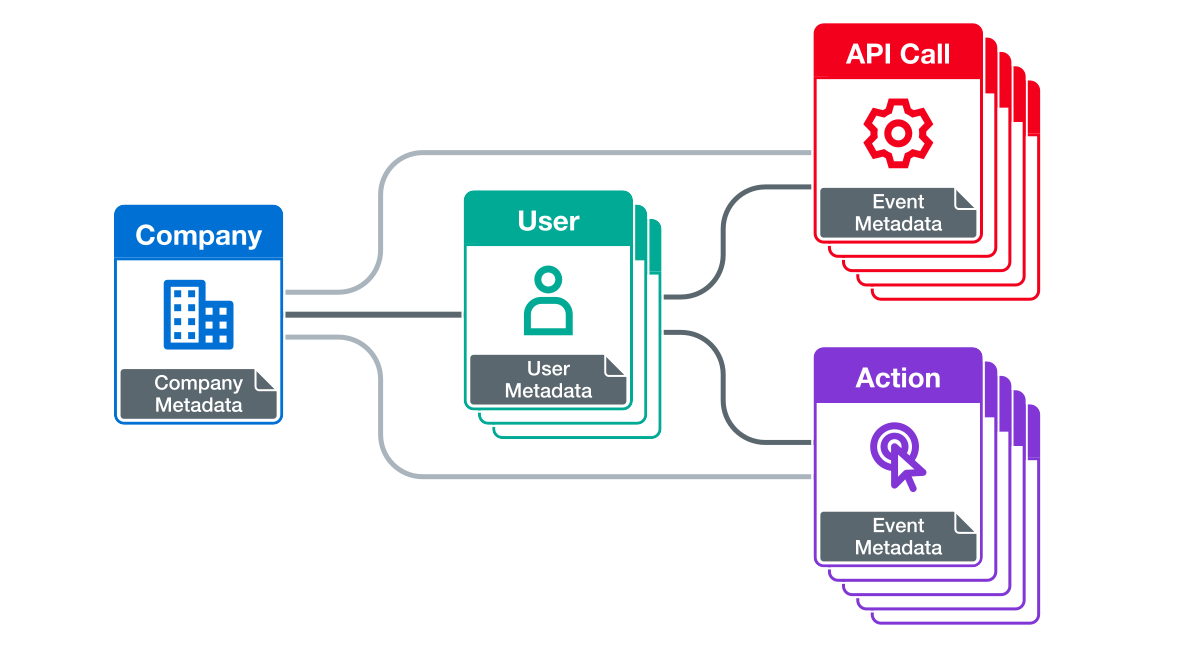
<p>The following diagram illustrates how these components relate in Moesif’s data model:</p>

<p><img class="lazyload blur-up" data-src="/blog/images/posts/2025-11-27-How-to-Leverage-Moesif-Effectively-for-API-Observability/moesif-event-model.png" alt="Moesif's event data model showing how API events, users, and companies relate to one another." title="Moesif's event data model illustrating relationships among API events and user entities." /></p>

<p>Using HTTP headers, you can inject this information at the API gateway or application layer. The custom metadata fields allow you to add identifiers like version numbers, LLM models, environment tags, and so on. From there, you define the proper filters in Moesif, and observe and utilize API calls pertinent to specific entities. API requests, no longer anonymous, become actionable observability data.</p>

<p>See a <a href="https://www.moesif.com/docs/server-integration/" target="_blank">server integration documentation</a> for more information on how to implement the identification and attribution layer you want for your setup.</p>

<p>Let’s get into more detail about enriching Moesif events with identifiers relevant to your architecture:</p>

<h3 id="identify-users-and-companies">Identify Users and Companies</h3>

<p>Each event can include a unique user ID, and, where applicable, a company ID. These identifiers allow fine-grained segmentation and behavioral analytics in Moesif; you can filter by account or customer in addition to endpoints and API-specific dimensions. This also sets up important components by which you can create and receive alerts.</p>

<p>Here’s a FastAPI example:</p>

<div class="language-py highlighter-rouge"><div class="highlight"><pre class="highlight"><code><span class="k">def</span> <span class="nf">identify_user</span><span class="p">(</span><span class="n">request</span><span class="p">,</span> <span class="n">response</span><span class="p">):</span>
    <span class="c1"># Implement your custom logic which reads user id from your request context
</span>    <span class="c1"># For example, you can extract the claim from a JWT in the Authorization header
</span>    <span class="k">return</span> <span class="sh">"</span><span class="s">12345</span><span class="sh">"</span>

<span class="k">def</span> <span class="nf">identify_company</span><span class="p">(</span><span class="n">request</span><span class="p">,</span> <span class="n">response</span><span class="p">):</span>
    <span class="c1"># Implement your custom logic which reads company id from your request context
</span>    <span class="c1"># For example, you can extract the claim from a JWT in the Authorization header
</span>    <span class="k">return</span> <span class="sh">"</span><span class="s">67890</span><span class="sh">"</span>

<span class="n">moesif_settings</span> <span class="o">=</span> <span class="p">{</span>
    <span class="sh">'</span><span class="s">APPLICATION_ID</span><span class="sh">'</span><span class="p">:</span> <span class="sh">'</span><span class="s">Your Moesif Application Id</span><span class="sh">'</span><span class="p">,</span>
    <span class="sh">'</span><span class="s">LOG_BODY</span><span class="sh">'</span><span class="p">:</span> <span class="bp">True</span><span class="p">,</span>
    <span class="sh">'</span><span class="s">DEBUG</span><span class="sh">'</span><span class="p">:</span> <span class="bp">True</span><span class="p">,</span>
    <span class="sh">'</span><span class="s">IDENTIFY_USER</span><span class="sh">'</span><span class="p">:</span> <span class="n">identify_user</span><span class="p">,</span>
    <span class="sh">'</span><span class="s">IDENTIFY_COMPANY</span><span class="sh">'</span><span class="p">:</span> <span class="n">identify_company</span><span class="p">,</span>
<span class="p">}</span>

<span class="n">app</span> <span class="o">=</span> <span class="nc">FastAPI</span><span class="p">()</span>

<span class="n">app</span><span class="p">.</span><span class="nf">add_middleware</span><span class="p">(</span><span class="n">MoesifMiddleware</span><span class="p">,</span> <span class="n">settings</span><span class="o">=</span><span class="n">moesif_settings</span><span class="p">)</span>
</code></pre></div></div>

<p>In conjunction with exhaustive API traffic data, customer identification makes possible deeper and more potent troubleshooting and debugging.</p>

<p>Consider some real-world issues:</p>

<ul>
  <li>Which customers are observing increased <code class="language-plaintext highlighter-rouge">4xx</code> errors after deployment?</li>
  <li>Has the new SDK release improved onboarding flow?</li>
</ul>

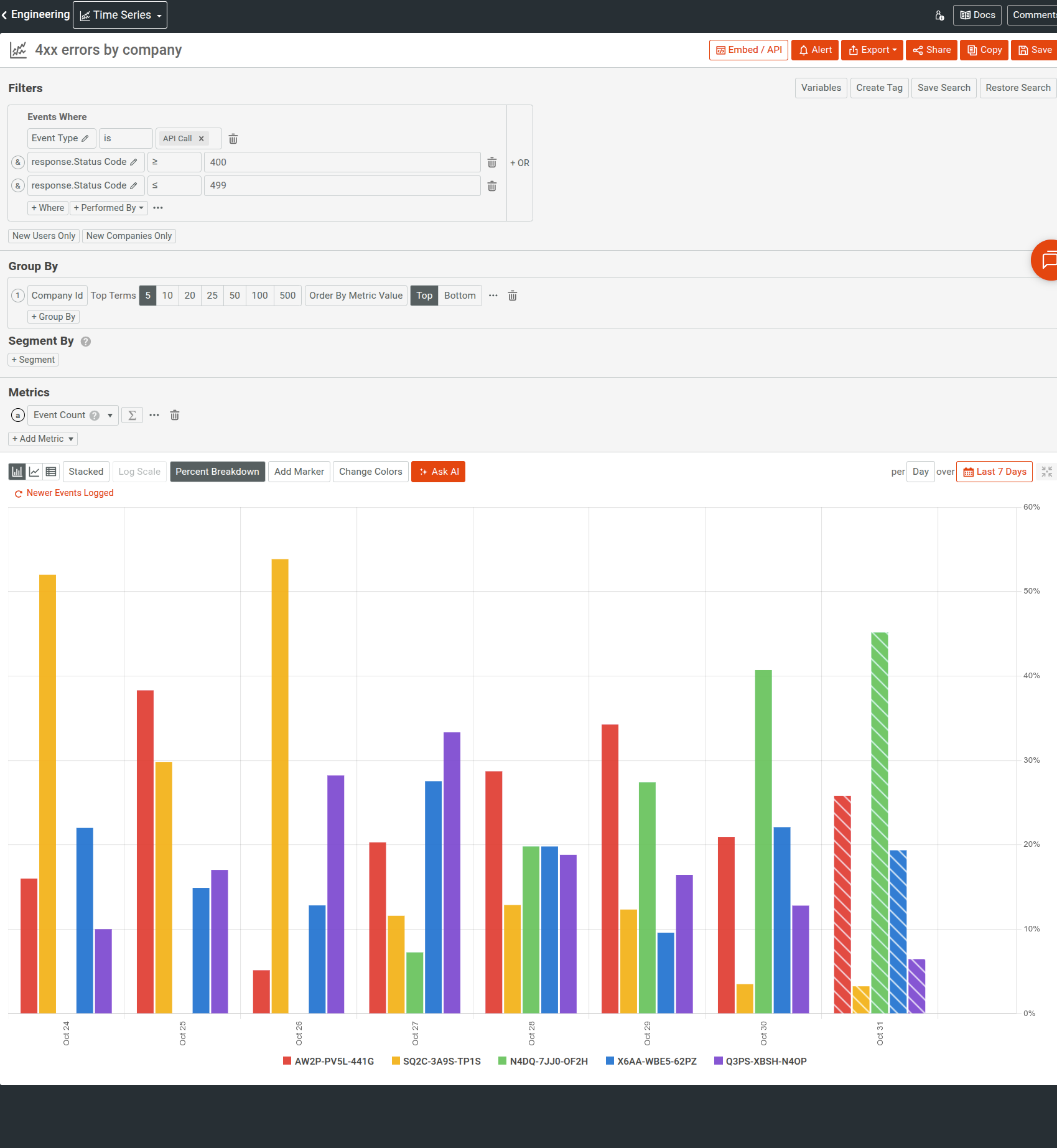
<p>The following <a href="https://www.moesif.com/docs/api-analytics/time-series-analysis/" target="_blank">time series</a> breaks down <code class="language-plaintext highlighter-rouge">4xx</code> errors across companies. It also enables <strong>Percent Breakdown</strong> to easily understand what percentage of the traffic has incurred those errors:</p>

<p><img class="lazyload blur-up" data-src="/blog/images/posts/2025-11-27-How-to-Leverage-Moesif-Effectively-for-API-Observability/4xx-errors-by-company.png" alt="A time series analyzing 4xx errors, breaking it down by company IDs." title="Understanding 4xx client errors across companies." /></p>

<p>You can then interact with a company ID value to go straight to the <a href="https://www.moesif.com/docs/user-analytics/profile-view/" target="_blank">company profile</a> for more information about the customer.</p>

<p><img class="lazyload blur-up" data-src="/blog/images/posts/2025-11-27-How-to-Leverage-Moesif-Effectively-for-API-Observability/going-to-company-profile-from-time-series.png" alt="From the time series analysis, you can select a company ID for a quick actions menu and go to the company's profile view for more information about the customer." title="Accessing more information about a customer from an interactive time series analysis." /></p>

<h3 id="tag-by-environment-and-version">Tag By Environment and Version</h3>

<p>If you have multi-tenant or polyglot systems, consider tagging requests with version and environment identifiers: for example, explicit API versions and tags for staging and production environments. It also allows you to detect inconsistency in deployment states; for example, you may find that your staging behaves correctly but production exhibits higher latency and degraded performance.</p>

<p>These context fields also make it possible to filter or compare across versions to evaluate new releases. Engineers can intuitively visualize latency or error-rate differentials between API versions in Moesif UI, without custom queries, to validate performance before and after releases.</p>

<p>For example, the following <a href="https://www.moesif.com/docs/api-analytics/time-series-analysis/" target="_blank">time series</a> analyzes error distributions for an API version:</p>

<p><img class="lazyload blur-up" data-src="/blog/images/posts/2025-11-27-How-to-Leverage-Moesif-Effectively-for-API-Observability/error-distribution-by-api-version.png" alt="A time series analysis in Moesif that analyzes all API errors, breaking the chart down by various API error types." title="Analyzing different error types affecting an API in real time." /></p>

<h2 id="capture-custom-events">Capture Custom Events</h2>

<p>Moesif can track both incoming and outgoing HTTP requests. However, many workflows and activities happen asynchronously and in ways that never appear as HTTP requests. For example, webhook deliveries, queue processing, AI pipelines, or downstream handoffs don’t fit the criteria of an HTTP traffic component. Oversights of tracking these events leave consequential blind spots in observability.</p>

<p>To that end, Moesif supports <a href="https://www.moesif.com/docs/getting-started/user-actions/" target="_blank"><em>custom actions</em></a>. Actions are custom events or activities that occur based on user interactions or as side effects of other occurrences, for example:</p>

<ul>
  <li>UI interactions like someone signing up or logging in</li>
  <li>System actions like internal retries or user-driven milestones</li>
  <li>Backend activities</li>
</ul>

<p>You can log these custom actions programmatically using Moesif’s Actions API directly. You can also use event streams like AWS Firehose and Logstash.</p>

<p>An Action looks like this:</p>

<div class="language-json highlighter-rouge"><div class="highlight"><pre class="highlight"><code><span class="p">{</span><span class="w">
  </span><span class="nl">"action_name"</span><span class="p">:</span><span class="w"> </span><span class="s2">"Finished Data Processing Job"</span><span class="p">,</span><span class="w">
  </span><span class="nl">"request"</span><span class="p">:</span><span class="w"> </span><span class="p">{</span><span class="w">
    </span><span class="nl">"time"</span><span class="p">:</span><span class="w"> </span><span class="s2">"2025-01-28T04:45:42.914"</span><span class="w">
  </span><span class="p">},</span><span class="w">
  </span><span class="nl">"company_id"</span><span class="p">:</span><span class="w"> </span><span class="s2">"12345"</span><span class="p">,</span><span class="w">
  </span><span class="nl">"metadata"</span><span class="p">:</span><span class="w"> </span><span class="p">{</span><span class="w">
    </span><span class="nl">"total_rows"</span><span class="p">:</span><span class="w"> </span><span class="mi">1024</span><span class="p">,</span><span class="w">
    </span><span class="nl">"found_rows"</span><span class="p">:</span><span class="w"> </span><span class="mi">999</span><span class="p">,</span><span class="w">
    </span><span class="nl">"consumed_input_tokens"</span><span class="p">:</span><span class="w"> </span><span class="mi">54322</span><span class="p">,</span><span class="w">
    </span><span class="nl">"time_seconds"</span><span class="p">:</span><span class="w"> </span><span class="mf">66.3</span><span class="w">
  </span><span class="p">}</span><span class="w">
</span><span class="p">}</span><span class="w">
</span></code></pre></div></div>

<p>You can correlate these events with API usage to, for example, understand failure cascades or measure workflow reliability. If a webhook retry event precedes <code class="language-plaintext highlighter-rouge">5xx</code> error responses and you observe an increase in such responses, it might point to an integration hitch. You become conscious of a potential issue before it impacts your customers and any support tickets.</p>

<p>In Moesif, you can filter by actions-type events and action names, For example, the following <a href="https://www.moesif.com/docs/api-analytics/event-stream/" target="_blank">Live Event Log</a> shows custom action events like users visiting landing page, signing-in, and so on:</p>

<p><img class="lazyload blur-up" data-src="/blog/images/posts/2025-11-27-How-to-Leverage-Moesif-Effectively-for-API-Observability/live-event-log-with-user-action-events.png" alt="Live Event Log in Moesif showing custom actions in the API in real time." title="Viewing custom user actions in the API in the Live Event Log for real time observability." /></p>

<p>On top of that, consider if you have HTTP events that delineate a specific outcome or action; you can attach a meaningful and recognizable name for it programmatically <a href="https://www.moesif.com/docs/api#log-an-api-call" target="_blank">using the <code class="language-plaintext highlighter-rouge">action_name</code> field</a>.</p>

<p>Here’s another example that breaks data export operations across customers by filtering the relevant action’s name:</p>

<p><img class="lazyload blur-up" data-src="/blog/images/posts/2025-11-27-How-to-Leverage-Moesif-Effectively-for-API-Observability/export-event-by-company.png" alt="Filtering real-time Live Event Log for a custom action related to a data export feature in an API." title="You can filter by specific custom actions to observe and debug API-specific features in real time." /></p>

<p>We recommend that you use custom actions selectively. Prioritize flows that delineate critical business or reliability events, from where silent or non-obvious failures can originate:</p>

<ul>
  <li>Webhook delivery attempts and acknowledgments</li>
  <li>User actions that indicate successful onboarding, provisioning, or purchased plan</li>
</ul>

<h2 id="integrate-moesif-into-engineering-workflows">Integrate Moesif into Engineering Workflows</h2>

<p>Lastly, route the insights Moesif gives you into systems your engineers already work: Slack, PagerDuty, emails, or custom internal webhooks for fine-grained automation.</p>

<p><a href="https://www.moesif.com/docs/api-monitoring/" target="_blank">Alerts in Moesif</a> are highly customizable and can serve assorted use cases. In place of opening an analysis in Moesif reactively, your defined alert rules can automatically notify teams when specific conditions meet:</p>

<ul>
  <li>Trigger an alert when a single account produces over 50 <code class="language-plaintext highlighter-rouge">401 Unauthorized</code> errors in a small amount of time.</li>
  <li>Send a PagerDuty incident if a critical endpoint’s <code class="language-plaintext highlighter-rouge">5xx</code> error rate exceeds a specific percentage.</li>
  <li>Notify a Slack channel if usage for a key account drops by more than 70% over a small time window.</li>
</ul>

<p>Moesif requires you to specify a <a href="https://www.moesif.com/docs/api-monitoring/creating-notification-channels/" target="_blank">channel to dispatch alert notifications to</a>. You can, for example, use a Slack channel to observe transient issues, while PagerDuty supports production-impacting incident response.</p>

<p>For more information, see <a href="https://www.moesif.com/docs/api-monitoring/real-time-alerts/" target="_blank">Real-Time Rolling Alerts</a> and <a href="https://www.moesif.com/docs/api-monitoring/calendar-based-alerts/" target="_blank">Calendar-Based Alerts</a> that demonstrate how you can monitor real-time incidents and long-term anomalies and trends.</p>

<p>As an example, the following static alert rule monitors the P90 latency for a GenAI API. It sets a static threshold of 500 milliseconds and evaluates the latency metric each calendar month.</p>

<p><img class="lazyload blur-up" data-src="/blog/images/posts/2025-11-27-How-to-Leverage-Moesif-Effectively-for-API-Observability/p90-latency-alert-rule.png" alt="An alert rule in Moesif that notifies when the P90 latency goes over 0.5 seconds." title="A static alert rule to monitor and get alerted for latency in a GenAI API." /></p>

<h3 id="embed-dashboards">Embed Dashboards</h3>

<p>Moesif supports securely <a href="https://www.moesif.com/docs/embedded-templates/" target="_blank">embedding your analysis metrics</a> into external workflows and third-party solutions. It can strengthen your internal observability by making it continuous, seamless, and more accessible, through familiar day-to-day tools. Real-time, flexible, and fast access to API metrics and customer behavior makes sure that you can observe them alongside system and infrastructure metrics; consequently, both technical and customer context substantiate your incident responses and initiatives.</p>

<h2 id="safeguard-privacy-and-data-hygiene">Safeguard Privacy and Data Hygiene</h2>

<p>Moesif provides field-level redaction through configuration options to mask sensitive resources, especially in systems handling personally identifiable information (PII) or financial data. You can therefore make sure replace or remove such resources before they leave your environment,</p>

<p>Here’s a Node.js sample that uses the <code class="language-plaintext highlighter-rouge">maskContent</code> option to remove two fields from the event model before sending to Moesif:</p>

<div class="language-javascript highlighter-rouge"><div class="highlight"><pre class="highlight"><code><span class="k">import</span> <span class="nx">_</span> <span class="k">from</span> <span class="dl">'</span><span class="s1">lodash</span><span class="dl">'</span><span class="p">;</span>

<span class="kd">var</span> <span class="nx">options</span> <span class="o">=</span> <span class="p">{</span>
  <span class="na">maskContent</span><span class="p">:</span> <span class="kd">function</span><span class="p">(</span><span class="nx">event</span><span class="p">)</span> <span class="p">{</span>
    <span class="kd">const</span> <span class="nx">newEvent</span> <span class="o">=</span> <span class="nx">_</span><span class="p">.</span><span class="nf">omit</span><span class="p">(</span><span class="nx">event</span><span class="p">,</span> <span class="p">[</span><span class="dl">'</span><span class="s1">request.headers.Authorization</span><span class="dl">'</span><span class="p">,</span> <span class="dl">'</span><span class="s1">event.response.body.sensitive_field</span><span class="dl">'</span><span class="p">])</span>
    <span class="k">return</span> <span class="nx">newEvent</span><span class="p">;</span>
  <span class="p">}</span>
<span class="p">};</span>
</code></pre></div></div>

<p>We also recommend that you regularly carry out audits to make sure that event payloads are lightweight and focused, and no unnecessary fields exist. Effective API observability should prioritize relevance of data over volume.</p>

<h2 id="wrapping-up">Wrapping Up</h2>

<p>Consider how AI is taking over industries and systems becoming more distributed; more and more contracts exist among APIs, clients, and integrations. They not only serve end users, but also internal customers, and engineers that work on these systems as well. As a result, there is more room for silent failures and missed technical and business opportunities.</p>

<p>The efforts you put behind capturing and enriching the data through Moesif pay off every time you encounter something unanticipated. Moesif encourages thoughtful instrumentation, consistent enrichment, and the discipline to be mindful about the data you emit; explicit intent and control will give you more precise insights and thereby more utility.</p>

<!-- url -->

<!-- image -->

<!-- excerpt -->

<!-- subtext -->

<!-- button text -->

<div class="cta-section__wrapper">
  <div class="cta-section__text">
    <img src="https://blog.moesif.com/images/posts/cta/logo.svg" alt="Learn More About Moesif" />
    <span id="cta_message" class="cta-section__excerpt">
      Deep API Observability with Moesif
    </span>
    <span class="cta-section__subtext">
      14 day free trial. No credit card required.
    </span>
    <a id="cta_anchor" href="https://www.moesif.com/wrap?onboard=true&amp;utm_source=blog&amp;utm_medium=bottom-cta&amp;utm_content=Moesif-for-API-Observability-and-Analytics-in-NGINX-OpenResty" class="buttoncta buttoncta--large buttoncta--primary">
      Try for Free
    </a>
  </div>
  <img class="cta-section__image" src="https://blog.moesif.com/images/posts/cta/metrics-filtering.svg" alt="" />
</div>

<!-- url -->

<!-- image -->

<!-- hero text -->

<!-- sub text -->

<!-- cta button text -->

<div id="popupModal" class="popup-modal" style="display:none;">
    <div class="popup-content">
        <span class="close-button" onclick="closeModal()">&times;</span>
        <div class="popup-top">
            <div class="image-wrapper">
                <img src="https://blog.moesif.com/images/cta-banners/onboard-body-empty-state-step-2-on-dark.svg" alt="Design, Build, and Deliver Better APIs!" />
            </div>
        </div>
        <div class="popup-bottom">
            <span class="popup-hero">Design, Build, and Deliver Better APIs!</span>
            <span class="popup-body">Use Moesif to up your API game with powerful analytics and more.</span>
            <button id="ctaButton" class="cta-button">Try for Free</button>
            <span class="popup-footer">No credit card required</span>
        </div>
    </div>
</div>

<script>
    // Close modal function
    function closeModal() {
        document.getElementById('popupModal').style.display = 'none';
    }

    document.addEventListener("DOMContentLoaded", function () {
        var modalShown = false;

        // Function to show the modal
        function showModal() {
            if (!modalShown) {
                document.getElementById('popupModal').style.display = 'flex';
                modalShown = true; // Ensure the modal is only shown once
            }
        }

        // Function to handle scroll event
        function checkScroll() {
            if (window.scrollY > (document.documentElement.scrollHeight - window.innerHeight) / 2) { // Check if user has scrolled halfway down the page
                showModal();
                window.removeEventListener('scroll', checkScroll); // Remove scroll event listener once modal is shown
            }
        }

        // Function to detect exit intent
        function checkExitIntent(e) {
            if (e.clientY < 50 && e.movementY < 0) {
                showModal();
                document.removeEventListener('mousemove', checkExitIntent);
            }
        }

        // Add event listeners
        window.addEventListener('scroll', checkScroll);
        document.addEventListener('mousemove', checkExitIntent);

        // Set a timeout to show the modal after 10 seconds
        setTimeout(showModal, 30000); // 10000 milliseconds = 10 seconds

        document.getElementById('ctaButton').addEventListener('click', function () {
            window.location.href = 'https://www.moesif.com/wrap?onboard=true&utm_source=blog&utm_medium=popup-cta&utm_content=Moesif-for-API-Observability-and-Analytics-in-NGINX-OpenResty'; // The URL is inserted here from your template
        });
    });

</script>]]></content><author><name>Abu Sakib</name><email>abu@moesif.com</email></author><category term="technical" /><category term="api-development" /><category term="Best Practices" /><category term="API Observability" /><category term="API Monitoring" /><summary type="html"><![CDATA[Effectively leverage Moesif for API observability through best practices for integration, event enrichment, custom actions, and engineering workflow integration.]]></summary></entry><entry><title type="html">How to Build an Internal Chargeback Model for Your API and AI Usage Using Moesif</title><link href="https://www.moesif.com/blog/api-strategy/api-monetization/How-to-Build-an-Internal-Chargeback-Model-for-Your-API-and-AI-Usage-Using-Moesif/" rel="alternate" type="text/html" title="How to Build an Internal Chargeback Model for Your API and AI Usage Using Moesif" /><published>2025-11-24T00:00:00+00:00</published><updated>2025-12-02T00:00:00+00:00</updated><id>https://www.moesif.com/blog/api-strategy/api-monetization/How-to-Build-an-Internal%20-Chargeback-Model-for-Your-API-and-AI-Usage-Using-Moesif</id><content type="html" xml:base="https://www.moesif.com/blog/api-strategy/api-monetization/How-to-Build-an-Internal-Chargeback-Model-for-Your-API-and-AI-Usage-Using-Moesif/"><![CDATA[<p>API and AI services now sit at the heart of modern products. However, the more we use them, the harder it seems to become to account for the budget.</p>

<p>Launching an AI product often leads to massive end-of-period bills. This requires attributing costs to the key internal power users and consumption drivers. The challenge is identifying the departments, products, or projects responsible for the consumption, and the extent to which they contribute. Vanity metrics alone, like API calls or token counts, don’t explain growth drivers. You need deeper, more attributable metrics to effectively manage and understand the spend.</p>

<p>This post discusses how an internal chargeback model provides a framework for gaining clarity and an actionable strategy when launching a new AI API program.</p>

<!-- url -->

<!-- image -->

<!-- excerpt -->

<!-- subtext -->

<!-- button text -->

<div class="cta-section__wrapper">
  <div class="cta-section__text">
    <img src="https://blog.moesif.com/images/posts/cta/logo.svg" alt="Learn More About Moesif" />
    <span id="cta_message" class="cta-section__excerpt">
      Eliminate the Black Box of Shared AI Costs
    </span>
    <span class="cta-section__subtext">
      14 day free trial. No credit card required.
    </span>
    <a id="cta_anchor" href="https://www.moesif.com/wrap?onboard=true&amp;utm_source=blog&amp;utm_medium=top-cta&amp;utm_content=How-to-Build-an-Internal-Chargeback-Model-for-Your-API-and-AI-Usage-Using-Moesif" class="buttoncta buttoncta--large buttoncta--primary">
      Start Free
    </a>
  </div>
  <img class="cta-section__image" src="https://blog.moesif.com/images/posts/cta/cta-api-log.svg" alt="" />
</div>

<h2 id="the-problem-of-unaccounted-api-and-ai-usage">The Problem of Unaccounted API and AI Usage</h2>

<h3 id="opaque-costs-in-distributed-systems">Opaque Costs in Distributed Systems</h3>

<p>APIs and AI workloads stand across multiple services, gateways, and cloud providers. When a request goes through this stack, the compute and network costs quietly accumulate across systems, like load balancers, AI models, databases, and storage layers. By the time these activities appear in invoices, they’ve lost important business context:</p>

<ul>
  <li>Which department generated the usage?</li>
  <li>Which product drove the associated costs?</li>
  <li>Which team should own the bill?</li>
</ul>

<h3 id="metrics-lacking-ownership">Metrics Lacking Ownership</h3>

<p>Most organizations can collect usage data: API call counts, latency distributions, or token consumption metrics. But how many of those connect to identity and ownership? Many organizations lack fine-grained tooling to translate usage into a coherent strategy. For example, consider an endpoint that logs millions of calls each day, but without consistent tagging through entities like headers or metadata. Those events remain anonymous from a cost-allocation outlook, and thus engender attribution gaps. Finance sees aggregate usage, while engineering sees operational activity, and neither can reconcile the two.</p>

<h3 id="the-complexity-of-ai-cost-attribution">The Complexity of AI Cost Attribution</h3>

<p>In production AI systems, one request often results in a distributed chain of model and data operations across different infrastructure layers. Consider an enterprise search assistant. It can answer employee questions using internal data sources and APIs. To satisfy a user query, one AI request may trigger:</p>

<ul>
  <li>An embedding model</li>
  <li>A vector DB lookup</li>
  <li>An LLM inference</li>
</ul>

<p>Each of these can have disparate billing semantics:</p>

<ul>
  <li>Embedding might charge per token</li>
  <li>Database can charge per compute unit</li>
  <li>The inference model can charge by input and output tokens</li>
</ul>

<p>And when overall costs spike, the root cause is hard to ascertain:</p>

<ul>
  <li>New user adoption</li>
  <li>Inefficient prompts</li>
  <li>Recursive bugs</li>
</ul>

<p>Lack of end-to-end attribution makes it challenging to link costs to actual consumption. It 
also obscures responsibility and optimization opportunities.</p>

<p>Unaccounted use, while an accounting inconvenience, also skews engineering and product decisions. With no team directly responsible for resource consumption, overuse feels complimentary. It exacerbates overprovisioned services and development environment sprawl; shared APIs and AI decline into shared liabilities.</p>

<p>Chargeback models can solve this problem as it reintroduces causality between action and cost by treating resource usage as a billable, attributable event. Therefore, as an organization, before any pricing model or automation, establish the foundation for chargeback; every request, task, or AI invocation must carry consistent identifiers that link to the owning team or project. Then use Moesif to track, meter, and report the usage to measure accountability.</p>

<h2 id="the-case-for-internal-chargebacks">The Case for Internal Chargebacks</h2>

<p>In most organizations, API and AI usage starts as a few shared services for internal teams. But it quickly becomes more complex with data pipelines, inference jobs, and model integrations. Each draws on shared compute, storage, and vendor-specific costs. To promote responsible consumption, you must allocate costs accurately to each team or department based on their actual usage. Without a structured budget allocation, every department benefits from the infrastructure, but none feel responsible for managing cost efficiency. An internal chargeback creates stewardship to design incentives for teams to stay on top of their monthly spend.</p>

<h3 id="what-is-an-internal-chargeback-model">What is an Internal Chargeback Model?</h3>

<p>An internal chargeback model assigns the cost of technology resources to the internal teams or products that consume them. Chargebacks create an internal transparency framework among teams, the platform no longer being a monolithic cost center. The model doesn’t change how APIs run; it changes how their costs are recognized and optimized.</p>

<p>A strong chargeback model requires three components:</p>

<dl>
  <dt>Measured Usage</dt>
  <dd>Clear units: requests, tokens, GB processed</dd>
  <dt>Unit Cost</dt>
  <dd>The financial rate tied to each unit</dd>
  <dt>Ownership Mapping</dt>
  <dd>Which department, product, or team generated the usage</dd>
</dl>

<p>Moesif provides the foundation for all three by converting raw API and AI events into billable, attributable metrics.</p>

<h3 id="why-api-and-ai-workloads-require-chargebacks">Why API and AI Workloads Require Chargebacks</h3>

<p>API and AI systems have distinct cost dynamics in comparison to traditional apps. Their costs scale horizontally, as each new interaction, workflow, or user interaction adds measurable consumption. AI especially institutes variability: inference costs fluctuate by model type, prompt complexity, and token amounts. Without a chargeback model, these expenses blend into a shared cloud budget, hiding inefficient usage and encouraging overconsumption.</p>

<h3 id="chargebacks-as-control">Chargebacks as Control</h3>

<p>Chargebacks demonstrate real costs to the teams that generate them, and in doing so, encourage better architectural decisions. Developers learn to assess performance trade-offs against economic impact. Product owners can predict budgets grounded in actual resource usage and not ballpark figures. Platform teams and department heads, in turn, reap the benefits of data-driven decisions when rationalizing infrastructure investments or cost optimizations.</p>

<p>In Moesif, you can repurpose usage data already collected for analytics to distribute costs, using product catalog features in tandem with billing meters and custom webhooks; we will provide a demonstration in the <a href="#how-to-implement-an-internal-chargeback-system-with-moesif">later section</a>.</p>

<h3 id="aligning-engineering-and-finance">Aligning Engineering and Finance</h3>

<p>Reliable, near–real-time data on technology spend gives teams autonomy to track and manage their own consumption. Instead of budget surprises, discussions shift toward measurable efficiency improvements. As AI and API ecosystems grow more complex, with token pricing, multi-model pipelines, and vendor-specific charges, you can’t retrofit this alignment later. Financial clarity must be designed into the architecture from day one.</p>

<h2 id="how-to-implement-an-internal-chargeback-system-with-moesif">How to Implement an Internal Chargeback System With Moesif</h2>

<p>Let’s look at the general steps involved in an internal chargeback implementation using Moesif. We will start by making sure reliable data exists, with consistent identifiers; that makes it possible to accurately extract quantifiable usage metrics using event-level analytics. Then, through Moesif’s automated metering system, usage data becomes financial data that your internal system utilizes to calculate and effectuate the chargeback.</p>

<h3 id="step-1-identify-and-attribute-usage">Step 1: Identify and Attribute Usage</h3>

<p>Every API or AI request must entail adequate context to determine who has generated it. Moesif offers various means to inject identification and attribution:</p>

<ul>
  <li><a href="https://www.moesif.com/docs/getting-started/identify-customers/" target="_blank">Customer identification</a> for <a href="https://www.moesif.com/docs/getting-started/users" target="_blank">users</a> and <a href="https://www.moesif.com/docs/getting-started/companies/" target="_blank">companies</a></li>
  <li>HTTP headers at gateway or app layer</li>
  <li>Custom metadata
    <ul>
      <li><a href="https://www.moesif.com/docs/getting-started/api-events/#event-metadata" target="_blank">Event-level custom metadata</a></li>
      <li><a href="https://www.moesif.com/docs/getting-started/users/#user-metadata" target="_blank">User</a> and <a href="https://www.moesif.com/docs/getting-started/companies/#companies-metadata" target="_blank">company</a> metadata</li>
    </ul>
  </li>
</ul>

<p>Then it’s only a matter of defining the appropriate filters in Moesif to observe and make use of API calls associated with a particular entity.</p>

<p>See a <a href="https://www.moesif.com/docs/server-integration/" target="_blank">server integration documentation</a> for more information on how to implement the identification and attribution layer you want for your setup.</p>

<p>The <a href="https://www.moesif.com/docs/api-analytics/event-stream/" target="_blank">Live Event Log in Moesif</a> shows real-time API traffic; from here you can verify whether or not the events contain appropriate identification and attribution data.</p>

<p><img class="lazyload blur-up" data-src="/blog/images/posts/2025-11-24-How-to-Build-an-Internal-Chargeback-Model-for-Your-API-and-AI-Usage-Using-Moesif/live-event-log.png" alt="A Live Event Log in Moesif showing real-time API events." title="A Live Event Log in Moesif showing real-time API events fro a GenAI API." /></p>

<h3 id="step-2-create-plan-and-optional-price">Step 2: Create Plan and Optional Price</h3>

<p>A billing meter in Moesif must have an associated plan and price to attribute the usage to. Use Moesif’s <a href="https://www.moesif.com/docs/product-catalog/" target="_blank">Product Catalog</a> to define the financial model.</p>

<ul>
  <li>The plan describes your internal pricing plan</li>
  <li>The price defines the usage rate; it can be flat or per-unit—for example, US$0.01 per 1,000 tokens</li>
</ul>

<p>Even if your chargeback feeds into a custom billing system, defining plans and prices in Moesif helps maintain clean mapping.</p>

<h4 id="create-a-plan">Create a Plan</h4>

<ol>
  <li>Select <strong>Create New</strong> and then select <strong>Plan</strong>.</li>
  <li>Enter a name for the plan.</li>
  <li>Select <strong>Custom</strong> as the billing provider.</li>
  <li>In the <strong>External Plan Id</strong> field, you can enter the external plan ID from your custom billing solution.</li>
  <li>Choose a <a href="https://www.moesif.com/docs/metered-billing/integrate-with-a-custom-webhook/#choosing-a-reporting-schedule-and-reporting-period" target="_blank">reporting schedule</a>. It dictates how Moesif reports usage to your webhook.</li>
  <li>Enter an optional description and plan metadata.</li>
  <li>Select <strong>Create</strong>.</li>
</ol>

<p>The following example shows a plan with calendar-aligned billing:</p>

<p><img class="lazyload blur-up" data-src="/blog/images/posts/2025-11-24-How-to-Build-an-Internal-Chargeback-Model-for-Your-API-and-AI-Usage-Using-Moesif/example-chargeback-plan.png" alt="An example chargeback plan in Moesif." title="A simple chargeback plan in Moesif Product Catalog." /></p>

<h4 id="create-a-price-optional">Create a Price (Optional)</h4>

<ol>
  <li>Select <strong>Create New</strong> and then select <strong>Price</strong>.</li>
  <li>Enter a name for the price.</li>
  <li>Link to the custom plan you created in the preceding step.</li>
  <li>Optionally, add price metadata.</li>
  <li>Define the pricing details:
    <ul>
      <li>You can choose between usage-based and flat-rate pricing models.</li>
      <li>For a usage-based model, specify the charged amount and the usage quantity.</li>
      <li>Define the usage calculation and aggregation method. For example, you may choose to sum up all consumed units in a month.</li>
    </ul>
  </li>
  <li>Select <strong>Create</strong>.</li>
</ol>

<p>Here’s an example price that charges 0.01 USD for each 1000 units of consumption:</p>

<p><img class="lazyload blur-up" data-src="/blog/images/posts/2025-11-24-How-to-Build-an-Internal-Chargeback-Model-for-Your-API-and-AI-Usage-Using-Moesif/example-chargeback-price.png" alt="An example chargeback price in Moesif." title="A simple chargeback price in Moesif Product Catalog." /></p>

<h3 id="step-3-create-billing-meter">Step 3: Create Billing Meter</h3>

<p>After the preceding steps, you have instituted ownership and the cost semantics it entails. A <a href="https://www.moesif.com/docs/metered-billing/" target="_blank">billing meter</a> connects these two by allowing you to <em>define, track, and measure usage</em>.</p>

<p>Moesif’s billing meters can define precise units of billable metrics, along dimensions that capture real cost drivers. For example:</p>

<ul>
  <li>Total LLM tokens</li>
  <li>Input and output tokens</li>
  <li>Requests to premium models</li>
  <li>Compute-heavy endpoints</li>
  <li>Only successful <code class="language-plaintext highlighter-rouge">2xx</code> responses</li>
</ul>

<p>Meters let you combine:</p>

<ul>
  <li>Filters</li>
  <li>Custom metrics</li>
  <li>Scripted fields</li>
  <li>Multipliers—for example, US$0.01 per 1,000 tokens</li>
</ul>

<p>This turns raw AI usage into financial quantity.</p>

<p>To create a billing meter, select <strong>Create New</strong> and then select <strong>Billing Meter</strong>. Then follow these steps:</p>

<h4 id="specify-billing-details">Specify Billing Details</h4>

<ol>
  <li>Enter a name for the meter.</li>
  <li>Select <strong>Custom</strong> as the billing provider.</li>
  <li>Select your webhook. To create a new webhook, select <strong>Add New Webhook</strong> from the dropdown menu.
    <ol>
      <li>Enter webhook name and URL.</li>
      <li>Select <strong>POST</strong> as the request method.</li>
      <li>(Recommended) Add a request header to authenticate requests coming from Moesif.</li>
      <li>Select <strong>Save</strong>.</li>
    </ol>
  </li>
  <li>Select the custom plan and optional price for chargeback you created in the first two steps.</li>
  <li>Set the usage multiplier to match the number of units you’re charging for. Moesif multiplies the raw metered usage by this multiplier before calculating the billable quantity. The billing meter tracks every event. But since our example price charges for every 1000 units, we must set the usage multiplier to <code class="language-plaintext highlighter-rouge">0.001</code>.</li>
  <li>Optionally, set which direction Moesif should round the usage too to handle fractional or decimal usage values when usage multiplier is less than one.</li>
  <li>Select the subscription statuses the billing meter should track usage for.</li>
</ol>

<h4 id="define-event-filters-and-billable-metrics">Define Event Filters and Billable Metrics</h4>

<ol>
  <li>Define event filters in the <strong>Filters</strong> pane to specify which events to track and meter. For example, you may want to meter events for a specific API or endpoint and disregard error responses.</li>
  <li>In the <strong>Metrics</strong> pane, define the metric to charge for. In addition to predefined metric types, you can create custom metrics. If a field does not exist in your event data that you want to bill on, you can compute and create the field using <a href="https://www.moesif.com/docs/metered-billing/scripted-fields/" target="_blank">Scripted Fields</a>.</li>
  <li>Select <strong>Create</strong> to finish creating the meter.</li>
</ol>

<p>Here’s an example of a billing meter. It defines a custom metric that charges for total token consumption for successful requests to two API endpoints.</p>

<p><img class="lazyload blur-up" data-src="/blog/images/posts/2025-11-24-How-to-Build-an-Internal-Chargeback-Model-for-Your-API-and-AI-Usage-Using-Moesif/example-billing-meter.png" alt="An example billing meter in Moesif that tracks and meters usage of AI text and embeddings generation." title="A billing meter in Moesif that connects with a custom billing provider to track and meter internal chargebacks." /></p>

<h3 id="step-4-create-subscription">Step 4: Create Subscription</h3>

<p>To send usage data through the webhook, you must create a subscription for your <em>internal customers</em>, as in, the different teams of your organization. The following example shows a cURL command to Moesif’s <code class="language-plaintext highlighter-rouge">/subscriptions</code> API endpoint:</p>

<div class="language-sh highlighter-rouge"><div class="highlight"><pre class="highlight"><code>curl <span class="nt">--request</span> POST <span class="se">\</span>
<span class="nt">--url</span> <span class="s1">'https://api.moesif.net/v1/subscriptions'</span> <span class="se">\</span>
<span class="nt">--header</span> <span class="s1">'X-Moesif-Application-Id: YOUR_COLLECTOR_APPLICATION_ID'</span> <span class="se">\</span>
<span class="nt">--header</span> <span class="s1">'Content-Type: application/json'</span> <span class="se">\</span>
<span class="nt">--data</span> <span class="s1">'{
  "subscription_id": "UNIQUE_SUBSCRIPTION_ID",
  "company_id": "COMPANY_ID",
  "current_period_start": "2025-10-22T20:13:00.001Z",
  "current_period_end": "2026-10-21T20:13:00.001Z",
  "status": "active",
  "items": [
    {
      "plan_id": "MOESIF_PLAN_ID" &lt;-- the GUID of the Moesif Plan
    }
  ]
}'</span>
</code></pre></div></div>

<p>For more information about the subscription data, see <a href="https://www.moesif.com/docs/metered-billing/integrate-with-a-custom-webhook/#6---create-a-subscription" target="_blank">the custom webhook setup</a> and <a href="https://www.moesif.com/docs/metered-billing/managing-custom-subscriptions/" target="_blank">managing subscriptions</a> docs.</p>

<h3 id="step-5-connect-with-internal-systems">Step 5: Connect with Internal Systems</h3>

<p>Moesif sends a payload containing usage data to the webhook that looks like this:</p>

<div class="language-json highlighter-rouge"><div class="highlight"><pre class="highlight"><code><span class="p">{</span><span class="w">
  </span><span class="nl">"idempotency_key"</span><span class="p">:</span><span class="s2">"KG5LxwFBepaKHyUD"</span><span class="p">,</span><span class="w">
  </span><span class="nl">"company_id"</span><span class="p">:</span><span class="s2">"J7F3-R9K1-T5B8"</span><span class="p">,</span><span class="w">
  </span><span class="nl">"subscription_id"</span><span class="p">:</span><span class="s2">"sub_a9e4bde6606e"</span><span class="p">,</span><span class="w">
  </span><span class="nl">"plan_id"</span><span class="p">:</span><span class="s2">"68f789d3596caf0b2f514306"</span><span class="p">,</span><span class="w">
  </span><span class="nl">"billing_meter_id"</span><span class="p">:</span><span class="s2">"68f8d856596caf0b2f51b123"</span><span class="p">,</span><span class="w">
  </span><span class="nl">"quantity"</span><span class="p">:</span><span class="mi">2</span><span class="p">,</span><span class="w">
  </span><span class="nl">"start_time"</span><span class="p">:</span><span class="s2">"2025-10-01T00:00:00.000Z"</span><span class="p">,</span><span class="w">
  </span><span class="nl">"end_time"</span><span class="p">:</span><span class="s2">"2025-10-31T23:59:59.999Z"</span><span class="w">
</span><span class="p">}</span><span class="w">
</span></code></pre></div></div>

<p>The webhook can be a Lambda or internal microservice. It can then convert the payload into the internal schema and post to your billing system or internal APIs to carry out the rest of the chargeback process. Each record should include these details at the minimum:</p>

<ul>
  <li>Department ID or equivalent. This maps to the webhook payload’s <code class="language-plaintext highlighter-rouge">company_id</code>.</li>
  <li>Billing period, mapping to the webhook payload’s <code class="language-plaintext highlighter-rouge">start_time</code> and <code class="language-plaintext highlighter-rouge">end_time</code>.</li>
  <li>Usage quantity.</li>
</ul>

<p>Finance systems can then aggregate and report these costs at the business-unit level. The teams use the same reports for budgeting.</p>

<h4 id="validate">Validate</h4>

<p>Here are some validation steps to make sure everything functions as intended:</p>

<ul>
  <li><a href="https://www.moesif.com/docs/metered-billing/testing-billing-meters/" target="_blank">Test your meter</a>.</li>
  <li>Conduct a test billing cycle and observe the following:
    <ul>
      <li>Usage data the webhook payload reports</li>
      <li>Observe usage statistics with corresponding revenue in the Billing Meter’s <strong>Synced Usage</strong> pane. From that pane, you can also view the events associated with the usage.<br />
    <img class="lazyload blur-up" data-src="/blog/images/posts/2025-11-24-How-to-Build-an-Internal-Chargeback-Model-for-Your-API-and-AI-Usage-Using-Moesif/billing-usage.png" alt="Billing meter in Moesif showing real-time billing usage." title="A billing meter in Moesif visualizing in real time the usage and associated bills for a chargeback model." /></li>
    </ul>
  </li>
  <li>Make sure your internal systems correctly receive the data.</li>
  <li>Reconcile reported costs with vendor invoices.</li>
</ul>

<h2 id="conclusion">Conclusion</h2>

<p>As organizations grow their AI and API footprint, shared workloads become a significant, but often poorly understood cost center. Without attributing costs directly, budgets get strained, optimization stalls, and cost overruns become inevitable. Notwithstanding the business dimension, the <em>infrastructure</em> ceases to be a managed resource.</p>

<p>An internal chargeback model administers financial discipline so that:</p>

<ul>
  <li>Usage becomes accountable</li>
  <li>Costs become explainable</li>
  <li>Teams become responsible consumers</li>
  <li>Finance and engineering align on real-time cost data</li>
</ul>

<p>Using Moesif, you can implement this model with precision, leveraging the analytics you already collect to drive financial clarity, operational efficiency, and healthier organizational culture.</p>

<!-- url -->

<!-- image -->

<!-- excerpt -->

<!-- subtext -->

<!-- button text -->

<div class="cta-section__wrapper">
  <div class="cta-section__text">
    <img src="https://blog.moesif.com/images/posts/cta/logo.svg" alt="Learn More About Moesif" />
    <span id="cta_message" class="cta-section__excerpt">
      The Infrastructure for AI Cost Attribution
    </span>
    <span class="cta-section__subtext">
      14 day free trial. No credit card required.
    </span>
    <a id="cta_anchor" href="https://www.moesif.com/wrap?onboard=true&amp;utm_source=blog&amp;utm_medium=bottom-cta&amp;utm_content=How-to-Build-an-Internal-Chargeback-Model-for-Your-API-and-AI-Usage-Using-Moesif" class="buttoncta buttoncta--large buttoncta--primary">
      Try for Free
    </a>
  </div>
  <img class="cta-section__image" src="https://blog.moesif.com/images/posts/cta/cta-dashboard.svg" alt="" />
</div>

<!-- url -->

<!-- image -->

<!-- hero text -->

<!-- sub text -->

<!-- cta button text -->

<div id="popupModal" class="popup-modal" style="display:none;">
    <div class="popup-content">
        <span class="close-button" onclick="closeModal()">&times;</span>
        <div class="popup-top">
            <div class="image-wrapper">
                <img src="https://blog.moesif.com/images/cta-banners/onboard-body-empty-state-step-2-on-dark.svg" alt="Stop Guessing Who Spent the AI Budget" />
            </div>
        </div>
        <div class="popup-bottom">
            <span class="popup-hero">Stop Guessing Who Spent the AI Budget</span>
            <span class="popup-body">Accurately attribute usage to teams and automate internal chargebacks with Moesif.</span>
            <button id="ctaButton" class="cta-button">Try for Free</button>
            <span class="popup-footer">No credit card required</span>
        </div>
    </div>
</div>

<script>
    // Close modal function
    function closeModal() {
        document.getElementById('popupModal').style.display = 'none';
    }

    document.addEventListener("DOMContentLoaded", function () {
        var modalShown = false;

        // Function to show the modal
        function showModal() {
            if (!modalShown) {
                document.getElementById('popupModal').style.display = 'flex';
                modalShown = true; // Ensure the modal is only shown once
            }
        }

        // Function to handle scroll event
        function checkScroll() {
            if (window.scrollY > (document.documentElement.scrollHeight - window.innerHeight) / 2) { // Check if user has scrolled halfway down the page
                showModal();
                window.removeEventListener('scroll', checkScroll); // Remove scroll event listener once modal is shown
            }
        }

        // Function to detect exit intent
        function checkExitIntent(e) {
            if (e.clientY < 50 && e.movementY < 0) {
                showModal();
                document.removeEventListener('mousemove', checkExitIntent);
            }
        }

        // Add event listeners
        window.addEventListener('scroll', checkScroll);
        document.addEventListener('mousemove', checkExitIntent);

        // Set a timeout to show the modal after 10 seconds
        setTimeout(showModal, 30000); // 10000 milliseconds = 10 seconds

        document.getElementById('ctaButton').addEventListener('click', function () {
            window.location.href = 'https://www.moesif.com/wrap?onboard=true&utm_source=blog&utm_medium=popup-cta&utm_content=How-to-Build-an-Internal-Chargeback-Model-for-Your-API-and-AI-Usage-Using-Moesif'; // The URL is inserted here from your template
        });
    });

</script>]]></content><author><name>Abu Sakib</name><email>abu@moesif.com</email></author><category term="API-Strategy" /><category term="API-Monetization" /><category term="API Monetization" /><category term="API Analytics" /><category term="API Observability" /><summary type="html"><![CDATA[Use Moesif to implement internal chargebacks and enable precise API and AI cost attribution for better transparency and resource optimization.]]></summary></entry><entry><title type="html">Introducing Moesif Basic Insights for WSO2 API Manager (APIM) and Bijira</title><link href="https://www.moesif.com/blog/technical/api-development/Introducing-Moesif-Basic-Insights-for-WSO2-API-Manager-APIM-and-Bijira/" rel="alternate" type="text/html" title="Introducing Moesif Basic Insights for WSO2 API Manager (APIM) and Bijira" /><published>2025-10-01T00:00:00+00:00</published><updated>2025-10-13T00:00:00+00:00</updated><id>https://www.moesif.com/blog/technical/api-development/Introducing-Moesif-Basic-Insights-for-WSO2-API-Manager-APIM-and-Bijira</id><content type="html" xml:base="https://www.moesif.com/blog/technical/api-development/Introducing-Moesif-Basic-Insights-for-WSO2-API-Manager-APIM-and-Bijira/"><![CDATA[<p>One of the principals of Moesif’s efforts has been making API analytics more accessible and easier to use for everyone. We have helped enterprises of different sizes and use cases grow and succeed with their API and AI products through data-backed insights. With Moesif, teams of assorted expertise feel empowered to gain deeper understanding of their product, customers, and the overarching market; consequently, every stakeholder can contribute to shared business goals through more effective teamworks.</p>

<p>As the next step towards realizing that vision, we are launching <a href="https://www.moesif.com/moesif-basic" target="_blank">Moesif Basic Insights</a>—a limited version of Moesif available to all WSO2 API Manager and Bijira customers.</p>

<!-- url -->

<!-- image -->

<!-- excerpt -->

<!-- subtext -->

<!-- button text -->

<div class="cta-section__wrapper">
  <div class="cta-section__text">
    <img src="https://blog.moesif.com/images/posts/cta/logo.svg" alt="Learn More About Moesif" />
    <span id="cta_message" class="cta-section__excerpt">
      Monitor and Analyze Your WSO2 APIs with Moesif
    </span>
    <span class="cta-section__subtext">
      
    </span>
    <a id="cta_anchor" href="https://www.moesif.com/wrap/basic?onboard=true&amp;utm_source=blog&amp;utm_medium=top-cta&amp;utm_content=Introducing-Moesif-Basic-Insights-for-WSO2-API-Manager-APIM-and-Bijira" class="buttoncta buttoncta--large buttoncta--primary">
      Start Free
    </a>
  </div>
  <img class="cta-section__image" src="https://blog.moesif.com/images/posts/cta/cta-monitoring.svg" alt="" />
</div>

<h2 id="what-is-moesif-basic-insights">What is Moesif Basic Insights?</h2>

<p>Moesif Basic Insights is a free, lightweight version of the Moesif platform. It is included as part of a valid WSO2 subscription to the following WSO2 products:</p>

<ul>
  <li>WSO2 API Manager</li>
  <li>Bijira</li>
</ul>

<p>You can access Moesif Basic Insights for Bijira in the standalone web app at <a href="https://moesif.com/moesif-basic" target="_blank"><code class="language-plaintext highlighter-rouge">https://moesif.com/moesif-basic</code></a>. If you’re using WSO2 API Manager, you can access it from the left sidebar.</p>

<h2 id="why-we-have-built-moesif-basic-insights-for-wso2">Why We Have Built Moesif Basic Insights for WSO2</h2>

<p>An API ecosystem built with WSO2 API Manager or Bijira possesses APIs, apps, and customers that generate millions of data points. Now WSO2 customers can effectively leverage that data through Moesif. Moesif Basic Insights provides a frictionless and integrated API analytics experience that comes included with your WSO2 API Manager and Bijira plan, requiring no complex setup or instrumentation.</p>

<h2 id="what-you-can-achieve-available-features">What You Can Achieve: Available Features</h2>

<p>Moesif Basic Insights resembles the WSO2 analytics architecture and organizes 
all the features into these components:</p>

<ul>
  <li>Inbound Analytics: Analytics for requests and data between the user and API Proxy</li>
  <li>Outbound Analytics: Analytics for requests and data between the API Proxy and the backend service</li>
  <li>AI Analytics: Outbound analytics purpose-built for AI APIs</li>
  <li>Alerting: Alert history and creation of new alert rules</li>
</ul>

<p>The following sections go over the features and analytics available in these components in WSO2 API Manager and Bijira across your APIs and applications.</p>

<h3 id="analytics-overview">Analytics Overview</h3>

<p><img class="lazyload blur-up" data-src="/blog/images/posts/2025-10-01-Introducing-Moesif-Basic-Insights-for-WSO2-API-Manager-APIM-and-Bijira/moesif-basic-overview.png" alt="The 'Overview' panel in Moesif Basic Insights web app." title="The 'Overview' panel in Moesif Basic Insights showing a rundown of various API usage statistics." /></p>

<p>The <strong>Overview</strong> panel in <strong>Inbound Analytics</strong>, <strong>Outbound Analytics</strong>, and <strong>AI</strong> <strong>Analytics</strong> contains a rundown of your API’s usage across different criteria:</p>

<h4 id="inbound-and-outbound-analytics">Inbound and Outbound Analytics</h4>

<ul>
  <li>Total traffic</li>
  <li>Error request count</li>
  <li>Average error rate</li>
  <li>95th percentile latency</li>
  <li>Time series visualization of request count and error count ratio with latency</li>
</ul>

<h4 id="ai-analytics">AI Analytics</h4>

<ul>
  <li>Total traffic</li>
  <li>Error request count</li>
  <li>Average error rate</li>
  <li>95th percentile latency</li>
  <li>Token usage statistics:
    <ul>
      <li>Total token</li>
      <li>Prompt token</li>
      <li>Completion token</li>
    </ul>
  </li>
  <li>Time series visualization of request count and error count ratio with latency</li>
</ul>

<h3 id="understanding-api-traffic">Understanding API Traffic</h3>

<p>The <strong>Traffic</strong> panel contains API traffic statistics:</p>

<h4 id="inbound-analytics">Inbound Analytics</h4>

<ul>
  <li>API usage over time</li>
  <li>API usage by <a href="https://wso2.com/bijira/docs/devportal/manage-applications/create-an-application/" target="_blank">Application</a></li>
  <li>API usage by Target, where Target is the the target endpoint for an API proxy</li>
  <li>API resource usage summary</li>
</ul>

<h4 id="outbound-analytics">Outbound Analytics</h4>

<ul>
  <li>Target usage over time</li>
  <li><a href="https://wso2.com/bijira/docs/devportal/manage-applications/create-an-application/" target="_blank">Application</a> usage over time</li>
  <li>Target usage summary</li>
</ul>

<h4 id="ai-analytics-1">AI Analytics</h4>

<ul>
  <li>Vendor usage over time</li>
  <li>Application usage over time</li>
  <li>Token usage distribution across total, prompt, and completion tokens usage</li>
  <li>Token usage over time, classifiable by total, prompt, and completion token types</li>
  <li>Summary of average token usage by vendor</li>
  <li>Vendor usage summary</li>
</ul>

<p>These metrics provide insights like:</p>

<ul>
  <li>APIs and applications driving the most traffic</li>
  <li>Peak usage hours</li>
  <li>Most popular API resources, AI features, and vendors</li>
</ul>

<h3 id="identifying-and-troubleshooting-api-errors">Identifying and Troubleshooting API Errors</h3>

<p>The <strong>Errors</strong> panel in Inbound, Outbound, and AI analytics shows API error statistics across existing APIs. It gives you an immediate, high-level observation of your API’s health. You can break errors down and visualize them by API, categories such as authentication and throttling, and status code.</p>

<p>The following Inbound Analytics illustrates errors by status codes :</p>

<p><img class="lazyload blur-up" data-src="/blog/images/posts/2025-10-01-Introducing-Moesif-Basic-Insights-for-WSO2-API-Manager-APIM-and-Bijira/errors-by-status-codes.png" alt="'Errors' panel in Moesif Basic Insights." title="The 'Errors' panel in Moesif Basic Insights visualizing API errors by status codes across different analytics types." /></p>

<h3 id="identifying-and-investigating-performance-bottlenecks">Identifying and Investigating Performance Bottlenecks</h3>

<p>The <strong>Latency</strong> panel in Inbound, Outbound, and AI analytics contains insights about your API’s performance by calculating 95th percentile latencies. It allows you to identify services that are performing poorly and provides breakdown of latency in different criteria.</p>

<p>Here’s an example of various latency statistics in <strong>Inbound Analytics</strong>:</p>

<p><img class="lazyload blur-up" data-src="/blog/images/posts/2025-10-01-Introducing-Moesif-Basic-Insights-for-WSO2-API-Manager-APIM-and-Bijira/latency-analysis.png" alt="'Latency' panel in Moesif Basic Insights with various latency metrics." title="The 'Latency' panel in Moesif Basic Insights visualizing various API latency metrics." /></p>

<h3 id="identifying-top-platforms-and-devices">Identifying Top Platforms and Devices</h3>

<p>The <strong>Devices</strong> panel in Inbound Analytics illustrates the top platforms and user agents so you can keep abreast of the technology your customers use. It helps you make informed product decisions, like whether to build new SDKs or developer tools.</p>

<p><img class="lazyload blur-up" data-src="/blog/images/posts/2025-10-01-Introducing-Moesif-Basic-Insights-for-WSO2-API-Manager-APIM-and-Bijira/device-statistics.png" alt="'Devices' panel in Moesif Basic Insights showing platform and user agent statistics." title="The 'Devices' panel in Moesif Basic Insights, visualizing insights into top platforms and user agents used by customers." /></p>

<h3 id="alerts">Alerts</h3>

<p>Alerts help you stay ahead of issues and proactively take measures for better customer experiences. The <strong>Alerts</strong> panel in <strong>Alerting</strong> shows details about existing alert rules as well as the history of triggered alerts. The preserved history helps track incident patterns over time.</p>

<p><img class="lazyload blur-up" data-src="/blog/images/posts/2025-10-01-Introducing-Moesif-Basic-Insights-for-WSO2-API-Manager-APIM-and-Bijira/alerts-history.png" alt="'Alerts' panel in Moesif Basic Insights showing alert history." title="The 'Alerts' panel in Moesif Basic Insights displaying alert history." /></p>

<p>You can also create and configure new alerts in the <strong>Alert Rules</strong> tab.</p>

<p><img class="lazyload blur-up" data-src="/blog/images/posts/2025-10-01-Introducing-Moesif-Basic-Insights-for-WSO2-API-Manager-APIM-and-Bijira/alert-rules.png" alt="'Alert Rules' tab in the 'Alerts' panel of Moesif Basic Insights." title="Viewing and editing existing alert rules in Moesif Basic Insights." /></p>

<p>Alerts notify automatically when API exceeds a specified threshold of a metric; for example, too many <code class="language-plaintext highlighter-rouge">400 Bad Request</code> errors. You can also specify where alert notifications should be dispatched to.</p>

<p><img class="lazyload blur-up" data-src="/blog/images/posts/2025-10-01-Introducing-Moesif-Basic-Insights-for-WSO2-API-Manager-APIM-and-Bijira/create-new-alert-rule.png" alt="'Create New Alert Rule' dialog to create new alert rule in Moesif Basic Insights." title="Creating new alert rules in Moesif Basic Insights ." /></p>

<h3 id="usage-reports">Usage Reports</h3>

<p>To help demonstrate the value and health of your API program and keep everyone informed, the <strong>Usage Reports</strong> panel allows you to download usage reports:</p>

<ul>
  <li>The <strong>Monthly Reports</strong> tab allows you to download monthly reports.</li>
  <li>In the <strong>Report Generator</strong> tab, you can specify the following criteria to generate and download reports:
    <ul>
      <li>The API</li>
      <li>The applications or API consumers</li>
      <li>The time period.</li>
    </ul>
  </li>
</ul>

<p><img class="lazyload blur-up" data-src="/blog/images/posts/2025-10-01-Introducing-Moesif-Basic-Insights-for-WSO2-API-Manager-APIM-and-Bijira/usage-reports.png" alt="Usage Reports in Moesif Basic Insights." title="Generating and downloading API usage reports in Moesif Basic Insights ." /></p>

<p>The <strong>Custom Reports</strong> panel allows further customization for generating reports where you can define the categories and metrics to plot. For example, the following custom report breaks down backend latency across applications:</p>

<p><img class="lazyload blur-up" data-src="/blog/images/posts/2025-10-01-Introducing-Moesif-Basic-Insights-for-WSO2-API-Manager-APIM-and-Bijira/usage-reports.png" alt="'Custom Reports' panel in Moesif Basic Insights." title="Generating and downloading custom reports in Moesif Basic Insights." /></p>

<p>Usage reports frees teams from the inconvenience of manually creating reports or spreadsheets, making communication easier among stakeholders and justifying future investments.</p>

<h3 id="geographic-heatmaps">Geographic Heatmaps</h3>

<p>Geographic heatmaps can supplement insights into your product, customers, and how both correlate when geographic location plays an important role in your product and analytics requirements. Using the <strong>Geo Map</strong> panel in Inbound Analytics, you can analyze API usage by location through <a href="https://www.moesif.com/docs/api-analytics/heatmaps/#heatmap-types" target="_blank">two heatmap types</a>:</p>

<ul>
  <li>Density heatmap</li>
  <li>Metric heatmap</li>
</ul>

<p><img class="lazyload blur-up" data-src="/blog/images/posts/2025-10-01-Introducing-Moesif-Basic-Insights-for-WSO2-API-Manager-APIM-and-Bijira/geo-map.png" alt="'Geo Map' panel in Moesif Basic Insights." title="Visualizing API usage by location in Moesif Basic Insights." /></p>

<h2 id="get-started">Get Started</h2>

<p>To get started with Moesif Basic Insights in WSO2 API Manager and Bijira, follow these steps:</p>

<ol>
  <li>Go to <a href="https://moesif.com/moesif-basic" target="_blank">Moesif Basic Insights web app</a> and sign up. Then follow along the onboarding process.<br />
<img class="lazyload blur-up" data-src="/blog/images/posts/2025-10-01-Introducing-Moesif-Basic-Insights-for-WSO2-API-Manager-APIM-and-Bijira/onboarding.png" alt="Onboarding screen in Moesif Basic Insights during first-time sign-up." title="Sign-up and onboarding screen in Moesif Basic Insights." /></li>
  <li>Follow the installation instructions for WSO2 API Manager and Bijira in the <strong>Quick Install</strong> screen. For WSO2 API Manager, update the <code class="language-plaintext highlighter-rouge">deployment.toml</code> file of your WSO2 API Manager instance accordingly. For more information about the installation process, see the <a href="https://www.moesif.com/docs/server-integration/wso2-apim/" target="_blank">integration docs for WSO2 API Manager</a> and <a href="https://wso2.com/bijira/docs/monitoring-and-insights/integrate-bijira-with-moesif/" target="_blank">Bijira</a>. <br />
 <img class="lazyload blur-up" data-src="/blog/images/posts/2025-10-01-Introducing-Moesif-Basic-Insights-for-WSO2-API-Manager-APIM-and-Bijira/wso2-integration-screen.png" alt="Integration screen for WSO2 in Moesif Basic Insights." title="Integration screen in Moesif Basic Insights to integrate with WSO2 API Manager and Bijira." /></li>
  <li>After successful integration, Moesif starts receiving API traffic from API Manager and Bijira. The installation screen shows a confirmation banner that it has started receiving event data.</li>
  <li>Optionally, <a href="https://www.moesif.com/docs/getting-started/identify-customers/#linking-users-to-companies" target="_blank">set up customer identification</a>.</li>
  <li>Invite team members to collaborate in the last step.</li>
</ol>

<p>You can configure your installation, import customer data, and set up customer identification anytime by following these steps:</p>

<ol>
  <li>Select the account icon to access your organization and app settings.</li>
  <li>Select <strong>Installation</strong>.</li>
</ol>

<p><img class="lazyload blur-up" data-src="/blog/images/posts/2025-10-01-Introducing-Moesif-Basic-Insights-for-WSO2-API-Manager-APIM-and-Bijira/installation-settings.png" alt="Configuring existing installation in Moesif Basic Insights from the account settings." title="Configuring existing WSO2 API Manager and Bijira integration from the settings menu in Moesif Basic Insights." /></p>

<h2 id="access-more-of-the-moesif-platform">Access More of the Moesif Platform</h2>

<p>As your API program matures and becomes more critical to your business, you will require more clarity as your questions evolve from <em>what</em> your API usage is to <em>why</em> it is so. Upgrading to a paid plan empowers you to go deeper and thereby refine your strategy to grow.</p>

<p>By <a href="https://www.moesif.com/price" target="_blank">upgrading to Moesif Enterprise</a>, you can gain access to more features, including:</p>

<ul>
  <li>Advanced <a href="https://www.moesif.com/docs/api-analytics/" target="_blank">API</a> and <a href="https://www.moesif.com/docs/user-analytics/" target="_blank">customer</a> behavior analysis</li>
  <li><a href="https://www.moesif.com/docs/getting-started/api-monetization/" target="_blank">API monetization</a></li>
  <li>Configurable <a href="https://www.moesif.com/docs/api-dashboards/" target="_blank">workspaces and dashboards</a> to organize analytics</li>
  <li>Advanced and custom <a href="https://www.moesif.com/docs/api-monitoring/" target="_blank">API monitoring and alerting with anomaly detection</a></li>
  <li><a href="https://www.moesif.com/docs/guides/guide-ai-powered-api-analytics-grow-api-products-with-moesif-ai-explain/" target="_blank">AI–powered insights through AI Explain</a></li>
  <li><a href="https://www.moesif.com/docs/embedded-templates/" target="_blank">Embeddable metrics</a></li>
</ul>

<h3 id="go-beyond-basic-metrics-to-deep-behavioral-analysis">Go Beyond Basic Metrics to Deep Behavioral Analysis</h3>

<p>While Basic Insights contributes high-level trends, Moesif Enterprise allows you to dig into the complete user journey to understand both the traffic and the behavior behind it. That means having definitive answers to business questions that directly impact your product strategy:</p>

<ul>
  <li>Which specific customer segments are adopting the new AI features?</li>
  <li>What API usage patterns correlate with customer retention versus churn?</li>
  <li>How can we link specific API errors to individual user actions for faster, more effective troubleshooting?</li>
</ul>

<p>Configurable workspaces can keep everything organized across different analysis dimensions and business units. Federating that with advanced alerting and AI-powered insights allows you to adopt a proactive, data-driven strategy.</p>

<h3 id="turn-your-apis-and-ai-usage-into-revenue-streams">Turn Your APIs and AI Usage Into Revenue Streams</h3>

<p>One of the most powerful capabilities of Moesif Enterprise is the tooling to <a href="https://www.moesif.com/docs/getting-started/api-monetization/" target="_blank">monetize your APIs</a>. You can create new revenue sources based on actual product usage, thanks to the strong foundation of Moesif’s high-dimensional, high-cardinality analytics. With industry-proven and AI-ready API monetization features, you can:</p>

<ul>
  <li>Monetize your AI and API products:
    <ul>
      <li>Implement usage-based and <a href="https://www.moesif.com/docs/guides/guide-how-to-implement-outcome-based-pricing-in-moesif/" target="_blank">outcome-based billing</a></li>
      <li><a href="/blog/api-strategy/model-context-protocol/Monetizing-MCP-Model-Context-Protocol-Servers-With-Moesif/" target="_blank">Monetize MCP servers</a></li>
      <li>Implement usage-based pricing for AI agents</li>
    </ul>
  </li>
  <li>Create, manage, and experiment with complex pricing plans with different tiers and features</li>
  <li>Provide customers with self-service developer portal and embeddable analytics workspaces to track their own usage and costs, improving transparency and user experiences</li>
</ul>

<h3 id="how-to-upgrade">How to Upgrade</h3>

<p>To add the complete Moesif Enterprise feature suite to your existing WSO2 subscription, reach out to your WSO2 account manager.</p>

<!-- url -->

<!-- image -->

<!-- excerpt -->

<!-- subtext -->

<!-- button text -->

<div class="cta-section__wrapper">
  <div class="cta-section__text">
    <img src="https://blog.moesif.com/images/posts/cta/logo.svg" alt="Learn More About Moesif" />
    <span id="cta_message" class="cta-section__excerpt">
      The Data-Driven Advantage for WSO2 Users
    </span>
    <span class="cta-section__subtext">
      
    </span>
    <a id="cta_anchor" href="https://www.moesif.com/wrap/basic?onboard=true&amp;utm_source=blog&amp;utm_medium=bottom-cta&amp;utm_content=Introducing-Moesif-Basic-Insights-for-WSO2-API-Manager-APIM-and-Bijira" class="buttoncta buttoncta--large buttoncta--primary">
      Start Free
    </a>
  </div>
  <img class="cta-section__image" src="https://blog.moesif.com/images/posts/cta/cta-engineering.svg" alt="" />
</div>

<!-- url -->

<!-- image -->

<!-- hero text -->

<!-- sub text -->

<!-- cta button text -->

<div id="popupModal" class="popup-modal" style="display:none;">
    <div class="popup-content">
        <span class="close-button" onclick="closeModal()">&times;</span>
        <div class="popup-top">
            <div class="image-wrapper">
                <img src="https://blog.moesif.com/images/cta-banners/onboard-body-empty-state-step-2-on-dark.svg" alt="Design, Build, and Deliver Better API and AI products." />
            </div>
        </div>
        <div class="popup-bottom">
            <span class="popup-hero">Design, Build, and Deliver Better API and AI products.</span>
            <span class="popup-body">Augment WSO2's best-in-class API management platform with actionable insights and revenue tools.</span>
            <button id="ctaButton" class="cta-button">Get Started Free</button>
            <span class="popup-footer">No credit card required</span>
        </div>
    </div>
</div>

<script>
    // Close modal function
    function closeModal() {
        document.getElementById('popupModal').style.display = 'none';
    }

    document.addEventListener("DOMContentLoaded", function () {
        var modalShown = false;

        // Function to show the modal
        function showModal() {
            if (!modalShown) {
                document.getElementById('popupModal').style.display = 'flex';
                modalShown = true; // Ensure the modal is only shown once
            }
        }

        // Function to handle scroll event
        function checkScroll() {
            if (window.scrollY > (document.documentElement.scrollHeight - window.innerHeight) / 2) { // Check if user has scrolled halfway down the page
                showModal();
                window.removeEventListener('scroll', checkScroll); // Remove scroll event listener once modal is shown
            }
        }

        // Function to detect exit intent
        function checkExitIntent(e) {
            if (e.clientY < 50 && e.movementY < 0) {
                showModal();
                document.removeEventListener('mousemove', checkExitIntent);
            }
        }

        // Add event listeners
        window.addEventListener('scroll', checkScroll);
        document.addEventListener('mousemove', checkExitIntent);

        // Set a timeout to show the modal after 10 seconds
        setTimeout(showModal, 30000); // 10000 milliseconds = 10 seconds

        document.getElementById('ctaButton').addEventListener('click', function () {
            window.location.href = 'https://www.moesif.com/wrap/basic?onboard=true&utm_source=blog&utm_medium=popup-cta&utm_content=Introducing-Moesif-Basic-Insights-for-WSO2-API-Manager-APIM-and-Bijira'; // The URL is inserted here from your template
        });
    });

</script>]]></content><author><name>Abu Sakib</name><email>abu@moesif.com</email></author><category term="technical" /><category term="api-development" /><category term="API Analytics" /><category term="API Monitoring" /><summary type="html"><![CDATA[Announcing Moesif Basic Insights for WSO2 API Manager and Bijira—a free, integrated, and AI-ready API analytics solution in WSO2.]]></summary></entry><entry><title type="html">How to Best Plan Usage-Based Pricing For AI Agents</title><link href="https://www.moesif.com/blog/api-monetization/api-strategy/How-To-Best-Plan-Usage-Based-Pricing-For-AI-Agents/" rel="alternate" type="text/html" title="How to Best Plan Usage-Based Pricing For AI Agents" /><published>2025-09-22T00:00:00+00:00</published><updated>2025-10-01T00:00:00+00:00</updated><id>https://www.moesif.com/blog/api-monetization/api-strategy/How-To-Best-Plan-Usage-Based-Pricing-For-AI-Agents</id><content type="html" xml:base="https://www.moesif.com/blog/api-monetization/api-strategy/How-To-Best-Plan-Usage-Based-Pricing-For-AI-Agents/"><![CDATA[<p>The rise of AI agents has reshaped software economics; businesses have been increasingly adopting them for efficiency, scale, and delivering values faster. However, pricing them has remained a hard problem.</p>

<p>By the established norms, you would tie cost to headcount or access, but that doesn’t fit; traditional methods misalign with how agents deliver value. And newer approaches often create more confusion than clarity. If you are a buyer, your concern might be fairness, and vendors worry about protecting their margins, while both sides are trying to define what “value” actually means.</p>

<p>Irrespective of your industry and customer demographic, the best pricing model should tie cost to real, observable activity while staying flexible as the market matures. So this article will try to examine why AI agents are uniquely difficult to price, and propose some strategic guidelines to best implement usage-based schemes using Moesif.</p>

<!-- url -->

<!-- image -->

<!-- excerpt -->

<!-- subtext -->

<!-- button text -->

<div class="cta-section__wrapper">
  <div class="cta-section__text">
    <img src="https://blog.moesif.com/images/posts/cta/logo.svg" alt="Learn More About Moesif" />
    <span id="cta_message" class="cta-section__excerpt">
      Implement Predictable Pricing for AI Agents
    </span>
    <span class="cta-section__subtext">
      14 day free trial. No credit card required.
    </span>
    <a id="cta_anchor" href="https://www.moesif.com/wrap?onboard=true&amp;utm_source=blog&amp;utm_medium=top-cta&amp;utm_content=How-To-Best-Plan-Usage-Based-Pricing-For-AI-Agents" class="buttoncta buttoncta--large buttoncta--primary">
      Try for Free
    </a>
  </div>
  <img class="cta-section__image" src="https://blog.moesif.com/images/posts/cta/billing-flow-overview-apis-on-dark.svg" alt="" />
</div>

<h2 id="what-are-ai-agents">What are AI Agents?</h2>

<p>AI agents are software systems that can autonomously plan and execute tasks with minimal human intervention. They are powered by large language models (LLMs) and have integrations with external tools or APIs. These agents autonomously decompose goals into smaller steps, call the right functions, and iterate until a task is complete.</p>

<p>Contrary to traditional apps with predefined workflows, AI agents adapt in real time. They can sequence multiple tool calls, fetch context from external data sources, and refine outputs dynamically.</p>

<h2 id="why-pricing-ai-agents-is-difficult">Why Pricing AI Agents is Difficult</h2>

<p>The technical nature of how agents operate introduces variability and uncertainty that conventional SaaS models by design cannot accommodate:</p>

<h3 id="volatile-cost-of-goods-sold">Volatile Cost of Goods Sold</h3>

<p>Every agent invocation consumes resources; they can be tokens, compute power, retrievals, and sometimes external APIs that charge per call. The cost profile of a request can swing widely depending on prompt size and complexity, sequence depth, or cache reuse. If you don’t meter carefully, you risk profit margin or unpredictable unit economics.</p>

<h3 id="non-deterministic-tasks">Non-Deterministic Tasks</h3>

<p>An evidently simple user prompt may result in dozens of tool calls, retries, or checks. For example, you can ask an AI agent to summarize a document. However, it might end up with multiple queries, embeddings generation, and multiple LLM passes. The workload variance makes it difficult to standardize what constitutes a “unit of work” in billing.</p>

<h3 id="seat-based-pricing-no-longer-fits">Seat-Based Pricing No Longer Fits</h3>

<p>AI agents promise automation and efficiency, replacing seats rather than adding them. Charging per seat also shrinks the revenue base as the product becomes more valuable.</p>

<p>Seat in traditional software is a proxy for value: a human using the tool to create value. In an agentic AI model, the AI itself creates value; a seat-based scheme can massively understate the AI’s output. Customers instead expect pricing to map to the savings or outputs delivered.</p>

<h3 id="immaturity-in-roi-attribution">Immaturity in ROI Attribution</h3>

<p>Charging per fraud prevented, ticket resolved, or sale closed—charging for outcomes like these are appealing but hard to operationalize. How can you prove that the AI agent directly caused the outcome? Most companies don’t yet have the telemetry, baselining, and customer trust for that. Until attribution improves, usage often becomes the only tenable stand-in for value.</p>

<h2 id="the-pricing-model-spectrum-for-ai-agents">The Pricing Model Spectrum for AI Agents</h2>

<p>Here are the dominant pricing archetypes we can observe in current market trends:</p>

<h3 id="seat-based">Seat-Based</h3>

<p>Seat pricing mirrors classic SaaS and is often the easiest to buy through existing procurement motions. It fits, for example, augmentation tools where humans remain primary operators and usage is broadly correlated with headcount.</p>

<h4 id="risks">Risks</h4>

<ul>
  <li>Seat compression when agents replace human efforts, shrinking the revenue base</li>
  <li>Poor cost alignment if a few power users drive disproportionate compute usage</li>
</ul>

<h3 id="agent-based">Agent-Based</h3>

<p>It charges per named agent or agent type, essentially mapping budget to <em>digital labor</em>. This model works when AI agents encapsulate a role, like a support representative, and carry clear SLAs.</p>

<h4 id="risks-1">Risks</h4>

<ul>
  <li>Compute costs can grow while revenue stays flat</li>
  <li>Lesser used agents may appear overpriced and reduce renewal rates</li>
</ul>

<h3 id="outcome-based">Outcome-Based</h3>

<p>This model charges customers based on what agents deliver:</p>

<ul>
  <li><strong>Jobs completed</strong>: operational KPIs like tickets resolved, workflows finished successfully</li>
  <li><strong>Financial outcomes:</strong> cost savings, revenue generated</li>
</ul>

<h4 id="risks-2">Risks</h4>

<ul>
  <li>Attribution dispute over whether the agent directly brought about the outcome</li>
  <li>External factors like market conditions may affect results outside vendor’s control</li>
  <li>Overhead for defining outcomes and arbitrating disagreements</li>
</ul>

<h3 id="credit-based">Credit-Based</h3>

<p>Abstracts heterogenous costs (tokens, tool calls, RAG) into a credit system with a burn table. Buyers pre-purchase credits and spend them as the agent works. This model simplifies complex agent runs and gives a visible usage balance.</p>

<h4 id="risks-3">Risks</h4>

<ul>
  <li>Conversion rates can feel ambiguous without clear communication</li>
  <li>Rollover credits can accumulate and impact revenue predictability</li>
  <li>Unclear credit burn rules frustrate costumes; balance may deplete faster than expected</li>
</ul>

<h3 id="usage-based">Usage-Based</h3>

<p>Charges by measurable consumption:</p>

<ul>
  <li><strong>Resource-centric</strong>: aptly ties to cost of goods sold; for example, per 1k tokens, per compute minute</li>
  <li><strong>Interaction-centric</strong>: easier for customers to audit and predict; for example, per request, per conversation</li>
</ul>

<h4 id="risks-4">Risks:</h4>

<ul>
  <li>Bill surprise without thresholds or alerts, especially when workloads upturn</li>
  <li>Potential disputes if customers can’t easily audit usage or understand the metric behind</li>
</ul>

<h3 id="hybrid-models">Hybrid Models</h3>

<p>Most vendors combine a base amount with included usage and overage, sometimes through credits for simplicity. Hybrid pricing models protect MRR while letting revenue scale with adoption. They are often a practical solution toward outcomes as attribution matures.</p>

<h4 id="risks-5">Risks</h4>

<ul>
  <li>Poorly designed thresholds can frustrate customers who frequently overrun or underuse limits</li>
  <li>Complexity in explaining plan details to buyers</li>
</ul>

<h2 id="the-case-for-and-against-usage-based-pricing">The Case for (and Against) Usage-Based Pricing</h2>

<p>Usage-based pricing, although pragmatic, doesn’t work in every situation for monetizing AI agents.</p>

<h3 id="when-usage-based-pricing-works">When Usage-Based Pricing Works</h3>

<dl>
  <dt>Outcomes Cannot be Substantiated Yet</dt>
  <dd>Most companies lack the telemetry and attribution tooling to charge directly for outcomes like “sales closed” or “fraud detected”. Usage provides a measurable, auditable proxy until <a href="/blog/api-monetization/api-strategy/Usage-Based-vs-Outcome-Based-Pricing-For-APIs/" target="_blank">outcome-based models</a> mature. You can defend more easily in negotiations because logs demonstrate the exact consumption.</dd>
  <dt>Costs are Material and Variable</dt>
  <dd>Agent invocations always have associated costs from tokens, context length, tool chaining, and external API calls. These inputs can fluctuate a lot across requests. To protect gross margins while still scaling with adoption, vendors must align revenue with these cost drivers.</dd>
  <dt>Customers Value Elasticity</dt>
  <dd>Customers value flexibility: they want to start small, experiment, and then grow without having to commit to immutable seat counts. Usage-based pricing adapts naturally to different consumption levels. With clear usage caps and alerts, it can offer predictability while retaining the elasticity buyers covet.</dd>
</dl>

<h3 id="when-to-avoid-usage-based-pricing">When To Avoid Usage-Based Pricing</h3>

<dl>
  <dt>Workloads are Too Unpredictable</dt>
  <dd>It might be difficult to predict cost if agent behavior is highly fluctuating or opaque. It can damage confidence, even if the pricing model is fair.</dd>
  <dt>Outcomes are Well-Defined</dt>
  <dd>Mature domains like support resolutions or invoice processing have clear, explicit outcomes. So outcome-based pricing may align better with customer-perceived value; it also means less disputes over whether usage matches the impact.</dd>
</dl>

<h2 id="designing-the-usage-meter-identifying-and-measuring-billable-usage">Designing the Usage Meter: Identifying and Measuring Billable Usage</h2>

<p>The billable metric for usage-based model must be clear, predictable, and auditable; otherwise you risk losing customer trust and billing disputes. A defensible billing meter balances technical feasibility, cost alignment, and customer comprehension.</p>

<h3 id="picking-the-right-unit-of-usage">Picking the Right Unit of Usage</h3>

<p>The best billing metric is the one that customers can understand, forecast, and validate, for example:</p>

<ul>
  <li><strong>Per request:</strong> Clean and auditable, but may obscure underlying cost variance between “light” and “complex” requests</li>
  <li><strong>Per 1k tokens:</strong> Aligns revenue with model costs, though tokens are less intuitive for non-technical customers</li>
  <li><strong>Per tool call:</strong> Great fit for multi-agent systems where each tool invocation drives incremental cost. However, you must carefully exclude or discount retries and validation runs</li>
</ul>

<h3 id="handling-edge-cases">Handling Edge Cases</h3>

<p>Without guardrails, edge cases can skew invoices and cause disputes:</p>

<ul>
  <li><strong>Retries and timeouts:</strong> A failed or repeated request should not double-charge the customer</li>
  <li><strong>Cache hits:</strong> Cached responses reduce actual compute, so customer shouldn’t be charged full price</li>
  <li><strong>Background agents:</strong> Long-running or autonomous <a href="https://docs.cursor.com/background-agent" target="_blank" rel="noopener noreferrer">background tasks</a> must have explicit billing rules to avoid unbounded costs</li>
  <li><strong>Evaluation or safety runs:</strong> Extra runs might be carried out to verify an agent’s output; for example, checking accuracy or screening for harmful content. While important for reliability, customers rarely accept them as billable units</li>
</ul>

<p>A well-designed meter defines which events count towards billing and which are absorbed as part of platform overhead.</p>

<h3 id="multiple-meters-and-normalization">Multiple Meters and Normalization</h3>

<p>You can have multiple billing meters in place. In Moesif, you can create as many billing meters as you need and activate them selectively. Multiple meters doesn’t mean double or multiple charging. Rather, it helps balance fairness and sustainability:</p>

<ul>
  <li>A workflow fee may already account for average token usage. You can establish another billing meter to track token data for visibility or overages.</li>
  <li>You might have one unit of usage that anchors pricing, like workflows, while another sets boundaries. For example, workflows may include up to <em>N tokens</em>; beyond that, you apply token-based overages.</li>
  <li>The ultimate goal is to protect margins from heavy users while keeping bills predictable and customer-friendly</li>
</ul>

<p>You can use Moesif’s <a href="https://www.moesif.com/docs/metered-billing/scripted-fields/" target="_blank">Scripted Fields</a> to transform messy or inconsistent data into clean billable metric. You can combine data to compute a metric; for example, combining input and output tokens:</p>

<p><img class="lazyload blur-up" data-src="/blog/images/posts/2025-09-22-How-To-Best-Plan-Usage-Based-Pricing-For-AI-Agents/scripted-field-for-total-token-usage.png" alt="Create a Scripted Field' dialog in Moesif." title="Creating a Scripted Field in Moesif that creates a custom-calculated field containing the sum of input and output token counts." /></p>

<p>Then specifying it as the billable metric in a billing meter:</p>

<p><img class="lazyload blur-up" data-src="/blog/images/posts/2025-09-22-How-To-Best-Plan-Usage-Based-Pricing-For-AI-Agents/billing-meter-for-total-token-usage.png" alt="A billing meter in Moesif that charges on total token usage." title="A billing meter in Moesif where the billable metric is the scripted field defined earlier, charging customers by their total token usage." /></p>

<p>Scripted Fields also allows you to normalize different data across services through arithmetic formulas and conditional expressions.</p>

<h2 id="keeping-usage-based-pricing-predictable-and-trustworthy">Keeping Usage-Based Pricing Predictable and Trustworthy</h2>

<p>Usage-based pricing works when:</p>

<ul>
  <li>Data is clean enough to bill on</li>
  <li>Customer can clearly see what they are paying for</li>
</ul>

<p>And to that end, a structured and disciplined approach to capturing data with built-in controls and customer-facing info go a long way.</p>

<h3 id="capture-the-right-data">Capture the Right Data</h3>

<ul>
  <li>
    <p>Link each customer-visible charge to specific requests and related steps or sub-steps so you can reconstruct any invoice line without conjecture. In Moesif, you can <a href="https://www.moesif.com/docs/user-analytics/profile-view/#billing-usage" target="_blank">access a customer’s billing usage statistics</a> in their <a href="https://www.moesif.com/docs/user-analytics/profile-view/" target="_blank">Profile View</a>.
  <img class="lazyload blur-up" data-src="/blog/images/posts/2025-09-22-How-To-Best-Plan-Usage-Based-Pricing-For-AI-Agents/billing-usage.png" alt="Moesif showing billing usage statistics of a customer for a specific billing meter and subscription" title="Moesif's company profile view showing billing usage statistics of a customer for a specific billing meter and subscription in the past 7 days." /></p>

    <p>From here, you can dig deeper into usage and associated costs. For example, you can interact with a reported usage amount to open a time-series of their usage:</p>

    <p><img class="lazyload blur-up" data-src="/blog/images/posts/2025-09-22-How-To-Best-Plan-Usage-Based-Pricing-For-AI-Agents/time-series-of-billing-usage.png" alt="Moesif showing a time-series view of a customer's billable consumption in the past 7 days." title="Moesif showing a time-series analysis of a customer's billing usage in the past 7 days, with daily billable consumption amounts." /></p>

    <p>Then click the funnel icon to open the associated events responsible for the reported usage and therefore the specific charge:</p>

    <p><img class="lazyload blur-up" data-src="/blog/images/posts/2025-09-22-How-To-Best-Plan-Usage-Based-Pricing-For-AI-Agents/live-event-log-for-billing-usage.png" alt="A Live Event Log in Moesif showing events associated with a customer's reported usage under a subscription." title="Moesif's Live Event Log showing events associated with a customer's reported usage under a subscription." /></p>

    <p>Moesif automatically assigns a session token to each API event for correlation and reliability; and <a href="https://www.moesif.com/docs/server-integration/open-telemetry/" target="_blank">the OpenTelemetry support</a> further helps keep end-to-end traces.</p>
  </li>
  <li>Make sure to log sufficient metadata or contextual information for each invocation: user ID, company ID, agent, tool, tenant ID, tokens input/output, model type, and so on.</li>
  <li>Ensure consistent event definitions; change in field names or meanings without notice can shift invoices even though usage hasn’t.</li>
  <li>Moesif supports <a href="https://www.moesif.com/docs/getting-started/user-actions/" target="_blank">custom actions</a> so you can explicitly define custom start-and-stop points to identify successful workflow runs.</li>
  <li><a href="https://www.moesif.com/docs/api-analytics/event-stream/" target="_blank">Live Event Log</a> in Moesif can help with testing and validating whether or not you’re capturing the usage data you want to.</li>
</ul>

<h3 id="include-guardrails">Include Guardrails</h3>

<ul>
  <li>Exclude retries, timeouts, discount cache hits; you don’t want to charge your customers for background and housekeeping tasks. Same goes for incomplete workflows, failed validations, and so on.</li>
  <li>Add soft thresholds with alerts and hard stops to prevent runaway costs from misconfigured agents, for example, using Moesif’s real-time <a href="https://www.moesif.com/docs/api-monitoring/" target="_blank">API monitoring and alerting</a>.</li>
  <li>Watch for spikes, deep sequences, or sudden cache miss rates at the tenant level; Moesif can help you set up <a href="https://www.moesif.com/docs/api-monitoring/real-time-alerts/" target="_blank">real-time</a> and <a href="https://www.moesif.com/docs/api-monitoring/calendar-based-alerts/" target="_blank">calendar-based</a> dynamic alerts to watch over those anomalies.</li>
  <li>Alongside your gateway-specific governance features, make use of Moesif’s <a href="https://www.moesif.com/docs/user-analytics/saved-cohorts/" target="_blank">customer cohorts</a>, <a href="https://www.moesif.com/docs/api-governance-rules/" target="_blank">quotas, and governance rules</a> to ensure structured, safe, and transparent usage.</li>
</ul>

<h2 id="make-usage-visible-to-customers">Make Usage Visible to Customers</h2>

<ul>
  <li>Show real-time consumption and approximate monthly cost.</li>
  <li>Dispatch alerts with prudence about usage thresholds and plan renewals; this protects your customers from unexpected surprises.</li>
</ul>

<p>You can use <a href="https://www.moesif.com/docs/developer-portal/" target="_blank">Moesif developer portal</a> and <a href="https://www.moesif.com/docs/embedded-templates/" target="_blank">Embedded Templates</a> to provide your customers self-service solutions.</p>

<h2 id="how-to-pilot-validate-and-iterate-on-pricing">How to Pilot, Validate, and Iterate on Pricing</h2>

<p>Agentic AI workloads are unpredictable, and therefore can shift customer expectations quickly. So it’s very important to validate your usage-based system before rolling out to production.</p>

<h3 id="make-use-of-historical-data">Make Use of Historical Data</h3>

<p>Moesif’s <a href="https://www.moesif.com/docs/metered-billing/billing-report-metrics/" target="_blank">Billing Report Metrics</a> can provide insights into historical trends to help evaluate your agent pricing strategy. You can visualize usage across your existing billing meters and slice and dice that data by different criteria for insights like:</p>

<ul>
  <li>Does the model sustain margins without overcharging?</li>
  <li>Do similar customers pay similar amounts?</li>
  <li>Do bills spike unpredictably for certain cohorts?</li>
</ul>

<p>It also allows you to <a href="https://www.moesif.com/docs/metered-billing/billing-report-metrics/#export-chart-data" target="_blank">export your analysis data</a> for external analysis, auditing, and scenario testing.</p>

<h3 id="pilot-with-real-customers">Pilot with Real Customers</h3>

<p>You can run pilot programs; select a small cohort of customers, set a time, and define your success criteria:</p>

<ul>
  <li>Business metrics like revenue health, churn risk, customer adoption</li>
  <li>Customer experience: transparency into how changes are calculated</li>
</ul>

<p>Pilots help you validate the metric you have chosen is both fair to customers and sustainable for the business.</p>

<p>Moesif provides a robust set of <a href="https://www.moesif.com/docs/user-analytics/" target="_blank">customer</a> and <a href="https://www.moesif.com/docs/api-analytics/" target="_blank">product-centric</a> analytics. Combining <a href="https://www.moesif.com/docs/api-dashboards/" target="_blank">dashboards and workspaces</a> and <a href="https://www.moesif.com/docs/platform/organizations-and-team/" target="_blank">App</a>, you can isolate and organize analytics for such pilot programs.</p>

<h3 id="iterate-with-confidence">Iterate with Confidence</h3>

<p>After pilots, compare across churn, gross margin, and cohort health. You may need to redefine the billable metric or set new thresholds; do those incrementally with clear versioning and communicate with your customers.</p>

<p>Moesif’s Billing Report Metrics can support your iteration and ongoing monitoring by aggregating financial flows across your active meters.</p>

<p>For example, here, a <a href="https://www.moesif.com/docs/user-analytics/composition/" target="_blank">Composition analysis</a> looks at the MRR from Enterprise customers that have successfully completed a workflow at least 10 times in the past 7 days:</p>

<p><img class="lazyload blur-up" data-src="/blog/images/posts/2025-09-22-How-To-Best-Plan-Usage-Based-Pricing-For-AI-Agents/composition-analysis-for-mrr.png" alt="A Composition analysis in Moesif breaking down enterprise customers by their monthly recurring revenue (MRR), all of them having successfully completed a workflow." title="Moesif's Composition analysis visualizing enterprise customers who have successfully completed an AI-powered workflow. The analysis also breaks down the customers by their monthly recurring revenue (MRR)." /></p>

<h3 id="build-a-continuous-review-loop">Build a Continuous Review Loop</h3>

<p>Your pricing should keep up and evolve with how AI workloads and model costs do. So schedule regular reviews to re-run scenario tests, analyze profit margins, and check customer sentiment.</p>

<h2 id="conclusion">Conclusion</h2>

<p>The huge potential of AI agents can be attributed to how they represent a type of convergence of software, services, and automation. When implementing a monetization strategy around them, companies need to keep that mind. Usage-based pricing, when done right, can provide a reliable foundation for such a strategy. It can be flexible enough for the unpredictability of agentic workloads, while transparent and intuitive to customers about consumption and the associated cost.</p>

<!-- url -->

<!-- image -->

<!-- excerpt -->

<!-- subtext -->

<!-- button text -->

<div class="cta-section__wrapper">
  <div class="cta-section__text">
    <img src="https://blog.moesif.com/images/posts/cta/logo.svg" alt="Learn More About Moesif" />
    <span id="cta_message" class="cta-section__excerpt">
      Meter, Bill, and Report on AI Agent Usage
    </span>
    <span class="cta-section__subtext">
      14 day free trial. No credit card required.
    </span>
    <a id="cta_anchor" href="https://www.moesif.com/wrap?onboard=true&amp;utm_source=blog&amp;utm_medium=bottom-cta&amp;utm_content=How-To-Best-Plan-Usage-Based-Pricing-For-AI-Agents" class="buttoncta buttoncta--large buttoncta--primary">
      Try for Free
    </a>
  </div>
  <img class="cta-section__image" src="https://blog.moesif.com/images/posts/cta/cta-dashboard.svg" alt="" />
</div>

<!-- url -->

<!-- image -->

<!-- hero text -->

<!-- sub text -->

<!-- cta button text -->

<div id="popupModal" class="popup-modal" style="display:none;">
    <div class="popup-content">
        <span class="close-button" onclick="closeModal()">&times;</span>
        <div class="popup-top">
            <div class="image-wrapper">
                <img src="https://blog.moesif.com/images/cta-banners/onboard-body-empty-state-step-2-on-dark.svg" alt="Price Your AI Agents with Confidence." />
            </div>
        </div>
        <div class="popup-bottom">
            <span class="popup-hero">Price Your AI Agents with Confidence.</span>
            <span class="popup-body">Implement a fair, auditable usage-based model that aligns your costs with customer value.</span>
            <button id="ctaButton" class="cta-button">Try for Free</button>
            <span class="popup-footer">No credit card required</span>
        </div>
    </div>
</div>

<script>
    // Close modal function
    function closeModal() {
        document.getElementById('popupModal').style.display = 'none';
    }

    document.addEventListener("DOMContentLoaded", function () {
        var modalShown = false;

        // Function to show the modal
        function showModal() {
            if (!modalShown) {
                document.getElementById('popupModal').style.display = 'flex';
                modalShown = true; // Ensure the modal is only shown once
            }
        }

        // Function to handle scroll event
        function checkScroll() {
            if (window.scrollY > (document.documentElement.scrollHeight - window.innerHeight) / 2) { // Check if user has scrolled halfway down the page
                showModal();
                window.removeEventListener('scroll', checkScroll); // Remove scroll event listener once modal is shown
            }
        }

        // Function to detect exit intent
        function checkExitIntent(e) {
            if (e.clientY < 50 && e.movementY < 0) {
                showModal();
                document.removeEventListener('mousemove', checkExitIntent);
            }
        }

        // Add event listeners
        window.addEventListener('scroll', checkScroll);
        document.addEventListener('mousemove', checkExitIntent);

        // Set a timeout to show the modal after 10 seconds
        setTimeout(showModal, 30000); // 10000 milliseconds = 10 seconds

        document.getElementById('ctaButton').addEventListener('click', function () {
            window.location.href = 'https://www.moesif.com/wrap?onboard=true&utm_source=blog&utm_medium=popup-cta&utm_content=How-To-Best-Plan-Usage-Based-Pricing-For-AI-Agents'; // The URL is inserted here from your template
        });
    });

</script>]]></content><author><name>Abu Sakib</name><email>abu@moesif.com</email></author><category term="API-Monetization" /><category term="API-Strategy" /><category term="API Monetization" /><category term="API Analytics" /><category term="API Observability" /><category term="Product Management" /><summary type="html"><![CDATA[A strategic guide to usage-based pricing for AI agents using Moesif. It covers challenges, billing meter design, and strategies for fairness and predictability.]]></summary></entry><entry><title type="html">Monetizing Content Through API for LLM Training</title><link href="https://www.moesif.com/blog/api-strategy/api-monetization/Monetizing-Content-Through-API-For-LLM-Training/" rel="alternate" type="text/html" title="Monetizing Content Through API for LLM Training" /><published>2025-09-19T00:00:00+00:00</published><updated>2025-10-01T00:00:00+00:00</updated><id>https://www.moesif.com/blog/api-strategy/api-monetization/Monetizing-Content-Through-API-For-LLM-Training</id><content type="html" xml:base="https://www.moesif.com/blog/api-strategy/api-monetization/Monetizing-Content-Through-API-For-LLM-Training/"><![CDATA[<p>To monetize digital content, we have used means like ad networks, affiliate links, and paywalls. However, with the fast and widespread adoption of AI, demand for high-quality data has increased. To make sure Large Language Models (LLMs) models deliver value and accurate results, a wide spectrum of content is often scraped and trained on without permission or compensation. This includes blogs, product and technical docs, forums, and research papers.</p>

<p>Organizations now have the opportunity to treat their content not just as a marketing asset, but as a licensable product. The future of content monetization lies beyond ads and subscriptions, in providing structured, API-based access for machine learning. This unlocks a powerful revenue stream and adoption of new business models by allowing AI developers to pay for the high-quality, domain-specific data they need. Platforms like Moesif can provide the critical infrastructure to track, meter, and bill for that access, making sure creators receive compensation for the true value of their work. Oxford University Press (OUP), for example, has taken this approach and successfully leveraged Moesif to monetize their content.</p>

<!-- url -->

<!-- image -->

<!-- excerpt -->

<!-- subtext -->

<!-- button text -->

<div class="cta-section__wrapper">
  <div class="cta-section__text">
    <img src="https://blog.moesif.com/images/posts/cta/logo.svg" alt="Learn More About Moesif" />
    <span id="cta_message" class="cta-section__excerpt">
      Productize and Monetize Your Content Through API
    </span>
    <span class="cta-section__subtext">
      14 day free trial. No credit card required.
    </span>
    <a id="cta_anchor" href="https://www.moesif.com/wrap?onboard=true&amp;utm_source=blog&amp;utm_medium=top-cta&amp;utm_content=Monetizing-Content-Through-API-For-LLM-Training" class="buttoncta buttoncta--large buttoncta--primary">
      Try for Free
    </a>
  </div>
  <img class="cta-section__image" src="https://blog.moesif.com/images/posts/cta/billing-flow-overview-apis-on-dark.svg" alt="" />
</div>

<h2 id="why-monetize-content-in-the-llm-era">Why Monetize Content in the LLM Era?</h2>

<p>The fundamental value of digital content has expanded beyond human readership. The rise of LLMs has transformed your existing content repositories into highly valuable training data. Companies developing AI models require vast, diverse, and high-quality datasets to improve model accuracy and relevance and get rid of hallucinations. And your unique content is a prime source for this material. This has substantiated a new, direct, and scalable revenue opportunity that didn’t exist just a few years ago.</p>

<p>Traditional monetization strategies like display ads, affiliate marketing, or even standard paywall subscriptions don’t align with this new demand. An AI model doesn’t click ads or appreciate a premium user experience; it needs raw access to the underlying information. This has paved the way for API monetization to emerge as the crucial supplement to older methods. It allows you to package and sell your content as a data product specifically for machine consumption, shifting from simply monetizing human attention.</p>

<p>We have observed major content platforms already proving this trend. For example, Stack Overflow and Reddit have established paid API tiers specifically for large-scale data access, allowing AI companies to legally and ethically train their models on high-quality conversational and technical data. Similarly, specialized data providers like LexisNexis have long monetized their curated legal and news archives through data licensing deals. These examples demonstrate a clear market validation: significant demand exists as well as willingness to pay for structured access to quality content for LLM training.</p>

<p>For example, StackOverflow offers OverflowAPI to allow LLMs and AI product (like generative AI) developers to access StackOverflow’s vast dataset. Reddit also enforces commercial agreements for LLM training on their data, like <a href="https://www.cbsnews.com/news/google-reddit-60-million-deal-ai-training/" target="_blank" rel="noopener noreferrer">Google’s partnership deal</a>.</p>

<h2 id="the-value-of-quality-content-for-large-language-model-training">The Value of Quality Content for Large Language Model Training</h2>

<p>The core drivers of value in content are accuracy, coverage, and structure. LLM developers seek content that reflects real-world knowledge, adheres to domain-specific terminology, and captures context that models can generalize from.</p>

<h3 id="domain-authority">Domain Authority</h3>

<p>LLM training pipelines <a href="https://aws.amazon.com/blogs/machine-learning/an-introduction-to-preparing-your-own-dataset-for-llm-training/" target="_blank" rel="noopener noreferrer">often filter data sources</a> for credibility and relevance before ingestion. That means your content needs to be both <em>present</em> online and <em>trusted</em>. For example, a structured medical terminology database with treatment protocols and peer-reviewed references carry more weight in training than loosely written health articles with anecdotal advice.</p>

<h3 id="format-and-structure">Format and Structure</h3>

<p>Training systems can efficiently parse and tokenize content that consistently follows a clean format, whether in HTML, Markdown, or JSON. Moreover, metadata like timestamps, author identifiers, tags, and semantic markup increases the dataset’s utility since it enables filtering, deduplication, and targeted training. For example, a product documentation API that tags functions, parameters, and return values makes it easy to create fine-tuned programming assistants.</p>

<h3 id="coverage-and-diversity">Coverage and Diversity</h3>

<p>A dataset that contains multiple perspectives, languages, or formats allow a model to generalize better. They also support training models with broader comprehension and reasoning skills. LLM engineers often actively seek out diverse but coherent content collections to reduce bias and increase the model’s robustness.</p>

<h3 id="consistency-over-time">Consistency Over Time</h3>

<p>Models benefit from content that’s regularly updated and historically versioned. This allows training teams to construct temporal datasets, so that models learn both current and historical context. If your content updates in predictable ways, you can expose it through a versioned API. This increases your content’s appeal to model vendors who want to retrain without rebuilding entire pipelines.</p>

<h2 id="common-forms-of-api-based-content-monetization">Common Forms of API-Based Content Monetization</h2>

<p>Once you have decided to monetize your content through API, you must select the right pricing model. The best strategy depends on a number of things, for example:</p>

<ul>
  <li>The nature of your content</li>
  <li>The target audience of LLM and AI-product developers and their requirements</li>
  <li>Your business model and goals.</li>
</ul>

<p>Taking a hybrid approach to mix different content monetization models can also prove very practical depending on your scenario.</p>

<h3 id="subscription-or-tiered-pricing">Subscription or Tiered Pricing</h3>

<p>This is a very common and predictable model, offering access to your API for a recurring fee. It allows you to design your tiers to segment your customers—from small teams to large enterprises. Every customer has a clear path to upgrade if necessary.</p>

<p>Here’s how the tiers might look:</p>

<ul>
  <li><strong>Free/Developer tier</strong>: Offers a limited number of requests or tokens per month at no cost. This tier lowers the barriers to entry. Potential customers can experiment and validate your content’s utility to determine whether or not it suits their models.</li>
  <li><strong>Pro/Business tier</strong>: Offers significant higher usage quotas, access to more valuable or recent data, and standard support. It suits small to medium-sized teams actively training LLM models.</li>
  <li><strong>Enterprise tier</strong>: Features custom pricing, very high or unlimited usage quotas, premium support (SLAs), and potentially more flexible licensing terms for derivative works. This tier supports large enterprises or commercial AI operations.</li>
</ul>

<p>Moesif can <a href="https://www.moesif.com/docs/api-governance-rules/" target="_blank">help enforce rate limits</a>, <a href="https://www.moesif.com/docs/api-monitoring/" target="_blank">trigger alerts</a> based on usage thresholds, and track how often enterprise customers hit their quotas. Having such control and data means your organization can perform renegotiations and upsell higher tiers.</p>

<h3 id="usage-based-pricing">Usage-Based Pricing</h3>

<p>This model directly ties cost to consumption. Developers find this fair and reliable since they only pay for what they use. Projects that deal with unpredictable or fluctuating data needs will find this model very ideal.</p>

<p>You can implement a usage-based model in different ways, for example:</p>

<ul>
  <li><strong>Per API call</strong>: Charging for each call to the API a fixed amount. This works well when the responses have uniform or predictable size and value, and incurs consistent computational cost.</li>
  <li><strong>On content volume</strong>: Charging based on the volume of data transferred. It provides an equitable way to charge when your payloads vary greatly in size and value, like images or full document workloads.</li>
</ul>

<p>One possible caveat is that while small use cases appreciate paying for what’s used, enterprises may view pay-per-call as unpredictable. Moesif can provide a decisive advantage here through its powerful <a href="https://www.moesif.com/docs/api-analytics/" target="_blank">product</a> and <a href="https://www.moesif.com/docs/user-analytics/" target="_blank">customer</a> analytics tools. If you have definitive insights into consumption patterns and customer behavior, you can confidently strategize your <a href="https://www.moesif.com/docs/metered-billing/" target="_blank">billing meters</a> and <a href="https://www.moesif.com/docs/credit-tracking/" target="_blank">pricing</a>.</p>

<h3 id="outcome-based-pricing">Outcome-Based Pricing</h3>

<p>An <a href="/blog/api-monetization/api-strategy/Usage-Based-vs-Outcome-Based-Pricing-For-APIs/" target="_blank">outcome-based pricing model</a> aligns your pricing structure directly with the value or computational unit relevant to your customer. For example:</p>

<ul>
  <li>You can charge a flat rate for each individual document analyzed or retrieved, like a financial report or news article.</li>
  <li>Charging for successful delivery and validation of a dataset</li>
  <li>Charging for each tokenized word or sentence; it aligns with how LLM pipelines measure training data at scale</li>
</ul>

<p>Another example can be data transformation: if your API enriches or cleans raw data, you can price by successful transformation.</p>

<p>An outcome-based scheme might prove harder to implement since outcomes often occur downstream of the request itself. However, Moesif’s high-cardinality and high-dimension analytics can easily help you capture those outcome events, which you can then make use of in the billing meter logic.</p>

<h3 id="dynamic-pricing-by-content-type">Dynamic Pricing by Content Type</h3>

<p>Dynamic pricing acknowledges the heterogeneity of content:</p>

<ul>
  <li>A general news editorial may have a base price per request</li>
  <li>A peer-reviewed research paper with structured metadata has more value and therefore is more expensive</li>
</ul>

<p>To make this model work, you need to appropriately tag the content so the billing infra can accurately identify what content the API delivered. With <a href="https://www.moesif.com/docs/getting-started/api-events/#event-metadata" target="_blank">Moesif, you can attach any custom metadata to your API events</a>; they become available in a dedicated <strong>Metadata</strong> field in the UI.</p>

<p>Dynamic pricing can maximize revenue; it also prevents undervaluing niche, high-quality content that carry disproportionate importance for model training.</p>

<h2 id="metering-and-charging-for-api-access-how-moesif-can-help">Metering and Charging for API Access: How Moesif Can Help</h2>

<p>LLMs consume millions of records or gigabytes of data. Without precise measurement, you will either undercharge and lose revenue, or overcharge and lose customers.</p>

<h3 id="define-billable-units">Define Billable Units</h3>

<p>First decide what counts as a billable metric or event. For example:</p>

<ul>
  <li>A finance API might bill per row of historical stock market data.</li>
  <li>A dictionaries API might charge for each requested dictionary entry.</li>
</ul>

<p>You can include custom fields and <a href="https://www.moesif.com/docs/getting-started/api-events/#event-metadata" target="_blank">metadata</a> to your API events that can help you track these chargeable units. In the following example, <a href="https://www.moesif.com/docs/api-analytics/event-stream/" target="_blank">Live Event Log</a> shows real-time API events for CSV exports in a content API. Notice that it also filters out unsuccessful export jobs.</p>

<p><img class="lazyload blur-up" data-src="/blog/images/posts/2025-09-19-2025-Monetizing-Content-Through-API-For-LLM-Training/live-event-log.png" alt="A Live Event Log in Moesif showing real-time API events." title="A Live Event Log in Moesif showing real-time API events for CSV exports in a content API." /></p>

<p>Inspecting API traffic helps you pinpoint the chargeable unit and verify whether you have sufficient instrumentation to capture that data.</p>

<h3 id="convert-requests-into-metered-usage">Convert Requests into Metered Usage</h3>

<p>After you have enriched your API events with contextual information to help track billable units, use Moesif Billing Meters to track, meter, and charge your customers for their usage. Billing Meters allow you to define the usage metric you want to bill on, with fine-grained filters to only consider events that matter.</p>

<p>For example, consider an API that associates a document ID for each document requested. You can think about the pricing in two ways:</p>

<ul>
  <li>Per API call</li>
  <li>Per content volume</li>
</ul>

<p>To charge customers 1 USD for each 1k successful API calls, you can <a href="https://www.moesif.com/docs/metered-billing/creating-billing-meters/" target="_blank">create the following billing meter</a>:</p>

<p><img class="lazyload blur-up" data-src="/blog/images/posts/2025-09-19-2025-Monetizing-Content-Through-API-For-LLM-Training/api-call-billing-meter.png" alt="A billing meter in Moesif that counts API requests for charging customers." title="A billing meter in Moesif with 'Event Count' as the billable metric, where successful API calls with valid document IDs are counted." /></p>

<p>For the latter strategy, you can change the billable metric from Event Count to events having distinct document IDs:</p>

<p><img class="lazyload blur-up" data-src="/blog/images/posts/2025-09-19-2025-Monetizing-Content-Through-API-For-LLM-Training/per-content-volume-billing-meter.png" alt="A billing meter in Moesif that defines a custom billable metric from response data." title="A billing meter in Moesif that defines a custom billable metric using response data. It counts successful API events having distinct document IDs." /></p>

<p>This meter has several benefits over the other:</p>

<ul>
  <li>Counts only distinct document ID values, thereby ignoring duplicate fetches</li>
  <li>Meters and charges appropriately when responses have multiple documents</li>
</ul>

<p>Both meters include pricing information:</p>

<ul>
  <li>The plan or tier</li>
  <li>The price associated with the plan or tier</li>
</ul>

<p>The <strong>Pro API</strong> price in this example configures the following about how to charge customers:</p>

<ul>
  <li>Charge 1 USD for each 1k units of billable metric</li>
  <li>Use a Stripe Meter to measure usage by adding up each month’s usage</li>
</ul>

<p><img class="lazyload blur-up" data-src="/blog/images/posts/2025-09-19-2025-Monetizing-Content-Through-API-For-LLM-Training/api-price-configuration.png" alt="A price configuration in Moesif for an API product." title="Prices screen Moesif showing a price configuration for an API product. It's a per-unit price structure charging 1 USD for each 1k units of billable metric." /></p>

<p>The billing meter shows each company’s usage in the past 7 days under their respective subscription plans. So a metric value of <code class="language-plaintext highlighter-rouge">18</code> means they have a bill of 18 USD so far.</p>

<h3 id="enforce-quotas-automatically">Enforce Quotas Automatically</h3>

<p>Enterprises expect hard and definite guardrails around consumption, more so when LLMs train on their data. Moesif compliments your gateway-specific guardrails and enforcements by allowing you to administer <a href="https://www.moesif.com/docs/api-governance-rules/#when-to-use-moesif-governance-rules" target="_blank">quotas and governance rules for complex, longer-term, and business-specific requirements</a>. For example, a basic tier might allow 50k requests per month, while enterprise customers get custom limits. Moesif can trigger alerts when a customer exceeds a monthly quota, block additional requests, and inform customers to upgrade or refill credits.</p>

<p>Here, a <a href="https://www.moesif.com/docs/api-governance-rules/creating-governance-rules/#quota-rules" target="_blank">quota rule</a> blocks premium plan users once they cross 10k requests in a billing period; the response also provides useful context:</p>

<p><img class="lazyload blur-up" data-src="/blog/images/posts/2025-09-19-2025-Monetizing-Content-Through-API-For-LLM-Training/quota-rule.png" alt="A quota rule in Moesif that blocks customers who exceed their quota." title="A quota rule in Moesif that prevents access to an API resource when customers exceed their monthly billing period quota." /></p>

<h3 id="provide-transparent-usage-reporting">Provide Transparent Usage Reporting</h3>

<p>You can share Moesif’s analytics with customers so they can view their own API usage in real time, with breakdowns by criteria like endpoints and billing periods. Moesif makes analytics data and visualizations available in different ways:</p>

<ul>
  <li><a href="https://www.moesif.com/docs/embedded-templates/" target="_blank">Embedded metrics templates</a></li>
  <li>Search API for <a href="https://www.moesif.com/docs/api-analytics/using-search-api" target="_blank">API</a> and <a href="https://www.moesif.com/docs/user-analytics/using-search-api/" target="_blank">customer</a> analytics</li>
</ul>

<p>These features not only support different use cases but also promotes transparency for less billing disputes and easier vendor compliance checks.</p>

<h3 id="integrate-with-billing-systems">Integrate with Billing Systems</h3>

<p>Lastly, the metered usage must flow into invoices and revenue systems. To simplify that process, <a href="https://www.moesif.com/docs/metered-billing/#setup-billing-provider" target="_blank">Moesif supports native integrations with popular billing providers</a> like Stripe, Recurly, Zuora, and Chargebee. You can integrate <a href="https://www.moesif.com/docs/metered-billing/integrate-with-a-custom-webhook/" target="_blank">custom billing solutions</a> as well. Moesif keeps metering and billing decoupled from API; so you can easily experiment with monetization models and dispense with costly re-architecture.</p>

<h2 id="conclusion">Conclusion</h2>

<p>Content has always been valuable, but in the LLM era, it has become a scarce and highly monetizable asset. Organizations that structure and productize their content using APIs are supporting digital experiences and driving the next wave of AI models. Content not monetized will still be consumed, just without any compensation. The urgency comes from the fact that model developers are aggressively sourcing data; early actors are setting market prices, standards, and licensing norms. So there are major opportunities to secure revenue and influence in a rapidly consolidating market.</p>

<!-- url -->

<!-- image -->

<!-- excerpt -->

<!-- subtext -->

<!-- button text -->

<div class="cta-section__wrapper">
  <div class="cta-section__text">
    <img src="https://blog.moesif.com/images/posts/cta/logo.svg" alt="Learn More About Moesif" />
    <span id="cta_message" class="cta-section__excerpt">
      The Infrastructure for API-Based Content Monetization
    </span>
    <span class="cta-section__subtext">
      14 day free trial. No credit card required.
    </span>
    <a id="cta_anchor" href="https://www.moesif.com/wrap?onboard=true&amp;utm_source=blog&amp;utm_medium=bottom-cta&amp;utm_content=Monetizing-Content-Through-API-For-LLM-Training" class="buttoncta buttoncta--large buttoncta--primary">
      Try for Free
    </a>
  </div>
  <img class="cta-section__image" src="https://blog.moesif.com/images/posts/cta/cta-dashboard.svg" alt="" />
</div>

<!-- url -->

<!-- image -->

<!-- hero text -->

<!-- sub text -->

<!-- cta button text -->

<div id="popupModal" class="popup-modal" style="display:none;">
    <div class="popup-content">
        <span class="close-button" onclick="closeModal()">&times;</span>
        <div class="popup-top">
            <div class="image-wrapper">
                <img src="https://blog.moesif.com/images/cta-banners/onboard-body-empty-state-step-2-on-dark.svg" alt="Make Your Content a Source of Revenue in the AI Era." />
            </div>
        </div>
        <div class="popup-bottom">
            <span class="popup-hero">Make Your Content a Source of Revenue in the AI Era.</span>
            <span class="popup-body">Use Moesif to track, meter, and bill for access to your content for LLM training.</span>
            <button id="ctaButton" class="cta-button">Try for Free</button>
            <span class="popup-footer">No credit card required</span>
        </div>
    </div>
</div>

<script>
    // Close modal function
    function closeModal() {
        document.getElementById('popupModal').style.display = 'none';
    }

    document.addEventListener("DOMContentLoaded", function () {
        var modalShown = false;

        // Function to show the modal
        function showModal() {
            if (!modalShown) {
                document.getElementById('popupModal').style.display = 'flex';
                modalShown = true; // Ensure the modal is only shown once
            }
        }

        // Function to handle scroll event
        function checkScroll() {
            if (window.scrollY > (document.documentElement.scrollHeight - window.innerHeight) / 2) { // Check if user has scrolled halfway down the page
                showModal();
                window.removeEventListener('scroll', checkScroll); // Remove scroll event listener once modal is shown
            }
        }

        // Function to detect exit intent
        function checkExitIntent(e) {
            if (e.clientY < 50 && e.movementY < 0) {
                showModal();
                document.removeEventListener('mousemove', checkExitIntent);
            }
        }

        // Add event listeners
        window.addEventListener('scroll', checkScroll);
        document.addEventListener('mousemove', checkExitIntent);

        // Set a timeout to show the modal after 10 seconds
        setTimeout(showModal, 30000); // 10000 milliseconds = 10 seconds

        document.getElementById('ctaButton').addEventListener('click', function () {
            window.location.href = 'https://www.moesif.com/wrap?onboard=true&utm_source=blog&utm_medium=popup-cta&utm_content=Monetizing-Content-Through-API-For-LLM-Training'; // The URL is inserted here from your template
        });
    });

</script>]]></content><author><name>Abu Sakib</name><email>abu@moesif.com</email></author><category term="API-Strategy" /><category term="API-Monetization" /><category term="API Observability" /><category term="API Analytics" /><category term="API Monitoring" /><category term="API Monetization" /><summary type="html"><![CDATA[Monetize content through APIs for LLM training. Learn about pricing models, metering, and how Moesif enables content monetization at scale.]]></summary></entry><entry><title type="html">Comparing MCP (Model Context Protocol) Gateways</title><link href="https://www.moesif.com/blog/monitoring/model-context-protocol/Comparing-MCP-Model-Context-Protocol-Gateways/" rel="alternate" type="text/html" title="Comparing MCP (Model Context Protocol) Gateways" /><published>2025-09-02T00:00:00+00:00</published><updated>2025-09-03T00:00:00+00:00</updated><id>https://www.moesif.com/blog/monitoring/model-context-protocol/Comparing-MCP-Model-Context-Protocol-Gateways</id><content type="html" xml:base="https://www.moesif.com/blog/monitoring/model-context-protocol/Comparing-MCP-Model-Context-Protocol-Gateways/"><![CDATA[<p>The rise of Model Context Protocol (MCP) has given AI agents and large language models (LLMs) a standardized way to talk to external tools, APIs, and data sources. In theory, it solves the messy integrations and custom connectors that have slowed down real-world agent adoption. A clean protocol should mean smooth interoperability.</p>

<p>However, we’re observing certain patterns of fragmentation. Each MCP server runs in isolation. Agents have to handle multiple connections. And enterprises possess little control over discovery, governance, or observability. Security-wise, too, no central place exists to enforce policies or audit usage. It’s as if the ecosystem is facing risks of repeating the same clutter we saw before API gateways emerged.</p>

<p>An MCP gateway, acting as a unified endpoint, can route, secure, and help monitor MCP traffic. It can potentially bring the same discipline to AI agents that API gateways have brought to microservices. Several open-source and enterprise-ready gateways are already competing to define the standard of what an MCP gateway should be.</p>

<p>In this article, we will look at some of the MCP gateways available today and their features. We will also discuss the necessity of a dedicated analytics layer that works in tandem with the gateway to help enterprises realize their AI roadmap.</p>

<!-- url -->

<!-- image -->

<!-- excerpt -->

<!-- subtext -->

<!-- button text -->

<div class="cta-section__wrapper">
  <div class="cta-section__text">
    <img src="https://blog.moesif.com/images/posts/cta/logo.svg" alt="Learn More About Moesif" />
    <span id="cta_message" class="cta-section__excerpt">
      Monitor MCP Traffic and Agent Behavior with Moesif
    </span>
    <span class="cta-section__subtext">
      14 day free trial. No credit card required.
    </span>
    <a id="cta_anchor" href="https://www.moesif.com/wrap?onboard=true&amp;utm_source=blog&amp;utm_medium=top-cta&amp;utm_content=Comparing-MCP-Model-Context-Protocol-Gateways" class="buttoncta buttoncta--large buttoncta--primary">
      Try for Free
    </a>
  </div>
  <img class="cta-section__image" src="https://blog.moesif.com/images/posts/cta/cta-monitoring.svg" alt="" />
</div>

<h2 id="what-is-a-model-context-protocol-mcp-gateway">What is a Model Context Protocol (MCP) Gateway?</h2>

<p>An MCP gateway is a piece of infrastructure that functions as a centralized control plane to securely, reliably, and idiomatically connect AI agents to the growing ecosystem of MCP servers. It provides a single endpoint that simplifies discovery, security, and traffic management for MCP workloads. Thanks to MCP gateway, an agent doesn’t need to open a connection to every tool it requires. Instead, the gateway aggregates secure and trusted servers under one addressable entry point, to which the agent connects to.</p>

<p>We can look comparatively at traditional API gateways and MCP gateways in five dimensions:</p>

<table>
  <thead>
    <tr>
      <th style="text-align: left">Dimension</th>
      <th style="text-align: left">Traditional API gateway</th>
      <th style="text-align: left">MCP gateway</th>
    </tr>
  </thead>
  <tbody>
    <tr>
      <td style="text-align: left"><strong>Primary consumer</strong></td>
      <td style="text-align: left">Human-driven apps and backend services</td>
      <td style="text-align: left">AI agents, AI assistants, large language models</td>
    </tr>
    <tr>
      <td style="text-align: left"><strong>Routing logic</strong></td>
      <td style="text-align: left">Path, headers, and standard request metadata</td>
      <td style="text-align: left">Semantic intent, agent context, and task structure</td>
    </tr>
    <tr>
      <td style="text-align: left"><strong>Protocol</strong></td>
      <td style="text-align: left">HTTP, REST; sometimes gRPC</td>
      <td style="text-align: left">Native support for MCP (JSON-RPC) for standardized agent-to-tool interactions</td>
    </tr>
    <tr>
      <td style="text-align: left"><strong>State management</strong></td>
      <td style="text-align: left">Largely stateless, with each requests handled independently</td>
      <td style="text-align: left">Can preserve context across multi-step workflows; may also cache tool outputs for reusability</td>
    </tr>
    <tr>
      <td style="text-align: left"><strong>Orchestration role</strong></td>
      <td style="text-align: left">Minimal; each request is isolated</td>
      <td style="text-align: left">Can orchestrate tool selection, chaining, or combining results across overlapping capabilities</td>
    </tr>
  </tbody>
</table>

<h2 id="why-do-you-need-an-mcp-gateway">Why Do You Need an MCP Gateway?</h2>

<p>An MCP gateway brings compelling benefits and solves problems that are frustrating standardized AI adoption through the Model Context Protocol.</p>

<h3 id="centralized-access-and-policy-management">Centralized Access and Policy Management</h3>

<p>Enterprises are adopting more MCP servers to power their agent workflows. Without a gateway, each AI agent must manage multiple direct connections, which quickly becomes unsustainable. It results in fragmented security, duplicated integrations, and makes visibility into usage harder.</p>

<p>A centralized gateway can solve these issues by acting as a single access point. You avoid the hassle of implementing authentication, authorization, and rate limiting in every tool. Instead, you enforce these policies at the gateway. It also becomes a lot easier to onboard new servers and meet compliance across sensitive environments like finance or healthcare.</p>

<h3 id="foundation-for-observability-and-monitoring">Foundation for Observability and Monitoring</h3>

<p>MCP gateways also standardize traffic paths between agents and tools, the indirect benefit of which is a consistent stream of telemetry. Every call, whether successful, failed, or retried, passes through a single checkpoint. As a result, you get reliable records of usage patterns, performance, and cost drivers. Gateways themselves don’t offer advanced analytics, but they can provide the raw data and make integration with platforms like Moesif simpler and more powerful; you can achieve deeper monitoring, reporting, and business intelligence.</p>

<h3 id="scalability-and-reliability">Scalability and Reliability</h3>

<p>Usage in agentic AI systems can spike unpredictably. To complete a task, an agent might  generate hundreds of tool calls. A gateway can handle these demands through different strategies like load balancing, cache, and request queuing. This prevents upstream MCP servers from becoming bottlenecks. It also allows enterprises to scale their agent usage without rewriting integrations or overprovisioning individual servers.</p>

<h3 id="composability-and-innovation">Composability and Innovation</h3>

<p>Perhaps the most strategic role MCP gateways play is enabling composability. Since they abstract away direct connections, enterprises can mix and match different MCP servers into a single unified interface. They can be internal APIs, vendor tools, or open-source utilities; as long as they are compatible with the MCP gateway, the integration simply just works.</p>

<p>This reduces friction between developers and allows AI agents to perform complex, multi-step workflows that don’t possess brittle point-to-point integrations. Naturally, it also pushes innovation forward and keeps operations governable.</p>

<h2 id="the-top-mcp-gateways-in-2025">The Top MCP Gateways in 2025</h2>

<p>Although still early, we already have several enterprise-ready solutions available in the market, as well as experimental open-source projects. Let’s look at some of them and their features.</p>

<h3 id="wso2">WSO2</h3>

<p>WSO2 allows you to create, discover, and manage MCP servers with a centralized control plane through the open-source <a href="https://apim.docs.wso2.com/en/4.6.0/mcp/overview/" target="_blank">API Manager (APIM)</a> and the <a href="https://wso2.com/bijira/docs/mcp-servers/get-started-with-mcp/" target="_blank">SaaS API management platform Bijira</a>. This means having a unified platform where you can streamline workflows across both traditional API and agent-based AI services. You can create an MCP server from its OpenAPI spec, from an existing API, and also set up a proxy for an existing MCP server.</p>

<p>Conveniently, using the AI Gateway, you can create, deploy, and manage AI APIs which you can then convert to MCP servers. This way, WSO2 APIM and Bijira can build and maintain your organization’s AI capabilities end-to-end across varying business requirements and product models, all under one platform.</p>

<h3 id="docker-mcp-gateway">Docker MCP Gateway</h3>

<p><a href="https://docs.docker.com/ai/mcp-gateway/" target="_blank" rel="noopener noreferrer">Docker’s MCP gateway</a> is positioned as an OSS, production-grade gateway for orchestrating and managing MCP servers from the Docker MCP catalog. It’s an obvious choice for organizations already invested in Docker and containerized apps and now wants to integrate MCP into their infrastructure. It centralizes routing, policy enforcement, and other managerial tasks. Deployment is also simple with familiar Docker Compose, both locally and in production.</p>

<h3 id="soloio-agent-gateway">Solo.io Agent Gateway</h3>

<p><a href="https://agentgateway.dev/" target="_blank" rel="noopener noreferrer">Solo.io’s Agent Gateway</a> is another open-source project that supports MCP. It functions as a production-ready data plane for agentic AI, supporting both agent-to-agent and agent-to-tool communication. You can have multiple backend types to which Agent Gateway proxies traffic to, all under one endpoint; these types include MCP servers and other agents. Irrespective of the number or type of backends, Agent Gateway exposes only one endpoint for receiving requests. As a data plane, it helps enterprises consolidate AI tool access through a managed endpoint.</p>

<h3 id="kong-ai-gateway">Kong AI Gateway</h3>

<p>Kong has extended its <a href="https://developer.konghq.com/mcp/" target="_blank" rel="noopener noreferrer">AI Gateway to support MCP servers</a>, allowing organizations to govern their AI tool usage through the same platform they use for API traffic. You can expose any MCP server through AI Gateway and then use plugins to establish policy enforcement, observability, and access control. It’s an appealing option for enterprises aiming to standardize traffic management across both APIs and agent workflows under one platform.</p>

<h3 id="tyk-ai-studio">Tyk AI Studio</h3>

<p><a href="https://tyk.io/docs/ai-management/ai-studio/overview/" target="_blank" rel="noopener noreferrer">Tyk’s AI Studio</a> lets you expose internal tools and APIs to AI agents. You can also convert your APIs to MCP servers with access control mechanisms in place to prevent misuse. The integrated AI Gateway provides a single entry point with built-in governance, monitoring, and security features for your AI services and deployed MCP servers. Like Kong, Tyk helps organizations manage authentication, traffic policies, and analytics consistently across both AI and API environments.</p>

<h3 id="ibm-contextforge-mcp-gateway">IBM ContextForge MCP Gateway</h3>

<p><a href="https://github.com/IBM/mcp-context-forge" target="_blank" rel="noopener noreferrer">IBM’s ContextForge MCP Gateway</a> is an open-source community project still in early beta, but not a supported IBM product. It implements a rich set of features you’d expect from an MCP gateway and also acts as an MCP registry. It can convert REST endpoints into MCP servers as well, bearing one of its goals of federating MCP and REST services. While not enterprise-backed, it adds diversity to the ecosystem and provides a way for experimentation, especially for multi-agent and multi-tool orchestration.</p>

<h3 id="microsofts-mcp-gateway-solutions">Microsoft’s MCP Gateway Solutions</h3>

<p>Microsoft supports MCP gateway capabilities in two ways:</p>

<ul>
  <li>The <a href="https://github.com/microsoft/mcp-gateway" target="_blank" rel="noopener noreferrer">open-source MCP gateway</a> provides traffic routing and control plane for MCP servers in Kubernetes environments, including enterprise-ready integrations for security and observability.</li>
  <li>Azure API management acts as an <a href="https://techcommunity.microsoft.com/blog/integrationsonazureblog/azure-api-management-your-auth-gateway-for-mcp-servers/4402690" target="_blank" rel="noopener noreferrer">auth and security gateway for MCP servers</a>, leveraging Azure APIM’s scalability as integrations grow.</li>
</ul>

<h3 id="lunar-mcpx">Lunar MCPX</h3>

<p><a href="https://www.lunar.dev/product/mcp" target="_blank" rel="noopener noreferrer">Lunar.dev MCPX</a> offers a comprehensive orchestration and security solution for MCP servers and tools. Its focus areas include centralized tool usage, granular and configurable access control, authorization, and Prometheus-compatible metrics. MCPX is one of the first purpose-built MCP gateways, designed to help enterprises with their growing catalogs of MCP servers and AI agent workflows. They have an open-source solution as well, and pricing plans for both free and commercial usage.</p>

<p>The following table summarizes the different aspects of the gateways we’ve discussed so far.</p>

<table>
  <thead>
    <tr>
      <th style="text-align: left">Gateway</th>
      <th style="text-align: left">Offering type</th>
      <th style="text-align: left">Primary focus</th>
      <th style="text-align: left">Ideal use cases</th>
    </tr>
  </thead>
  <tbody>
    <tr>
      <td style="text-align: left">WSO2</td>
      <td style="text-align: left">Open-source and enterprise</td>
      <td style="text-align: left">Open-source and SaaS control plane for complete lifecycle management of MCP servers using one platform</td>
      <td style="text-align: left">Feature-rich open-source solution for prototyping and evaluating use cases, or SaaS solution for enterprise-grade MCP use cases</td>
    </tr>
    <tr>
      <td style="text-align: left">Docker MCP Gateway</td>
      <td style="text-align: left">Open-source and enterprise-ready</td>
      <td style="text-align: left">Unified MCP endpoint for MCP servers in Docker MCP Catalog, container-native integration</td>
      <td style="text-align: left">Enterprises already using Docker and have containerized workloads</td>
    </tr>
    <tr>
      <td style="text-align: left">Solo.io Agent Gateway</td>
      <td style="text-align: left">Open-source</td>
      <td style="text-align: left">Data plane for agent-to-agent and agent-to-tool communication in agentic AI systems</td>
      <td style="text-align: left">Enterprises consolidating AI usage through a managed endpoint</td>
    </tr>
    <tr>
      <td style="text-align: left">Tyk AI Studio</td>
      <td style="text-align: left">Commercial</td>
      <td style="text-align: left">Unifying and controlling AI usage, improving developer and customer experience</td>
      <td style="text-align: left">Exposing internal APIs and tools to AI agents in enterprise use cases</td>
    </tr>
    <tr>
      <td style="text-align: left">IBM ContextForge</td>
      <td style="text-align: left">Open-source</td>
      <td style="text-align: left">Unified access point for AI usage and federation of REST and AI services</td>
      <td style="text-align: left">Developers and researchers evaluating AI usage in hybrid backend architectures consisting of RESTful and MCP-based services</td>
    </tr>
    <tr>
      <td style="text-align: left">Microsoft</td>
      <td style="text-align: left">Open-source and commercial</td>
      <td style="text-align: left">Open-source gateway solution for MCP servers in Kubernetes environments Enterprise-grade auth gateway for MCP servers , supporting security and scale</td>
      <td style="text-align: left">Developers prototyping MCP, or enterprises using Azure API Management.</td>
    </tr>
    <tr>
      <td style="text-align: left">Lunar MCPX</td>
      <td style="text-align: left">Free and commercial</td>
      <td style="text-align: left">Orchestration, security, and management for enterprise MCP usage</td>
      <td style="text-align: left">Large organizations building complex agentic AI systems</td>
    </tr>
  </tbody>
</table>

<h2 id="the-importance-of-analytics-for-mcp-gateways-and-agentic-ai">The Importance of Analytics for MCP Gateways and Agentic AI</h2>

<p>MCP gateways solve the operational challenge of consolidating the management of MCP-compatible tools, their usage, and lifecycles. However, to build reliable and cost-effective AI systems, you need a dedicated platform like Moesif that allows you to observe past basic telemetry and logs.</p>

<h3 id="understanding-agent-behavior-at-scale">Understanding Agent Behavior at Scale</h3>

<p>AI applications and agents are not predictable clients. They may call multiple tools in succession, retry failed calls, or generate traffic bursts unlike anything we see in human-driven apps. If there’s a surge in requests, it could be either productive automation or an agent stuck in a loop. Traditional gateway metrics won’t reveal the difference. But analytics capable of correlating agent identity, tools, and session context can.</p>

<h3 id="linking-mcp-server-usage-to-costs-and-outcomes">Linking MCP Server Usage to Costs and Outcomes</h3>

<p>Each MCP request carries costs, whether that’s compute cycles, API credits, or licensing fees. Gateways aren’t designed to explain who is driving those costs or whether those calls lead to <a href="/blog/api-monetization/api-strategy/Usage-Based-vs-Outcome-Based-Pricing-For-APIs/#what-is-outcome-based-pricing" target="_blank">successful outcomes</a> that define the actual value enterprises get from your product. To make roadmap and pricing decisions, product and finance teams need metrics like cost per successful tasks and adoption by customer segment. Without this attribution layer, MCP adoption risks cost overruns with little accountability.</p>

<h3 id="making-continuous-optimization">Making Continuous Optimization</h3>

<p>Analytics also promotes iteration. It makes engineering leaders knowledgeable about:</p>

<ul>
  <li>Underperforming services</li>
  <li>Workflows incurring failures the most</li>
  <li>Adoption of new MCP servers or tools</li>
</ul>

<p>Analytics platforms provide customizable performance analytics that you can associate with various parameters, like specific servers, agents, or tools. These provide valuable insights to act on and improve agent workflows and prioritize engineering investments.</p>

<h3 id="monitoring-in-real-time">Monitoring in Real Time</h3>

<p>Without real-time monitoring, it’s impossible to stay on top of the high risks that come with the dynamic and unpredictable nature of AI agents. Real-time analytics tools not only detect anomalies according to your specification, but also provide configurable means to dispatch alerts in real time to appropriate channels. This allows you to resolve issues before they escalate and improve user experiences.</p>

<h2 id="moesifs-role-in-mcp-gateway-for-analytics-and-observability">Moesif’s Role in MCP Gateway for Analytics and Observability</h2>

<p>Moesif adds actionable analytics and observability as your MCP system scales through the gateway to more and more agent workflows. It provides the longitudinal analytics necessary for better and confident decision making without stressing or altering your gateway’s role; for example:</p>

<ul>
  <li>Churning agents</li>
  <li>Tools driving the most outcomes</li>
  <li>Behavioral changes</li>
  <li>Anomalies</li>
</ul>

<p>Insights like these allow engineering and product teams to run AI systems reliably, cost-effectively, and with confidence. And Moesif unifies all of this even if your setup involves multiple MCP servers or gateways, with <a href="https://www.moesif.com/docs/server-integration/" target="_blank">native integrations available for platforms like WSO2, Kong, and Tyk</a>.</p>

<h3 id="deep-visibility-into-agent-and-tool-behavior">Deep Visibility into Agent and Tool Behavior</h3>

<p>You can use Moesif to enrich your MCP traffic with agent identity, session context, and tool-level metadata; for example, consider fields like these:</p>

<ul>
  <li><code class="language-plaintext highlighter-rouge">agent_id</code></li>
  <li><code class="language-plaintext highlighter-rouge">mcp_server</code></li>
  <li><code class="language-plaintext highlighter-rouge">retry_count</code></li>
</ul>

<p>Moesif can capture the entire request and response context, including headers. So you can add custom headers as well, for example, to tie usage back to specific customers and teams, or attach token consumption information.</p>

<p>For example, here’s some MCP traffic data in Moesif’s real-time <a href="https://www.moesif.com/docs/api-analytics/event-stream/" target="_blank">Live Event Log</a>:</p>

<p><img class="lazyload blur-up" data-src="/blog/images/posts/2025-09-02-Comparing-MCP-Model-Context-Protocol-Gateways/mcp-traffic-in-live-event-log.png" alt="A Live Event Log workspace in Moesif showing live MCP traffic." title="Moesif's Live Event Log showing real-time view of MCP traffic with request and response payload, headers, and more." /></p>

<p>Moesif also supports tracking custom actions outside typical HTTP activities. For example, in streaming or SSE (Server-Sent Events), you can emit a “start” and a “complete” event to get an end-to-end visibility into a workflow through Moesif. Moesif’s OpenTelemetry support also allows you to capture span actions.</p>

<p>See the article <a href="/blog/monitoring/model-context-protocol/Monitoring-MCP-Security-And-Agent-Behavior-With-Moesif/" target="_blank">Monitoring MCP Security and Agent Behavior with Moesif</a> for a more detailed discussion about making agent and tool behavior observable.</p>

<h3 id="business-level-cost-attribution">Business-Level Cost Attribution</h3>

<p>Moesif maps the requests flowing through your gateway to customers, teams, and agents. This opens up different ways to analyze usage and surface metrics like cost for each completed task or customer segment. It becomes easier to understand things like adoption patterns and true ROI of adding or deprecating tools. Using such insights, you can align engineering capacity with business values. Apart from <a href="/blog/monitoring/Monitoring-Cost-and-Consumption-of-AI-APIs-and-Apps/" target="_blank">tracking costs</a>, Moesif can also help you <a href="/blog/api-strategy/model-context-protocol/Monetizing-MCP-Model-Context-Protocol-Servers-With-Moesif/" target="_blank">monetize your MCP servers</a>.</p>

<h3 id="kpis-dashboards-with-custom-analytics">KPIs Dashboards with Custom Analytics</h3>

<p>Engineering leaders can create real-time analytics dashboards, for example, to track percentile latencies like P90 and failure rates per tool and per MCP server. For example, here we look at average latency by JSON-RPC method using a <a href="https://www.moesif.com/docs/api-analytics/time-series-analysis/" target="_blank">time series</a>:</p>

<p><img class="lazyload blur-up" data-src="/blog/images/posts/2025-09-02-Comparing-MCP-Model-Context-Protocol-Gateways/average-latency-by-json-rpc-method.png" alt="A time series analysis of average latency in MCP server using Moesif." title="Moesif's Time Series illustrating average latency in MCP activity, broken down by JSON-RPC method." /></p>

<p>Having agent and server data as first-class analytics entities means you can easily correlate error spikes with specific tools or versions and highlight regressions by different criteria.</p>

<p>Product and platform teams can monitor activation funnels, task success and error rate, and cost per successful task by agent, tool, and customer segment. For example, the following <a href="https://moesif.com/docs/segmentation">Segmentation analysis</a> looks at API errors in an MCP server, broken down by company ID and JSON-RPC method:</p>

<p><img class="lazyload blur-up" data-src="/blog/images/posts/2025-09-02-Comparing-MCP-Model-Context-Protocol-Gateways/errors-by-company-and-json-rpc-method.png" alt="A segmentation analysis in Moesif to visualize API errors in MCP server." title="Moesif's Segmentation analysis illustrating top API errors in MCP server, broken down by company ID and JSON-RPC method." /></p>

<h3 id="real-time-monitoring-and-alerts">Real-Time Monitoring and Alerts</h3>

<p>Moesif’s <a href="https://www.moesif.com/features/api-monitoring" target="_blank">robust monitoring features</a> can detect anomalies in real-time and route alerts to the right teams. You can customize every step of what you want to monitor, alert criteria and type, and where you want Moesif to dispatch those alerts. For example, you can set up alerts for agents crossing quota limits, or a specific server experiencing degraded performance.</p>

<p>For example, here we <a href="https://www.moesif.com/docs/api-monitoring/creating-alert-rules/" target="_blank">set up an alert</a> to monitor latency: Moesif alerts you whenever the threshold P90 latency of 200 milliseconds is exceeded:</p>

<p><img class="lazyload blur-up" data-src="/blog/images/posts/2025-09-02-Comparing-MCP-Model-Context-Protocol-Gateways/mcp-alert-rule-for-p90-latency-threshold.png" alt="An alert rule in Moesif that monitors P90 latency." title="Setting up an alert in Moesif to monitor MCP activity, dispatching alerts whenever the P90 latency threshold of 200 milliseconds is crossed." /></p>

<h2 id="conclusion">Conclusion</h2>

<p>MCP gateways are quickly becoming a major component in how enterprises scale their AI infrastructure and succeed. As agentic AI systems get more adoption through the MCP standard, we also need systems that don’t collapse under erratic agent behavior. Enterprises also need to make sure their efforts drive measurable value rather than hidden costs.</p>

<p>Without a gateway, every new tool integration becomes an operational burden, since there’s nothing to centralize traffic and governance. And without proper analytics, it’s impossible to grow since there’s no data to base decisions on. That’s where Moesif comes in, supporting business goals by layering on analytics and observability that can tackle the unpredictable nature of AI systems. This way, enterprises possess both the control to govern their AI systems and the intelligence to improve it over time.</p>

<!-- url -->

<!-- image -->

<!-- excerpt -->

<!-- subtext -->

<!-- button text -->

<div class="cta-section__wrapper">
  <div class="cta-section__text">
    <img src="https://blog.moesif.com/images/posts/cta/logo.svg" alt="Learn More About Moesif" />
    <span id="cta_message" class="cta-section__excerpt">
      Deep API Observability with Moesif
    </span>
    <span class="cta-section__subtext">
      14 day free trial. No credit card required.
    </span>
    <a id="cta_anchor" href="https://www.moesif.com/wrap?onboard=true&amp;utm_source=blog&amp;utm_medium=bottom-cta&amp;utm_content=Comparing-MCP-Model-Context-Protocol-Gateways" class="buttoncta buttoncta--large buttoncta--primary">
      Try for Free
    </a>
  </div>
  <img class="cta-section__image" src="https://blog.moesif.com/images/posts/cta/metrics-filtering.svg" alt="" />
</div>

<!-- url -->

<!-- image -->

<!-- hero text -->

<!-- sub text -->

<!-- cta button text -->

<div id="popupModal" class="popup-modal" style="display:none;">
    <div class="popup-content">
        <span class="close-button" onclick="closeModal()">&times;</span>
        <div class="popup-top">
            <div class="image-wrapper">
                <img src="https://blog.moesif.com/images/cta-banners/onboard-body-empty-state-step-2-on-dark.svg" alt="Unlock the Intelligence Your MCP Gateway Needs." />
            </div>
        </div>
        <div class="popup-bottom">
            <span class="popup-hero">Unlock the Intelligence Your MCP Gateway Needs.</span>
            <span class="popup-body">Get actionable insights on agent behavior, costs, and value.</span>
            <button id="ctaButton" class="cta-button">Try for Free</button>
            <span class="popup-footer">No credit card required</span>
        </div>
    </div>
</div>

<script>
    // Close modal function
    function closeModal() {
        document.getElementById('popupModal').style.display = 'none';
    }

    document.addEventListener("DOMContentLoaded", function () {
        var modalShown = false;

        // Function to show the modal
        function showModal() {
            if (!modalShown) {
                document.getElementById('popupModal').style.display = 'flex';
                modalShown = true; // Ensure the modal is only shown once
            }
        }

        // Function to handle scroll event
        function checkScroll() {
            if (window.scrollY > (document.documentElement.scrollHeight - window.innerHeight) / 2) { // Check if user has scrolled halfway down the page
                showModal();
                window.removeEventListener('scroll', checkScroll); // Remove scroll event listener once modal is shown
            }
        }

        // Function to detect exit intent
        function checkExitIntent(e) {
            if (e.clientY < 50 && e.movementY < 0) {
                showModal();
                document.removeEventListener('mousemove', checkExitIntent);
            }
        }

        // Add event listeners
        window.addEventListener('scroll', checkScroll);
        document.addEventListener('mousemove', checkExitIntent);

        // Set a timeout to show the modal after 10 seconds
        setTimeout(showModal, 30000); // 10000 milliseconds = 10 seconds

        document.getElementById('ctaButton').addEventListener('click', function () {
            window.location.href = 'https://www.moesif.com/wrap?onboard=true&utm_source=blog&utm_medium=popup-cta&utm_content=Comparing-MCP-Model-Context-Protocol-Gateways'; // The URL is inserted here from your template
        });
    });

</script>]]></content><author><name>Abu Sakib</name><email>abu@moesif.com</email></author><category term="Monitoring" /><category term="Model-Context-Protocol" /><category term="API Observability" /><category term="API Analytics" /><category term="API Monitoring" /><summary type="html"><![CDATA[Learn about the top Model Context Protocol (MCP) gateways in 2025 and how Moesif adds analytics and observability on top for your AI infrastructure.]]></summary></entry><entry><title type="html">Analyzing OpenTelemetry Logs in Moesif for Operational and Business Insights</title><link href="https://www.moesif.com/blog/technical/api-development/Analyzing-OpenTelemetry-Logs-in-Moesif-For-Operational-And-Business-Insights/" rel="alternate" type="text/html" title="Analyzing OpenTelemetry Logs in Moesif for Operational and Business Insights" /><published>2025-08-15T00:00:00+00:00</published><updated>2025-08-19T00:00:00+00:00</updated><id>https://www.moesif.com/blog/technical/api-development/Analyzing-OpenTelemetry-Logs-in-Moesif-For-Operational-And-Business-Insights</id><content type="html" xml:base="https://www.moesif.com/blog/technical/api-development/Analyzing-OpenTelemetry-Logs-in-Moesif-For-Operational-And-Business-Insights/"><![CDATA[<p>As your application grows, the volume of telemetry data expands with it. Every additional service, customer, and feature generates more log entries. It becomes harder to quickly isolate the events that actually matter. Without the right tools, finding a single root cause can feel like searching for a needle in an ever-growing haystack.</p>

<p>You may have already been using log search tools to find and act on errors. However, those tools rarely connect that data back to your API traffic patterns or metrics. OpenTelemetry logs are standardized, but developers still need a way to slice, filter, and analyze them at high cardinality and high dimension without losing performance.</p>

<p>To overcome these challenges, we have added logs support in our OpenTelemetry integration. You can now send your OTel logs directly to Moesif. This allows you to correlate logs with traces, link them with API calls, and drill into the data with the same powerful analytics used for API metrics.</p>

<!-- url -->

<!-- image -->

<!-- excerpt -->

<!-- subtext -->

<!-- button text -->

<div class="cta-section__wrapper">
  <div class="cta-section__text">
    <img src="https://blog.moesif.com/images/posts/cta/logo.svg" alt="Learn More About Moesif" />
    <span id="cta_message" class="cta-section__excerpt">
      Monitor and Analyze APIs with Moesif
    </span>
    <span class="cta-section__subtext">
      14 day free trial. No credit card required.
    </span>
    <a id="cta_anchor" href="https://www.moesif.com/wrap?onboard=true&amp;utm_source=blog&amp;utm_medium=top-cta&amp;utm_content=Analyzing-OpenTelemetry-Logs-in-Moesif-For-Operational-And-Business-Insights" class="buttoncta buttoncta--large buttoncta--primary">
      Try for Free
    </a>
  </div>
  <img class="cta-section__image" src="https://blog.moesif.com/images/posts/cta/cta-monitoring.svg" alt="" />
</div>

<h2 id="from-noise-to-insight">From Noise to Insight</h2>

<p>You likely send logs to monitoring tools like Datadog. However, OTel logs also contain hidden business insights; you can leverage those insights to track product experience and usage metrics. Moesif’s powerful analytics can analyze OTel logs, assuming they contain structured JSON:</p>

<p><img class="lazyload blur-up" data-src="/blog/images/posts/2025-08-15-Analyzing-OpenTelemetry-Logs-in-Moesif-For-Operational-And-Business-Insights/structured-json-in-otel-log.png" alt="Viewing OpenTelemetry log containing structured JSON in Moesif." title="Using Moesif Live Event Log to observe an OpenTelemetry log containing structured JSON." /></p>

<p>Logs tell you <em>what</em> happened, whereas API analytics tell you how often it happened and under what conditions. Moesif’s OTel logs support puts both in the same place for better operational analysis. Using <a href="https://www.moesif.com/docs/api-analytics/" target="_blank">Moesif’s API analysis types</a>, you can now incorporate logs into your metrics filters and visualizations. You can instantly see trends, patterns, and hotspots, all within the context of your API activity.</p>

<h2 id="what-is-new">What is New</h2>

<ul>
  <li>Natively ingest logs from any OpenTelemetry Collector or OpenTelemetry SDK-instrumented application.</li>
  <li>Analyze structured JSON containing business-specific information to drive critical decisions. Moesif automatically parses log data and makes them available for analytics.</li>
  <li>Cross-link logs with traces, API calls.</li>
  <li>Reduce data silos by reviewing both API usage metrics and logs in the same analytics views.</li>
</ul>

<p>The following <a href="https://www.moesif.com/docs/api-analytics/segmentation/" target="_blank">Segmentation</a> chart uses log data to illustrate event count across deployment regions:</p>

<p><img class="lazyload blur-up" data-src="/blog/images/posts/2025-08-15-Analyzing-OpenTelemetry-Logs-in-Moesif-For-Operational-And-Business-Insights/segmentation-analysis-on-log-body.png" alt="Segmentation analysis on OpenTelemetry log field." title="Using Moesif Segmentation analysis to use a JSON-structured OpenTelemetry log to visualize deployment regions." /></p>

<p class="notice--info">OpenTelemetry logs are available in filters for API analysis types only. They are
not supported in customer analytics like funnels and retention.</p>

<h2 id="how-it-works">How it Works</h2>

<p>Simply configure your OpenTelemetry Exporter to send logs to Moesif over OTLP/HTTP:</p>

<div class="language-yaml highlighter-rouge"><div class="highlight"><pre class="highlight"><code><span class="na">exporters</span><span class="pi">:</span>
  <span class="na">otlphttp/logs</span><span class="pi">:</span>
    <span class="na">endpoint</span><span class="pi">:</span> <span class="s">https://api.moesif.net/v1/logs</span>
    <span class="na">headers</span><span class="pi">:</span>
      <span class="na">X-Moesif-Application-Id</span><span class="pi">:</span> <span class="s1">'</span><span class="s">YOUR_MOESIF_APPLICATION_ID'</span>
</code></pre></div></div>

<p>Make sure to include your Moesif Application ID in the request headers as <code class="language-plaintext highlighter-rouge">X-Moesif-Application-Id</code> to authenticate requests.</p>

<p>As your application runs, OpenTelemetry should start sending log data to Moesif. Open a Live Event Log workspace in Moesif and you should see logs appear:</p>

<p><img class="lazyload blur-up" data-src="/blog/images/posts/2025-08-15-Analyzing-OpenTelemetry-Logs-in-Moesif-For-Operational-And-Business-Insights/live-event-log.png" alt="Live Event Log in Moesif showing API events and OpenTelemetry data." title="Moesif's Live Event Log showing real-time API events and OpenTelemetry logs." /></p>

<h2 id="analyze-otel-logs-in-moesif">Analyze OTel Logs in Moesif</h2>

<p>Once you have logs flowing into Moesif in real time, you have more control and finesse over your analytics, for example:</p>

<ul>
  <li><strong>Search and filter in Live Event Log</strong>: Quickly isolate log entries or API activities by status code, trace and span data, or log-specific fields and attributes.</li>
  <li><strong>Build Time Series:</strong> Track error rates or other metrics over time.</li>
  <li><strong>Segment by different criteria:</strong> Compare error volume by service, region, or deployment version.</li>
  <li><strong>Visualize on geo heatmaps:</strong> See where errors originate geographically.</li>
</ul>

<p>Here’s an example of looking at logs by their severity levels in a <a href="https://www.moesif.com/docs/api-analytics/time-series-analysis/" target="_blank">Time Series</a>.</p>

<p><img class="lazyload blur-up" data-src="/blog/images/posts/2025-08-15-Analyzing-OpenTelemetry-Logs-in-Moesif-For-Operational-And-Business-Insights/segmentation-by-log-severity-text.png" alt="Segmentation in Moesif showing distribution of OpenTelemetry log severity." title="Moesif's Segmentation grouping API event volume by OpenTelemetry log severity." /></p>

<h2 id="why-use-moesif-for-otel-logs">Why Use Moesif for OTel Logs?</h2>

<p>We’ve purpose-built Moesif for high-cardinality, high-dimension analytics. Now we’re extending that to telemetry data like traces and logs. So you can:</p>

<ul>
  <li>Filter and group logs across millions of unique values</li>
  <li>Correlate log patterns with API performance trends</li>
  <li>Use familiar Moesif dashboards, workspaces, and other utilities to investigate incidents faster.</li>
</ul>

<p>If you have set up <a href="https://www.moesif.com/docs/getting-started/identify-customers/" target="_blank">customer identification</a>, you can pivot to the <a href="https://www.moesif.com/docs/user-analytics/profile-view/" target="_blank">customer profile screen</a> from a Live Event Log workspace and get more info on exactly who’s impacted.</p>

<p><img class="lazyload blur-up" data-src="/blog/images/posts/2025-08-15-Analyzing-OpenTelemetry-Logs-in-Moesif-For-Operational-And-Business-Insights/customer-attribution-in-live-event-log.png" alt="Live Event Log in Moesif showing API events and OpenTelemetry logs that have customer information attached." title="Moesif's Live Event Log showing real-time API traffic with customer information attached." /></p>

<p>You can also observe all events associated with a user or company in the current context:</p>

<p><img class="lazyload blur-up" data-src="/blog/images/posts/2025-08-15-Analyzing-OpenTelemetry-Logs-in-Moesif-For-Operational-And-Business-Insights/events-for-a-customer.png" alt="Accessing all events for a specific customer from a Live Event Log workspace in Moesif." title="Observing all events associated with a customer in a Live Event Log workspace." /></p>

<h3 id="correlate-trace-and-log-data-in-moesif">Correlate Trace and Log Data in Moesif</h3>

<p>Moesif’s Live Event Log allows you to view your API traffic interactively through different lenses so you can navigate between API calls, custom actions, and telemetry data.</p>

<p><img class="lazyload blur-up" data-src="/blog/images/posts/2025-08-15-Analyzing-OpenTelemetry-Logs-in-Moesif-For-Operational-And-Business-Insights/live-event-log-views.png" alt="Different views in Live Event Log." title="Stream and Trace views in Moesif's Live Event Log." /></p>

<p>OpenTelemetry automatically injects trace and span IDs into logs. So a log message emitted during the execution of a specific span will include the trace ID and span ID of that active span.</p>

<p>In Moesif, you can view logs associated with a specific span or trace in both Stream and Trace views:</p>

<p>In Stream view:</p>

<ol>
  <li>Expand an API event element.</li>
  <li>Select the trace ID or span ID value.</li>
  <li>Select <strong>Open trace</strong> or <strong>Open span</strong>.</li>
</ol>

<p>In Trace view, select the span ID, or expand the API event element and then follow the same steps.</p>

<h2 id="best-practices">Best Practices</h2>

<p>Structured JSON in your logs will unlock powerful analytics and possibilities for you through Moesif. Emit JSON bodies that:</p>

<ul>
  <li>Describe the domain event (what happened)</li>
  <li>Mirror a minimal set of dimensions into attributes, to help with filtering and defining metrics</li>
</ul>

<p>The log attributes appear as metadata in Moesif. Favor attributes that make filtering and grouping useful, and therefore contextual analysis more constructive in <a href="https://www.moesif.com/docs/api-analytics/segmentation/" target="_blank">Segmentation</a>, <a href="https://www.moesif.com/docs/api-analytics/time-series-analysis/" target="_blank">Time Series</a>, and <a href="https://www.moesif.com/docs/api-analytics/heatmaps/" target="_blank">Geo Heatmaps</a>.</p>

<p>Here are some tips to make the best out of OpenTelemetry logs in Moesif:</p>

<h3 id="model-domain-events">Model Domain Events</h3>
<p>In the log body, include fields that mirror domain events and contextual details, like request method, route, and outcome (successes and errors). This gives you stable semantics across services and helps build consistent charts.</p>

<h3 id="mirror-only-filterable-dimensions-into-attributes">Mirror Only Filterable Dimensions Into Attributes</h3>
<p>Keep attributes lean and stable. For example:</p>

<ul>
  <li><code class="language-plaintext highlighter-rouge">http.route</code></li>
  <li><code class="language-plaintext highlighter-rouge">user.id</code></li>
  <li><code class="language-plaintext highlighter-rouge">company.id</code></li>
  <li><code class="language-plaintext highlighter-rouge">region</code></li>
  <li><code class="language-plaintext highlighter-rouge">country</code></li>
  <li><code class="language-plaintext highlighter-rouge">deployment_version</code></li>
  <li><code class="language-plaintext highlighter-rouge">feature_flag</code></li>
</ul>

<p>Use lowercase keys and avoid spaces and mixed types.</p>

<h3 id="attach-release-and-experiment-context">Attach Release and Experiment Context</h3>
<p>Attach deployment version, feature flags, and A/B testing variant data so you can segment errors by release or experiment in Segmentation and Time Series. It often provides the fastest way to prove or disprove a regression.</p>

<h3 id="treat-high-cardinality-with-intent">Treat High-Cardinality With Intent</h3>
<p>Include IDs you actually filter on, like customer, trace, and span IDs. Keep unbounded text, like stack traces and full messages, in the log body, not attributes. This preserves query performance while keeping rich details available in an idiomatic way.</p>

<h3 id="add-trace-context">Add trace Context</h3>
<p>Moesif allows you to open a trace and observe every span and log event within that trace. Despite that, we recommend you include trace and span IDs in log attributes. It makes correlation and filtering more dynamic and easier. And if you export your data out of Moesif, having those IDs inline in attributes makes correlation easier.</p>

<h3 id="sampling">Sampling</h3>
<p>Moesif’s <a href="https://www.moesif.com/docs/server-integration/open-telemetry/#limitations" target="_blank">dynamic sampling doesn’t apply to the ingested OpenTelemetry data</a>. So you must <a href="https://www.moesif.com/docs/server-integration/open-telemetry/#sampling--weight-attribute" target="_blank">configure sampling manually</a> in your OpenTelemetry setup. Ensure stable sampling to avoid situations like biased Segmentation when comparing regions or releases.</p>

<h3 id="privacy-and-governance">Privacy and Governance</h3>
<p>Avoid PII in attributes. If you require PII in the body, use redaction or hashing. Never log secrets or tokens. Keep customer IDs synthetic and stable. This keeps your analytics useful without creating or exposing your systems to risks.</p>

<h3 id="get-started-today">Get Started Today</h3>

<p>See the <a href="https://www.moesif.com/docs/server-integration/open-telemetry/" target="_blank">OpenTelemetry integration docs</a> to get started. You can also get up and running by walking through our <a href="https://www.moesif.com/docs/guides/guide-on-integrating-opentelemetry-traces/" target="_blank">Integrating with OpenTelemetry</a> guide that features an example Node.js application.</p>

<!-- url -->

<!-- image -->

<!-- excerpt -->

<!-- subtext -->

<!-- button text -->

<div class="cta-section__wrapper">
  <div class="cta-section__text">
    <img src="https://blog.moesif.com/images/posts/cta/logo.svg" alt="Learn More About Moesif" />
    <span id="cta_message" class="cta-section__excerpt">
      Deep API Observability with Moesif
    </span>
    <span class="cta-section__subtext">
      14 day free trial. No credit card required.
    </span>
    <a id="cta_anchor" href="https://www.moesif.com/wrap?onboard=true&amp;utm_source=blog&amp;utm_medium=bottom-cta&amp;utm_content=Analyzing-OpenTelemetry-Logs-in-Moesif-For-Operational-And-Business-Insights." class="buttoncta buttoncta--large buttoncta--primary">
      Try for Free
    </a>
  </div>
  <img class="cta-section__image" src="https://blog.moesif.com/images/posts/cta/metrics-filtering.svg" alt="" />
</div>

<!-- url -->

<!-- image -->

<!-- hero text -->

<!-- sub text -->

<!-- cta button text -->

<div id="popupModal" class="popup-modal" style="display:none;">
    <div class="popup-content">
        <span class="close-button" onclick="closeModal()">&times;</span>
        <div class="popup-top">
            <div class="image-wrapper">
                <img src="https://blog.moesif.com/images/cta-banners/onboard-body-empty-state-step-2-on-dark.svg" alt="Unlock Business Insights from Your OpenTelemetry Logs." />
            </div>
        </div>
        <div class="popup-bottom">
            <span class="popup-hero">Unlock Business Insights from Your OpenTelemetry Logs.</span>
            <span class="popup-body">Correlate structured logs with user-level traces to see the full business context.</span>
            <button id="ctaButton" class="cta-button">Try for Free</button>
            <span class="popup-footer">No credit card required</span>
        </div>
    </div>
</div>

<script>
    // Close modal function
    function closeModal() {
        document.getElementById('popupModal').style.display = 'none';
    }

    document.addEventListener("DOMContentLoaded", function () {
        var modalShown = false;

        // Function to show the modal
        function showModal() {
            if (!modalShown) {
                document.getElementById('popupModal').style.display = 'flex';
                modalShown = true; // Ensure the modal is only shown once
            }
        }

        // Function to handle scroll event
        function checkScroll() {
            if (window.scrollY > (document.documentElement.scrollHeight - window.innerHeight) / 2) { // Check if user has scrolled halfway down the page
                showModal();
                window.removeEventListener('scroll', checkScroll); // Remove scroll event listener once modal is shown
            }
        }

        // Function to detect exit intent
        function checkExitIntent(e) {
            if (e.clientY < 50 && e.movementY < 0) {
                showModal();
                document.removeEventListener('mousemove', checkExitIntent);
            }
        }

        // Add event listeners
        window.addEventListener('scroll', checkScroll);
        document.addEventListener('mousemove', checkExitIntent);

        // Set a timeout to show the modal after 10 seconds
        setTimeout(showModal, 30000); // 10000 milliseconds = 10 seconds

        document.getElementById('ctaButton').addEventListener('click', function () {
            window.location.href = 'https://www.moesif.com/wrap?onboard=true&utm_source=blog&utm_medium=popup-cta&utm_content=Analyzing-OpenTelemetry-Logs-in-Moesif-For-Operational-And-Business-Insights.'; // The URL is inserted here from your template
        });
    });

</script>]]></content><author><name>Abu Sakib</name><email>abu@moesif.com</email></author><category term="technical" /><category term="api-development" /><category term="Best Practices" /><category term="API Analytics" /><category term="API Monitoring" /><summary type="html"><![CDATA[Capture and analyze OpenTelemetry logs in Moesif to surface business and operational insights using advanced API analytics.]]></summary></entry><entry><title type="html">Moesif + Gloo Gateway: Deep API Analytics and Observability at the Edge</title><link href="https://www.moesif.com/blog/technical/gloo/Moesif-Gloo-Gateway-Deep-API-Analytics-and-Observability-at-the-Edge/" rel="alternate" type="text/html" title="Moesif + Gloo Gateway: Deep API Analytics and Observability at the Edge" /><published>2025-08-15T00:00:00+00:00</published><updated>2025-09-03T00:00:00+00:00</updated><id>https://www.moesif.com/blog/technical/gloo/Moesif-Gloo-Gateway-Deep-API-Analytics-and-Observability-at-the-Edge</id><content type="html" xml:base="https://www.moesif.com/blog/technical/gloo/Moesif-Gloo-Gateway-Deep-API-Analytics-and-Observability-at-the-Edge/"><![CDATA[<p>Solo.io Gloo Gateway gives teams a reliable way to secure, route, and monitor API traffic in real time. With its high-performance Envoy core and Kubernetes-native design, it meets the demands of distributed applications and modern service architectures.</p>

<p>However, performance metrics alone don’t reveal how developers engage with your APIs or why adoption stalls. Gateway-level logs may confirm an endpoint works, but they don’t explain underused features, where onboarding breaks down, or what patterns drive retention.</p>

<p>That’s where Moesif compliments Gloo’s strength. By combining Gloo Gateway’s real-time traffic control with Moesif’s deep API analytics, your team can gain both operational visibility and product-level insight. This article demonstrates how this integration helps engineering and product leaders debug faster, improve developer experience, and drive smarter decisions through accessible data.</p>

<!-- url -->

<!-- image -->

<!-- excerpt -->

<!-- subtext -->

<!-- button text -->

<div class="cta-section__wrapper">
  <div class="cta-section__text">
    <img src="https://blog.moesif.com/images/posts/cta/logo.svg" alt="Learn More About Moesif" />
    <span id="cta_message" class="cta-section__excerpt">
      Monitor and Analyze APIs with Moesif
    </span>
    <span class="cta-section__subtext">
      14 day free trial. No credit card required.
    </span>
    <a id="cta_anchor" href="https://www.moesif.com/wrap?onboard=true&amp;utm_source=blog&amp;utm_medium=top-cta&amp;utm_content=Moesif-Gloo-Gateway-Deep-API-Analytics-and-Observability-at-the-Edge" class="buttoncta buttoncta--large buttoncta--primary">
      Try for Free
    </a>
  </div>
  <img class="cta-section__image" src="https://blog.moesif.com/images/posts/cta/cta-monitoring.svg" alt="" />
</div>

<h2 id="what-is-gloo-gateway">What is Gloo Gateway?</h2>

<p>Gloo Gateway is a Kubernetes-native, “next-generation” API gateway engineered for performance, extensibility, and operational consistency across environments. It builds on Envoy Proxy, and has been designed to integrate with the <a href="https://gateway-api.sigs.k8s.io/" target="_blank" rel="noopener noreferrer">Kubernetes Gateway API</a>. By doing so, Gloo helps platform teams standardize how they expose, secure, and manage API traffic across services and clusters.</p>

<p>Its declarative configuration model and support for enterprise features like rate limiting, JWT validation, and function-level routing make it ideal for managing modern API workloads at scale. Irrespective of your use case—serving public APIs, internal microservices, or hybrid apps—Gloo Gateway provides the control and reliability to meet production demands.</p>

<p>While Gloo delivers extensive metrics for traffic health and behavior, Moesif, on top of that, can provide a complementary lens on user interaction and product-level trends. Gloo directs and secures your API traffic, while Moesif analyzes who is using your API and how. This allows you to better align infrastructure performance with broader product and developer experience goals.</p>

<h2 id="what-is-moesif">What is Moesif?</h2>

<p>We have built the Moesif platform to help teams understand how their APIs are used, by whom, and why—because system health checks aren’t enough; you need business transaction intelligence.</p>

<p>Moesif graduates from simple pass/fail signals to providing the complete and high-fidelity record, with context, behind every transaction. It captures every API call, with metadata—including headers, payloads, status codes, and response times—and ties that data to users and companies in real time.</p>

<p>Unlike many tools that stop at infrastructure metrics, Moesif delivers product-level observability. You can track developer behavior across onboarding, integration, and retention stages. Metrics like Time to First Hello World (TTFHW), active API users, or drop-off points in usage funnels help teams identify where consumers succeed—or get stuck.</p>

<p>For engineering leaders, Moesif enables targeted debugging and precise root cause analysis with powerful event-based filtering, anomaly detection, and long-tail latency tracking. If you’re working in the product team, you have clear windows into which endpoints drive adoption and where to focus future improvements.</p>

<p>With lightweight integration options and real-time dashboards, Moesif fits cleanly into cloud-native environments—providing the kind of usage intelligence you need to shape better API products.</p>

<h2 id="using-moesif-and-gloo-gateway-together-for-a-complete-observability-stack">Using Moesif and Gloo Gateway Together for a Complete Observability Stack</h2>

<p>Moesif’s integration with Gloo works through <a href="https://docs.solo.io/gateway/latest/traffic-management/extproc/about/" target="_blank" rel="noopener noreferrer">Envoy’s External Processing (ExtProc) interface</a>. This allows Moesif to capture enriched API call data from Gloo in real time, without injecting latency or risking path stability. This section outlines how the integration unlocks visibility across three critical areas: real-time performance monitoring, developer experience, and usage-aware operations.</p>

<h3 id="real-time-monitoring-at-the-edge-without-trade-offs">Real-Time Monitoring at the Edge, Without Trade-Offs</h3>

<p>Moesif’s ExtProc plugin forwards request and response data to Moesif asynchronously as traffic flows through Gloo Gateway. This enables high-frequency logging without impacting throughput or introducing additional hop latency. More importantly, the integration runs out-of-band with configurable failover modes. Your production traffic stays free from any reliability risk.</p>

<p>This architecture, on top of Gloo’s infra metrics, gives teams access to detailed telemetry across every route and method, including:</p>

<ul>
  <li>Latency distributions at high percentiles—like P95, P99—to catch tail-end degradations</li>
  <li>Time-series breakdowns by endpoint, method, or client ID</li>
  <li>Spike detection for both traffic surges and error responses</li>
</ul>

<p>This conjunction makes request context always available for faster root cause analysis—and <a href="https://www.moesif.com/docs/api-monitoring/" target="_blank">continuous monitoring</a> for anomalies, error responses, and unexpected traffic behavior.</p>

<h3 id="linking-api-calls-to-user-journeys">Linking API Calls to User Journeys</h3>

<p>Moesif makes it possible to track how real users interact with your APIs by automatically capturing user and company IDs from request headers. You don’t need any changes in your backend services for Moesif to enrich API events with identity-aware context right at the gateway. You get a clear view into how customers experience your APIs over time.</p>

<p>You can trace signals back to specific users, bringing a product analytics lens to API traffic:</p>

<ul>
  <li>Monitor onboarding success with metrics like TTFHW.</li>
  <li>Analyze when users drop off in common integration paths.</li>
  <li>Identify underused endpoints or features across customer segments.</li>
  <li>Visualize usage funnels and conversion stages</li>
  <li>Detect recurring friction points like spikes in <code class="language-plaintext highlighter-rouge">401</code>s during auth workflows.</li>
  <li>Track retention and segment behavior by SDK, plan tier, or customer vertical</li>
</ul>

<p>Platform owners can easily distinguish between technical failures and user-facing usability gaps.</p>

<p>For more information on how customer identification works, see <a href="https://www.moesif.com/docs/server-integration/solo-gloo-gateway/#identifying-users-and-companies" target="_blank">Identifying Users and Companies in Gloo Gateway</a>.</p>

<h3 id="analytics-that-drive-operational-and-product-decisions">Analytics That Drive Operational and Product Decisions</h3>

<p>Moesif turns traffic patterns into decision-ready data for both engineering and product leaders. You can leverage dashboards and reporting tools to define KPIs across availability, adoption, and engagement—all in a way that’s sharable and aligned across functions.</p>

<p>For example:</p>

<ul>
  <li>Identifying the top API methods and endpoints by traffic and error rates.</li>
  <li>Filtering by SDK to prioritize developer tooling investments.</li>
  <li>Detecting sudden drops in activity that might signal integration issues.</li>
  <li>Correlating response time regressions with user impact.</li>
</ul>

<h2 id="setting-up-moesif-with-gloo-gateway">Setting up Moesif with Gloo Gateway</h2>

<p>Follow the <a href="https://www.moesif.com/implementation/log-http-calls-from-solo-gloo-gateway?platform=solo&amp;flow=analytics#instructions" target="_blank">integration guide</a> to get started. The <a href="https://www.moesif.com/docs/server-integration/solo-gloo-gateway/" target="_blank">documentation</a> contains examples, configuration options, and usage instructions to further help you adjust your setup.</p>

<p>Since Moesif integrates with Gloo through Envoy’s External Processing (ExtProc) filter, traffic data streams to an external gRPC service. Moesif provides a lightweight ExtProc-compatible service that you can deploy as a standalone Kubernetes pod within your environment. The service receives API call data from Envoy and asynchronously forwards it to Moesif.</p>

<h2 id="live-monitoring-and-operational-metrics">Live Monitoring and Operational Metrics</h2>

<p>Moesif extends Gloo’s built-in metrics with live, high-resolution telemetry on how your APIs behave in production. For engineering teams managing uptime and SLAs, this translates to faster detection, clearer visibility, and more effective troubleshooting.</p>

<p>Here are some ways Moesif strengthens your operational observability at the gateway layer:</p>

<h3 id="track-p95p99-latency-by-endpoint">Track P95/P99 Latency By Endpoint</h3>

<p>You can analyze latency percentiles in real time using Moesif. For example, if a login route maintains a 150ms median but spikes to 1.2s at P99 during peak hours, an average analysis will miss that.</p>

<p>In the following 24-hour span <a href="https://moesif.com/docs/api-analytics/time-series-analysis" target="_blank">Time Series</a>, we perform an hourly analysis to observe P99 latency across API endpoints:</p>

<p><img class="lazyload blur-up" data-src="/blog/images/posts/2025-08-15-Moesif-Gloo-Gateway-Deep-API-Analytics-and-Observability-at-the-Edge/p99-latency-by-endpoint.png" alt="P99 latency analysis in Moesif" title="Using Moesif Time Series to perform a P99 latency analysis and categorize the metric by endpoint." /></p>

<h3 id="segment-error-responses-across-routes-and-clients">Segment Error Responses Across Routes and Clients</h3>

<p>By filtering <code class="language-plaintext highlighter-rouge">4xx</code> and <code class="language-plaintext highlighter-rouge">5xx</code> API errors by customer ID, API key, or SDK, you can pinpoint problematic patterns. For example, the following analyzes <code class="language-plaintext highlighter-rouge">5xx</code> server error counts within the past 12 weeks, breaking down the analysis by response status codes:</p>

<p><img class="lazyload blur-up" data-src="/blog/images/posts/2025-08-15-Moesif-Gloo-Gateway-Deep-API-Analytics-and-Observability-at-the-Edge/5xx-errors-by-hour.png" alt="Analyzing 5xx errors in Moesif for the past 12 days in an hourly interval" title="Using Moesif Time Series to analyze hourly 5xx errors for the past 12 days." /></p>

<p>It also folds the time series (notice the grey activated button next to the analysis time period) to help visualize periodic patterns, making it easier to spot regular anomalies, such as spikes in error rates. By isolating specific time frames, you can pinpoint the worst-case scenarios and investigate underlying problems like:</p>

<ul>
  <li>Performance bottlenecks when API usage reaches its peak.</li>
  <li>Service disruptions caused by routine maintenance or scheduled tasks.</li>
  <li>Recurring failures from external dependencies that occur at specific times.</li>
</ul>

<p>Let’s look at another example that visualizes all error types:</p>

<p><img class="lazyload blur-up" data-src="/blog/images/posts/2025-08-15-Moesif-Gloo-Gateway-Deep-API-Analytics-and-Observability-at-the-Edge/http-error-types.png" alt="Analyzing API error types in Moesif" title="Using Moesif's Segmentation to analyze HTTP error types." /></p>

<p>Being able to break down errors and contextualize them allows you to create <em>error heatmaps</em> to identify problematic parts of your product offerings. For example, the following <a href="https://www.moesif.com/docs/api-analytics/segmentation/" target="_blank">Segmentation analysis</a> uses two categories—response status code and SDKs, to break down errors. The result clearly illustrates the erroneous SDKs causing the most friction.</p>

<p><img class="lazyload blur-up" data-src="/blog/images/posts/2025-08-15-Moesif-Gloo-Gateway-Deep-API-Analytics-and-Observability-at-the-Edge/errors-by-sdk.png" alt="Analyzing API error types across different SDKs in Moesif" title="Using Moesif's Segmentation to analyze HTTP error types in diffferent SDKs." /></p>

<h2 id="product-analytics-and-developer-insights">Product Analytics and Developer Insights</h2>

<p>Linking API traffic with individual users and companies allows you to perform value-aligned product and customer analysis in Moesif. This gives product and platform teams the necessary behavioral signals to improve developer experience and API adoption.</p>

<p>Here are some ways teams use Moesif to drive product decisions with usage-level visibility:</p>

<h3 id="measure-onboarding-success">Measure Onboarding Success</h3>

<p>Tracking metrics like TTFHW can provide insights on the period of time developers need to make their first successful API call. If, for example, you observe that most drop offs occur before completing authentication, it might suggest  a documentation or SDK usability issue, rather than an infrastructure one.</p>

<p>For example, here’s a <a href="https://www.moesif.com/docs/user-analytics/conversion-funnel-analysis/" target="_blank">funnel analysis in Moesif</a> for a GenAI API, constituting of these steps:</p>

<ol>
  <li>Signing in successfully</li>
  <li>First call to the embeddings endpoint</li>
  <li>Consuming more than 100 input tokens</li>
</ol>

<p><img class="lazyload blur-up" data-src="/blog/images/posts/2025-08-15-Moesif-Gloo-Gateway-Deep-API-Analytics-and-Observability-at-the-Edge/funnel-analysis-example.png" alt="Example funnel analysis in Moesif for a GenAI API" title="A three-step funnel analysis in Moesif for a GenAI API product." /></p>

<h3 id="map-usage-funnels">Map Usage Funnels</h3>

<p>Using <a href="https://www.moesif.com/docs/user-analytics/conversion-funnel-analysis/" target="_blank">funnels</a>, you can go further to evaluate your product’s sustained usage. For example, if you have an AI API, you might define a multi-stage funnel like this:</p>

<ul>
  <li>Generating model key</li>
  <li>First prediction</li>
  <li>Triggering batch inference</li>
  <li>Initiating feedback loop</li>
</ul>

<p>If Moesif illustrates that many users stop after single predictions but never reach batch or feedback stages, it may indicate a number of issues:</p>

<ul>
  <li>Unclear pricing</li>
  <li>Limited onboarding docs</li>
  <li>Undercommunicated API performance constraints</li>
</ul>

<p>You can segment funnel drop-off by customer tier or SDK version to target improvements that reduce churn and support higher-value usage patterns.</p>

<h3 id="analyze-engagement-adoption-and-popular-features">Analyze Engagement, Adoption, and Popular Features</h3>

<p>You can segment usage by different criteria like endpoint, SDK, or customer tier to understand which features drive sustained engagement, and which ones go underused.</p>

<p>For example, here a <a href="https://www.moesif.com/docs/api-analytics/segmentation/" target="_blank">Segmentation</a> analysis illustrates top customers for existing endpoints:</p>

<p><img class="lazyload blur-up" data-src="/blog/images/posts/2025-08-15-Moesif-Gloo-Gateway-Deep-API-Analytics-and-Observability-at-the-Edge/top-customers-by-endpoint.png" alt="Viewing top customers for existing endpoints in Moesif" title="Using Moesif's Segmentation to visualize top customers by endpoints." /></p>

<p>To prioritize what to build next and where to invest team effort, Moesif can help with API adoption analysis, through its usage segmentation and <a href="https://www.moesif.com/docs/user-analytics/saved-cohorts/" target="_blank">cohorts</a>. You can confidently answer queries like these:</p>

<ul>
  <li>Which customer tiers are adopting our new features the fastest?</li>
  <li>Are enterprise accounts activating key features, or are they stalled in early integration steps?</li>
  <li>How does adoption vary across SDKs, environments, or regions?</li>
</ul>

<p>Consider you’ve released a new version of your API. You want to compare its uptake against the prior one across your existing customers. Using a monthly time window, you can segment API call volume by customer domain and version identifier. You can perform a rolling aggregation (rolling average or sum) to visualize adoption trends over time—highlighting how fast customers are migrating, and whether specific accounts or cohorts are lagging behind.</p>

<p>The following <a href="https://moesif.com/docs/api-analytics/time-series-analysis" target="_blank">time series</a> example shows such a use case:</p>

<p><img class="lazyload blur-up" data-src="/blog/images/posts/2025-08-15-Moesif-Gloo-Gateway-Deep-API-Analytics-and-Observability-at-the-Edge/api-usage-by-company-for-different-api-versions.png" alt="Viewing API usage across different companies for new and older API versions using a time series" title="Using Moesif's Time Series to visualize API usage of existing customers for newer and older API versions." /></p>

<h2 id="ai-explain-fast-insights-into-complex-api-behavior">AI Explain: Fast Insights Into Complex API Behavior</h2>

<p>Moesif has built AI-powered features into its analytics and observability suite to enhance your experience.</p>

<p>AI Explain provides an interactive, natural language-based conversational interface to empower non-technical shareholders with analytics insights. It works across <a href="https://www.moesif.com/docs/api-analytics/ai-explain" target="_blank">API analytics</a>, <a href="https://www.moesif.com/docs/user-analytics/ai-explain" target="_blank">customer analytics</a>, and <a href="https://www.moesif.com/docs/api-monitoring/ai-explain" target="_blank">alerting</a>.</p>

<p>AI Explain surfaces key observations directly from your API traffic in one click, according to the analysis configuration you’ve defined in a workspace. For example, consider analyzing the growth of an embeddings API in Gloo Gateway:</p>

<p><img class="lazyload blur-up" data-src="/blog/images/posts/2025-08-15-Moesif-Gloo-Gateway-Deep-API-Analytics-and-Observability-at-the-Edge/embeddings-api-growth-by-company.png" alt="Visualizing an embeddings API's growth by company in a time series" title="Using Moesif's Time Series to analyze growth of an embeddings API across different companies." /></p>

<p>Select <strong>Ask AI</strong> to start asking questions about the analysis:</p>

<p><img class="lazyload blur-up" data-src="/blog/images/posts/2025-08-15-Moesif-Gloo-Gateway-Deep-API-Analytics-and-Observability-at-the-Edge/ask-ai-chat-session.png" alt="An example chat session in Ask AI." title="A chat session in Moesif Ask AI, giving insights about the embeddings API growth analysis." /></p>

<p>Moesif’s investment in AI features is grounded on making API analytics more accessible, explainable, and actionable across teams. To avoid every stakeholder needing to configure and build dashboards from scratch, these features lower the barrier to insight. Teams have at their disposal fast, natural ways to interrogate traffic patterns, detect anomalies, and explore customer behavior.</p>

<p>For engineering leaders, this means shorter incident investigation cycles, even in high-volume Gloo environments. Product and platform owners have quicker answers to strategic questions.</p>

<h2 id="conclusion">Conclusion</h2>

<p>Modern API programs’ success hinges on two things: control and clarity. And successful APIs, in addition to being stable, are also adopted, retained, and evolved thoughtfully. Gloo Gateway delivers the control and makes sure the delivery path remains strong. And Moesif makes sure the feedback loop exists and provides clarity all around.</p>

<p>This article has tried to demonstrate how those layers complement each other for a shared visibility across engineering and product—empowering faster interaction, better onboarding, and more strategic planning. When you account for both performance and context, your teams will move faster with fewer blind spots.</p>

<!-- url -->

<!-- image -->

<!-- excerpt -->

<!-- subtext -->

<!-- button text -->

<div class="cta-section__wrapper">
  <div class="cta-section__text">
    <img src="https://blog.moesif.com/images/posts/cta/logo.svg" alt="Learn More About Moesif" />
    <span id="cta_message" class="cta-section__excerpt">
      Deep API Observability with Moesif
    </span>
    <span class="cta-section__subtext">
      14 day free trial. No credit card required.
    </span>
    <a id="cta_anchor" href="https://www.moesif.com/wrap?onboard=true&amp;utm_source=blog&amp;utm_medium=bottom-cta&amp;utm_content=Moesif-Gloo-Gateway-Deep-API-Analytics-and-Observability-at-the-Edge" class="buttoncta buttoncta--large buttoncta--primary">
      Try for Free
    </a>
  </div>
  <img class="cta-section__image" src="https://blog.moesif.com/images/posts/cta/metrics-filtering.svg" alt="" />
</div>

<!-- url -->

<!-- image -->

<!-- hero text -->

<!-- sub text -->

<!-- cta button text -->

<div id="popupModal" class="popup-modal" style="display:none;">
    <div class="popup-content">
        <span class="close-button" onclick="closeModal()">&times;</span>
        <div class="popup-top">
            <div class="image-wrapper">
                <img src="https://blog.moesif.com/images/cta-banners/onboard-body-empty-state-step-2-on-dark.svg" alt="Add Product Observability to Your Gloo Gateway." />
            </div>
        </div>
        <div class="popup-bottom">
            <span class="popup-hero">Add Product Observability to Your Gloo Gateway.</span>
            <span class="popup-body">Translate raw metrics into clear signals on adoption and retention.</span>
            <button id="ctaButton" class="cta-button">Try for Free</button>
            <span class="popup-footer">No credit card required</span>
        </div>
    </div>
</div>

<script>
    // Close modal function
    function closeModal() {
        document.getElementById('popupModal').style.display = 'none';
    }

    document.addEventListener("DOMContentLoaded", function () {
        var modalShown = false;

        // Function to show the modal
        function showModal() {
            if (!modalShown) {
                document.getElementById('popupModal').style.display = 'flex';
                modalShown = true; // Ensure the modal is only shown once
            }
        }

        // Function to handle scroll event
        function checkScroll() {
            if (window.scrollY > (document.documentElement.scrollHeight - window.innerHeight) / 2) { // Check if user has scrolled halfway down the page
                showModal();
                window.removeEventListener('scroll', checkScroll); // Remove scroll event listener once modal is shown
            }
        }

        // Function to detect exit intent
        function checkExitIntent(e) {
            if (e.clientY < 50 && e.movementY < 0) {
                showModal();
                document.removeEventListener('mousemove', checkExitIntent);
            }
        }

        // Add event listeners
        window.addEventListener('scroll', checkScroll);
        document.addEventListener('mousemove', checkExitIntent);

        // Set a timeout to show the modal after 10 seconds
        setTimeout(showModal, 30000); // 10000 milliseconds = 10 seconds

        document.getElementById('ctaButton').addEventListener('click', function () {
            window.location.href = 'https://www.moesif.com/wrap?onboard=true&utm_source=blog&utm_medium=popup-cta&utm_content=Moesif-Gloo-Gateway-Deep-API-Analytics-and-Observability-at-the-Edge'; // The URL is inserted here from your template
        });
    });

</script>]]></content><author><name>Abu Sakib</name><email>abu@moesif.com</email></author><category term="Technical" /><category term="Gloo" /><category term="API Observability" /><category term="API Analytics" /><category term="API Monitoring" /><summary type="html"><![CDATA[Enhance Gloo Gateway with Moesif for deep API analytics, monitoring, and insights to boost performance and adoption.]]></summary></entry></feed>